Trigger Jenkins Builds with GitHub Webhooks
Connect GitHub to Jenkins so every push to a branch starts the pipeline, using a GitHub token, the githubPush trigger and ngrok to expose a local Jenkins.

ON THIS PAGE
A CI server that waits for someone to click Build Now is not continuous integration. This guide configures GitHub to send a webhook on every push to the develop branch so Jenkins starts the pipeline automatically. Because the Jenkins server runs in a private Vagrant VM that GitHub cannot reach, ngrok provides the public URL.
Prerequisites
- Jenkins with a working pipeline from the earlier parts of this series, such as Jenkins Pipelines.
- Admin access to the GitHub repository and a GitHub personal access token.
- A free ngrok account.
How the flow works
- You push a commit to GitHub.
- GitHub sends an HTTP POST (the webhook) to
<jenkins-url>/github-webhook/. - The Jenkins GitHub plugin finds jobs that use this repository and have the GitHub push trigger.
- Those jobs check the repository for changes on their branch and start a build if there are any.
Step 1: Install the plugins
Go to Manage Jenkins → Plugins → Available plugins and install:
- GitHub plugin (provides the push trigger and the
/github-webhook/endpoint) - GitHub Integration
- Pipeline: GitHub (if not already installed)
Restart Jenkins after the install.
Step 2: Add a GitHub server in Jenkins
Go to Manage Jenkins → System, find the GitHub section and add a GitHub Server:
- Name:
GitHub(any name) - API URL:
https://api.github.com - Credentials: click Add → Jenkins and create a Secret text credential. The secret is a GitHub personal access token; give it an ID such as
github-token. - Click Test connection. It should say the credentials are verified.
- Tick Manage hooks.
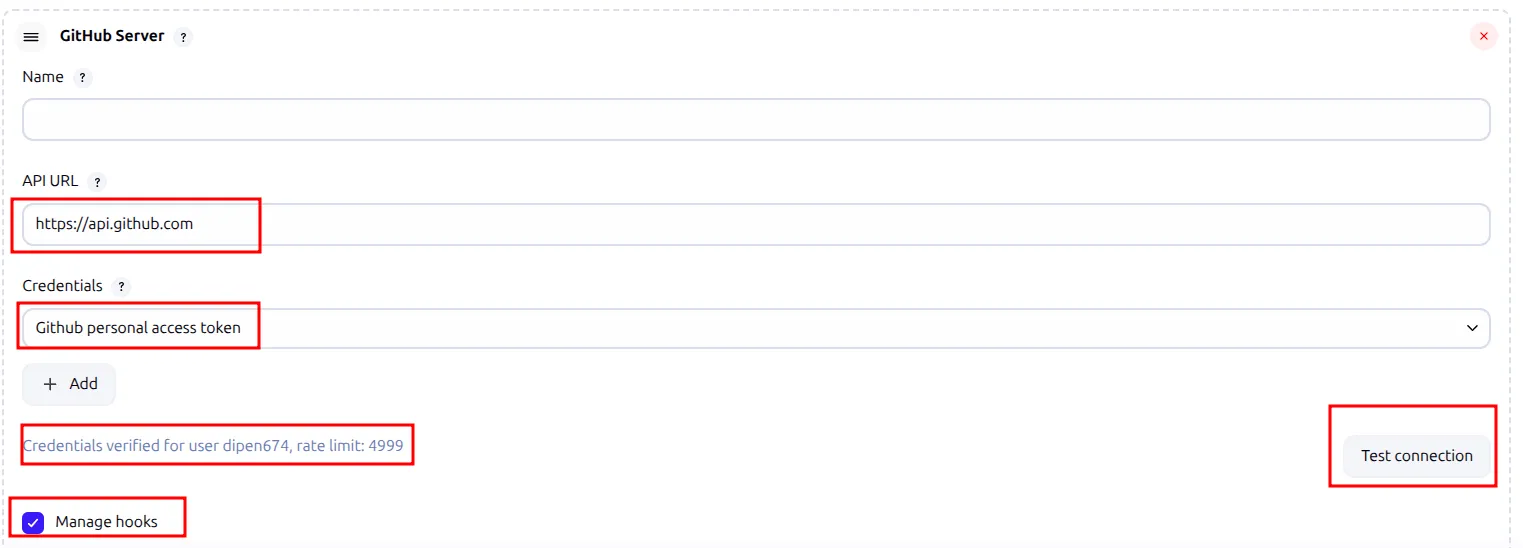
Click Save. With Manage hooks on, Jenkins can create webhooks in GitHub by itself; the token needs hook admin scopes for that, as described in the GitHub plugin docs. I still added my webhook by hand (Step 5), because GitHub cannot reach a private Vagrant IP.
Step 3: Add the trigger to the Jenkinsfile
pipeline {
    agent none

    triggers {
        githubPush()
    }

    environment {
        mydockerimage = "harbor.registry.local/jenkins/mylocalimage"
    }

    stages {
        // your existing stages
    }
}githubPush() tells Jenkins to start this job when GitHub reports a push. It does not pick the branch itself; the branch comes from the job's SCM settings (Step 6). Commit and push the Jenkinsfile.
Step 4: Expose Jenkins with ngrok
Exposing the VM's port 8080 directly to the internet was not possible in my lab, so I used ngrok. ngrok creates a public HTTPS URL that forwards to a local port.
After installing ngrok, sign up, add your auth token on the machine, and start a tunnel to Jenkins:
$ ngrok config add-authtoken <your-ngrok-token>
$ ngrok http 8080ngrok http 8080 runs in the foreground and occupies the terminal. The following script runs it in the background and prints the webhook URL:
#!/bin/bash

PORT=8080
LOGFILE="ngrok.log"

# Kill any existing ngrok process on this port (optional)
pkill -f "ngrok http $PORT"

# Start ngrok in background and save logs
nohup ngrok http $PORT > $LOGFILE 2>&1 &

# Wait for ngrok to initialize
sleep 5

# Fetch the public HTTPS URL from ngrok's local API
NGROK_URL=$(curl -s http://localhost:4040/api/tunnels \
  | grep -o 'https://[a-zA-Z0-9.-]*.ngrok-free.app' | head -n 1)

if [[ -n "$NGROK_URL" ]]; then
  echo "Your Jenkins webhook URL is:"
  echo "$NGROK_URL/github-webhook/"
  echo ""
  echo "Use this URL in your GitHub webhook settings."
else
  echo "Failed to get ngrok URL. Check logs in $LOGFILE"
fingrok serves a small local API on port 4040, which the script reads to find the public URL. To check or stop the tunnel:
$ ps aux | grep ngrok
$ curl http://localhost:4040/api/tunnels
$ pkill ngrok
Step 5: Add the webhook in GitHub
In the repository, open Settings → Webhooks → Add webhook:
- Payload URL: the ngrok URL plus
/github-webhook/, for examplehttps://<id>.ngrok-free.app/github-webhook/ - Content type:
application/x-www-form-urlencoded(I used this; the plugin also acceptsapplication/json) - Keep SSL verification enabled and save.
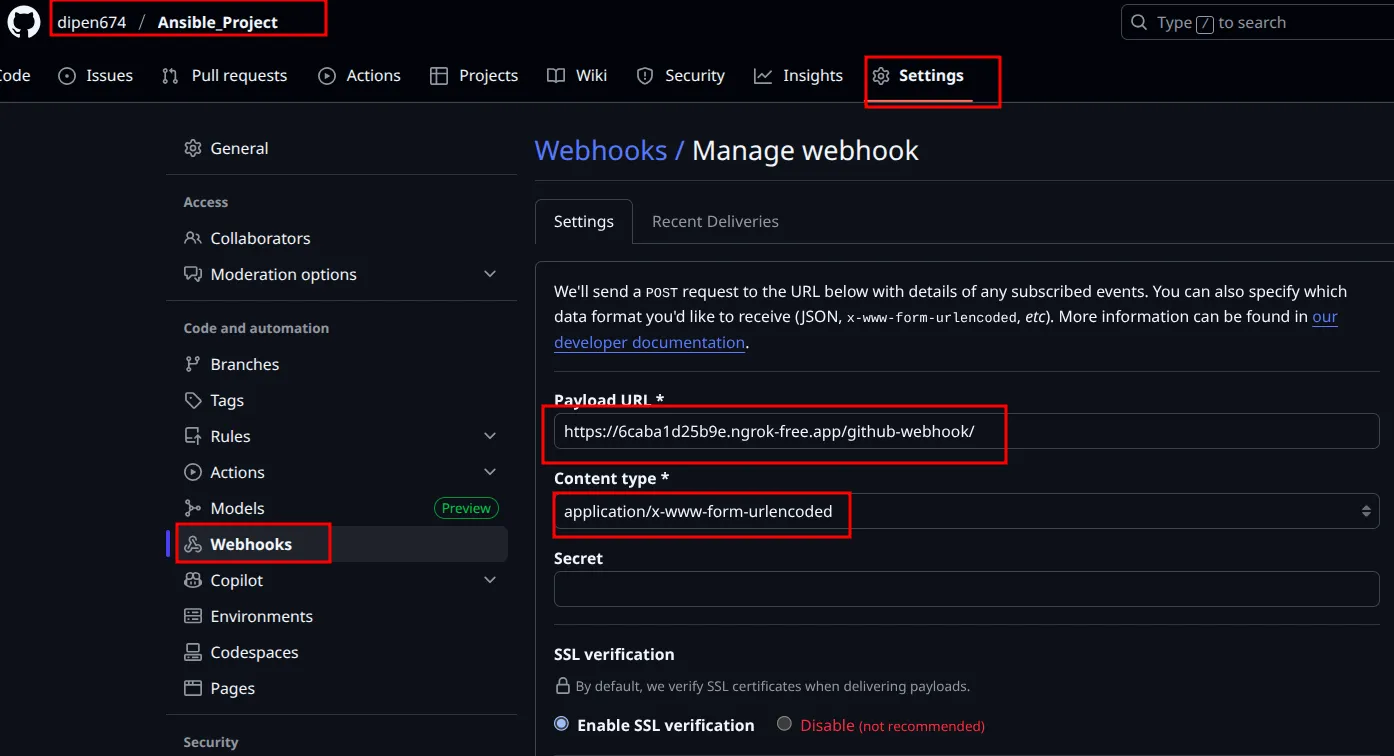
Step 6: Configure the pipeline job
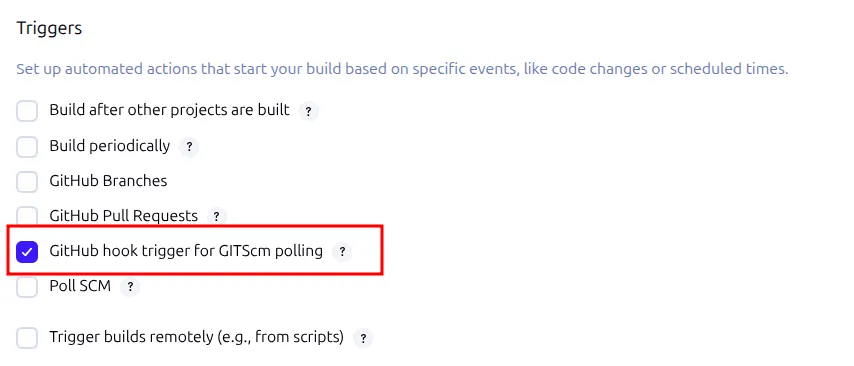
In the pipeline job's configuration, tick GitHub hook trigger for GITScm polling. (Running a build with githubPush() in the Jenkinsfile ticks this box automatically.)
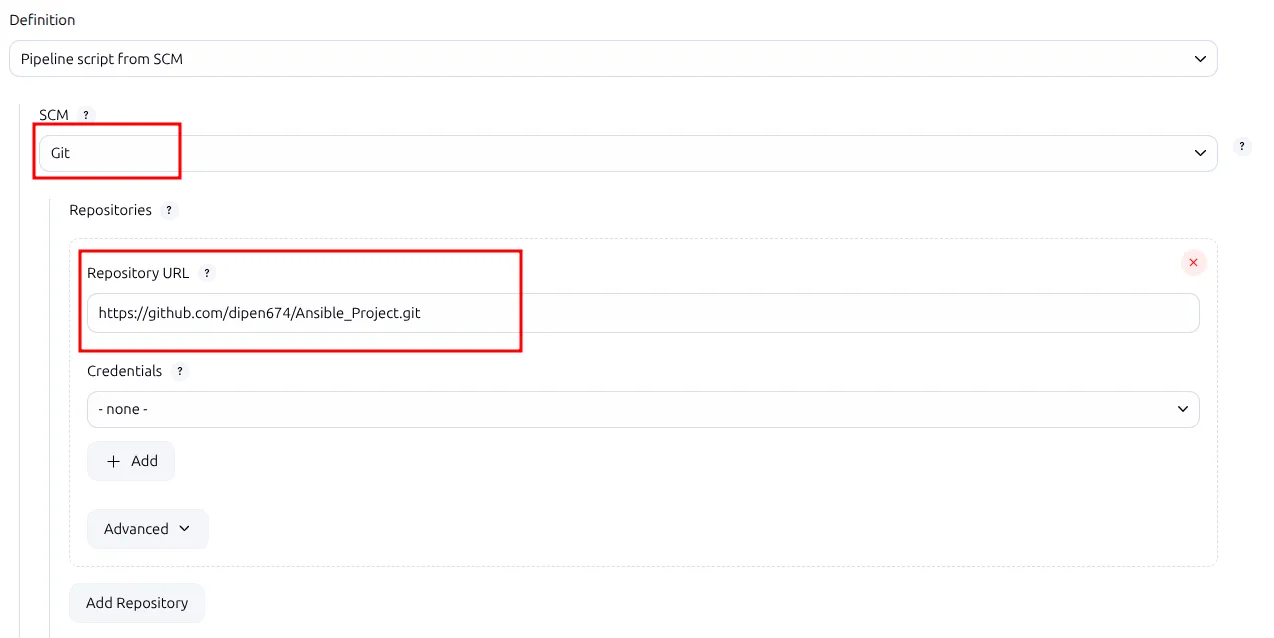
Under Pipeline, choose Pipeline script from SCM, select Git and enter the repository URL. A public repository needs no credentials.
Set the Branch Specifier to the branch that should trigger builds (*/develop here) and leave Script Path as Jenkinsfile.
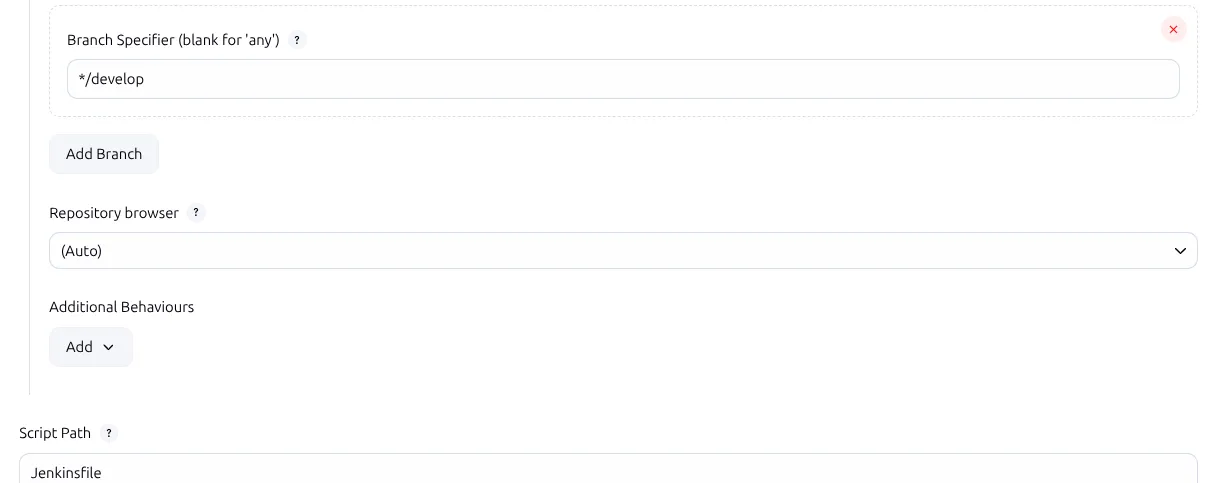
Now a push to develop starts the pipeline without anyone clicking Build Now.
Troubleshooting
| Problem | Cause and fix |
|---|---|
| Webhook worked yesterday, fails today | The free ngrok URL changed when I restarted ngrok (my screenshots show two different URLs). Update the payload URL in GitHub. |
| GitHub shows an error for the delivery | Open the webhook's Recent Deliveries tab to see the response code. Check that the URL ends with /github-webhook/, including the last slash. |
curl: (7) Failed to connect to localhost port 4040 | ngrok is not running. Start it again with the script. |
| Push arrives but no build starts | Run the pipeline once by hand so Jenkins registers githubPush(), and check that the push was to the branch in Branch Specifier. |
| Test connection fails | The token is wrong or expired. Create a new token and update the Secret text credential. |
Key takeaways
- GitHub sends a POST to
<jenkins-url>/github-webhook/; the GitHub plugin turns it into a build. githubPush()sets the trigger; the job's SCM branch decides which pushes count.- Run the pipeline once by hand so the trigger is registered.
- A Jenkins on a private network needs a tunnel such as ngrok, and the free URL changes on every restart.
- Recent Deliveries in GitHub is the first place to look when a webhook does nothing.
Next in this series: SonarQube and Nexus in a Jenkins Pipeline.
Keep reading
- SonarQube and Nexus in a Jenkins Pipeline
Install SonarQube and Sonatype Nexus, define a quality gate, and extend a Jenkins pipeline to scan Java code and publish each WAR build to a Nexus repository.
- Jenkins Distributed Builds with Agents and Labels
Connect two Vagrant VMs to Jenkins as SSH agents, use labels to choose where each stage runs, and ship a Java app and a Node.js app across separate nodes.
- Jenkins Pipeline for Building and Deploying Docker Images
Write a declarative Jenkinsfile that builds a Maven app, packs it into a Docker image, scans it with Trivy, pushes it to Docker Hub, deploys it and emails the team.