Amazon S3 Buckets, Bucket Policies and Static Website Hosting
Learn the core Amazon S3 ideas (buckets, keys, versioning, bucket policies, storage classes), then create a bucket and host a static website on it step by step.

ON THIS PAGE
Amazon S3 (Simple Storage Service) is the AWS object storage service, and most AWS environments depend on it for build artifacts, backups, logs, Terraform state or static websites. This guide defines the core terms (buckets, objects, keys, versioning, policies), then creates a bucket, uploads a small site, works through the default AccessDenied errors, and hosts the site publicly. It closes with two common questions: why S3 cannot run an operating system, and why it can host a static site.
Prerequisites
- An AWS account and a sign-in with permission to manage S3 (see AWS IAM).
- A small static site to upload: at least an
index.html, plus anerror.htmlfor the custom error page.
What S3 is and where it is used
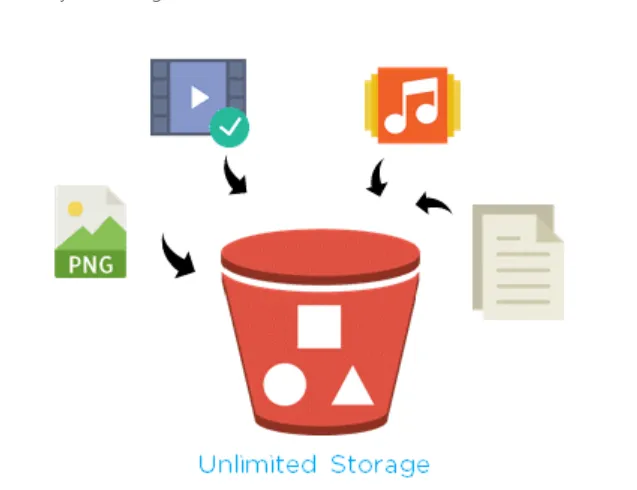
S3 stores data as objects inside buckets. You can store any amount of data, and a single object can be up to 5 TB. You do not manage disks or servers. You pay for what you store, the requests you make, and the data you transfer out.
Common uses:
- Storing files that other services read, such as EC2 instances or CodeBuild jobs. Access is controlled with IAM roles and policies (see AWS IAM).
- Software delivery: put installers or build artifacts in a bucket and let users or servers download them.
- Backups and disaster recovery.
- Data for big data analytics.
- Hosting static websites (shown below).
Core terms
Bucket
A bucket is a container for objects, like a top-level folder. Bucket names are globally unique across all AWS accounts, 3 to 63 characters, using lowercase letters, numbers, dots and hyphens.
S3 has four bucket types:
| Bucket type | Use it for |
|---|---|
| General purpose | The original and most common type. Suits most workloads and stores data across multiple Availability Zones. |
| Directory | Consistently low latency (the delay between a request and its response). Uses the S3 Express One Zone storage class in a single Availability Zone. |
| Table | Tabular data, such as transactions or sensor readings, stored in the Apache Iceberg format for analytics queries. |
| Vector | Storing and querying vector embeddings for AI and machine learning search. |
The walkthrough below uses a general purpose bucket.
Object
An object is the file you store (a document, image, video, zip) plus its metadata, which is a set of name-value pairs that describe it, such as the content type.
Key
The key is the unique name of an object inside a bucket. S3 has no true folders: a "folder" in the console is a prefix in the key. In this URL:
https://dipendra-testbucket.s3.us-east-1.amazonaws.com/devops-techaxis/index.htmldipendra-testbucket is the bucket and devops-techaxis/index.html is the key. Bucket + key (+ version ID when versioning is on) identifies every object.
Versioning and version ID
With S3 Versioning turned on, S3 keeps every version of an object instead of overwriting it. Each upload gets a unique version ID. If someone overwrites or deletes a file by mistake, you can restore an older version. Objects that existed before you turned versioning on have the version ID null.
For example, upload report.pdf, then upload an edited report.pdf. Without versioning, the first file is gone. With versioning, both copies exist and you can download either one.
Bucket policy
A bucket policy is a resource-based IAM policy, written in JSON, attached to the bucket. It decides who can do what with the bucket and its objects. Only the bucket owner can attach one, and it can be at most 20 KB. The following policy, used later in the walkthrough, makes the website files readable by everyone:
{
  "Version": "2012-10-17",
  "Statement": [
    {
      "Sid": "PublicReadGetObject",
      "Effect": "Allow",
      "Principal": "*",
      "Action": ["s3:GetObject"],
      "Resource": ["arn:aws:s3:::dipendra-testbucket/*"]
    }
  ]
}Principal: "*"means anyone, including anonymous users.s3:GetObjectallows reading (downloading) objects only, not listing, uploading or deleting./*at the end of the ARN means every object in the bucket.
Access points
An access point is a named endpoint attached to a bucket, with its own access policy. Instead of one huge bucket policy for many teams or applications, each one gets its own access point and policy. This makes access to large shared datasets easier to manage.
Access control lists (ACLs)
ACLs are the older way to grant read and write permissions on individual buckets and objects. They existed before IAM.
Creating a bucket
In the console, go to Amazon S3 > Buckets > Create bucket.
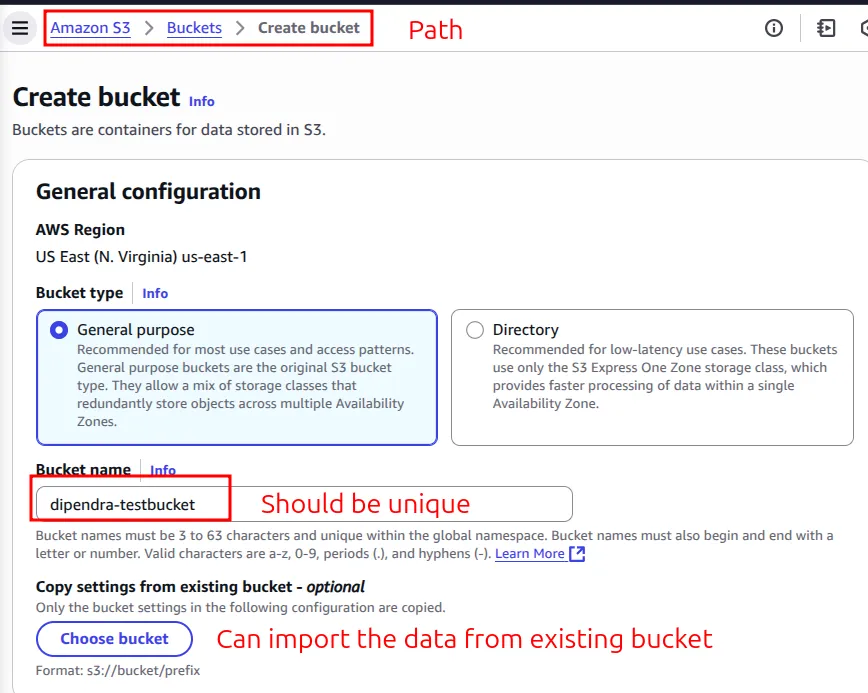
The settings used in this walkthrough:
| Setting | What it does | My choice |
|---|---|---|
| Bucket type | General purpose or directory | General purpose |
| Bucket name | Must be globally unique | dipendra-testbucket |
| Copy settings from existing bucket | Copies the configuration (not the data) of another bucket | Not used |
| Object Ownership | Turns ACLs on or off | ACLs disabled (recommended) |
| Block Public Access | Blocks any public access, even if a policy allows it. On by default | Left on for now |
| Bucket Versioning | Keeps all versions of each object. Off by default | Off |
| Default encryption | Encrypts new objects at rest. SSE-S3 (S3-managed keys) is the default; SSE-KMS and DSSE-KMS use AWS KMS keys | SSE-S3 |
| Bucket Key | Reduces the number of calls (and cost) to KMS when you use SSE-KMS | Default |
| Object Lock (advanced) | Write once, read many (WORM): nobody can delete or overwrite objects for a set time. Works only with versioning, and turning it on also turns on versioning | Off |
Click Create bucket.
Uploading objects
Open the bucket and click Upload. You can add single files or a whole folder. The console uploads files up to 160 GB; for larger files use the AWS CLI, an SDK or the REST API.
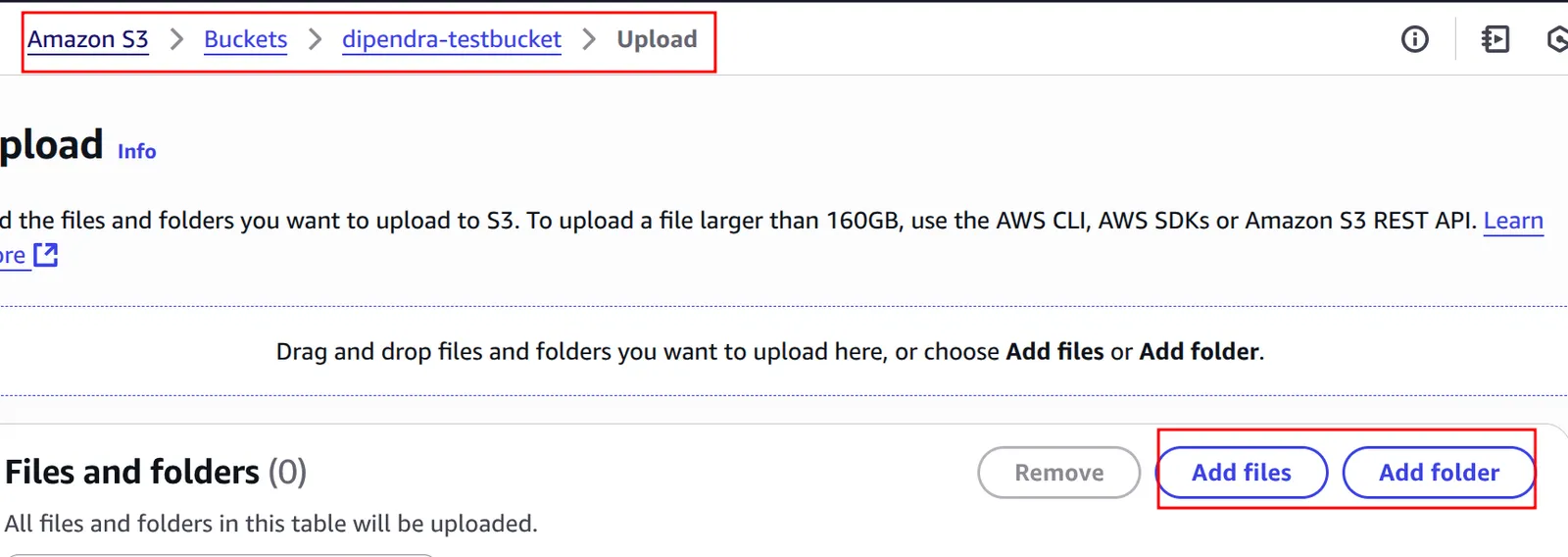
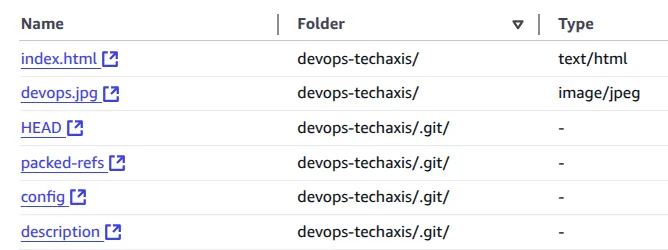
In my lab, I uploaded a folder called devops-techaxis containing a small website (index.html and devops.jpg). The folder was a full Git checkout, so the .git/ files went up too; exclude them for a real site. A successful upload returns HTTP status 200.
Cost and large-file considerations:
- Data transferred into S3 from the internet is free. You pay for storage, for requests, and for data transferred out to the internet.
- For large files, use multipart upload (the CLI does this automatically). S3 Transfer Acceleration can speed up uploads from far away by routing them through AWS edge locations, for an extra charge.
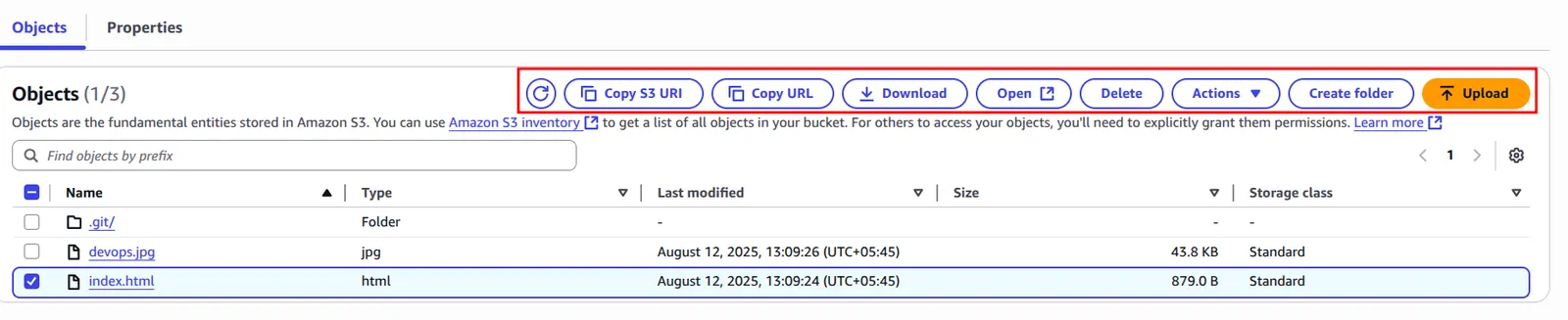
From the object list you can copy the S3 URI or URL, download, open, delete, create folders and run other actions:
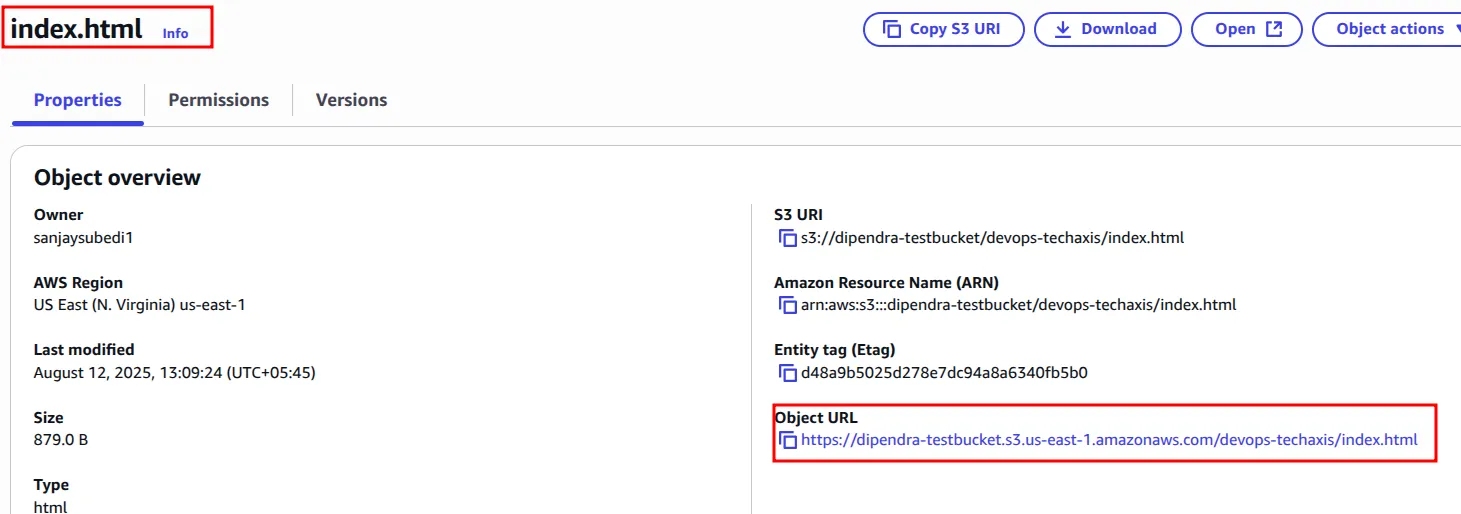
Clicking an object shows its details, including the Object URL:
Opening that URL in a browser returns an error:
<Error>
<Code>AccessDenied</Code>
<Message>Access Denied</Message>
<RequestId>RGJNJJMFSEA2PRY5</RequestId>
<HostId>nkK5Fq27Ko8JUP71n2d1ebsE/gQhE25DNl4gyzCMxQciIIboUBB4+jWhqxGjUprg4+f94Bkc0J0zEbKSvXMxV/MGTmMBReuP</HostId>
</Error>The error is expected. Objects are private by default, and Block Public Access is on.
Hosting a static website
1. Turn on static website hosting
Static website hosting is in the bucket's Properties tab, at the bottom of the page.
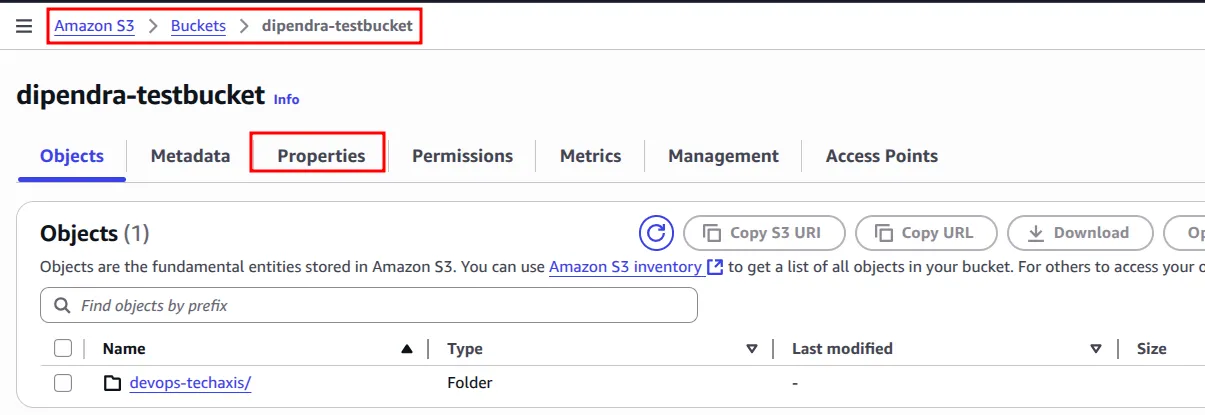

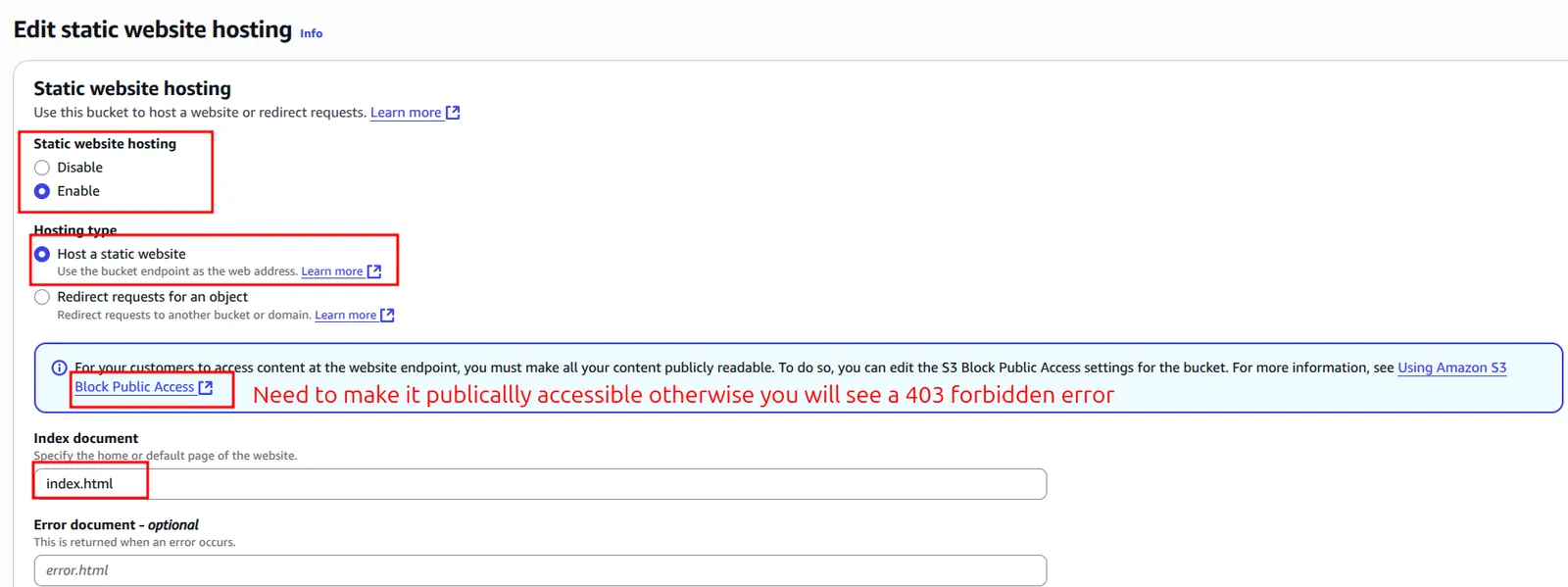
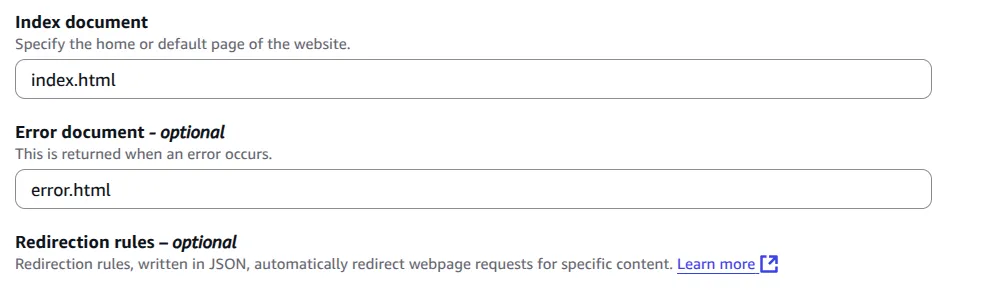
Click Edit, choose Enable, choose Host a static website, and set the index document to index.html.
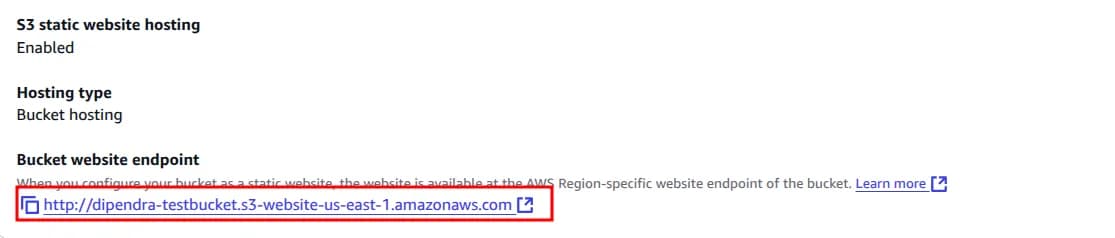
After saving, the properties page shows the bucket website endpoint:
2. First error: 403 Forbidden
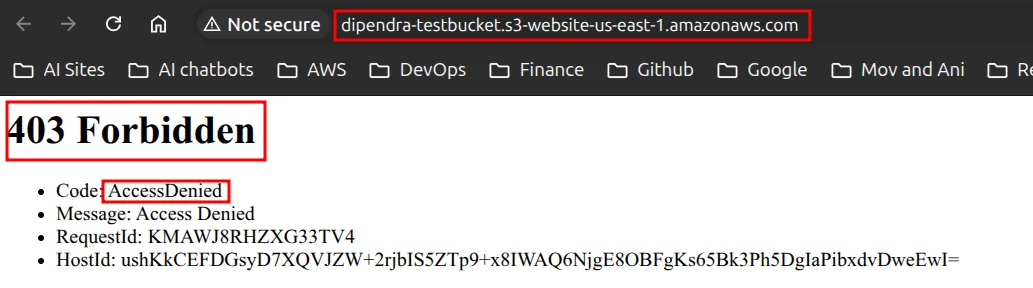
Opening the endpoint returned 403 Forbidden with AccessDenied, because nothing is public yet.
3. Turn off Block Public Access
In the Permissions tab, edit Block public access (bucket settings) and untick Block all public access.
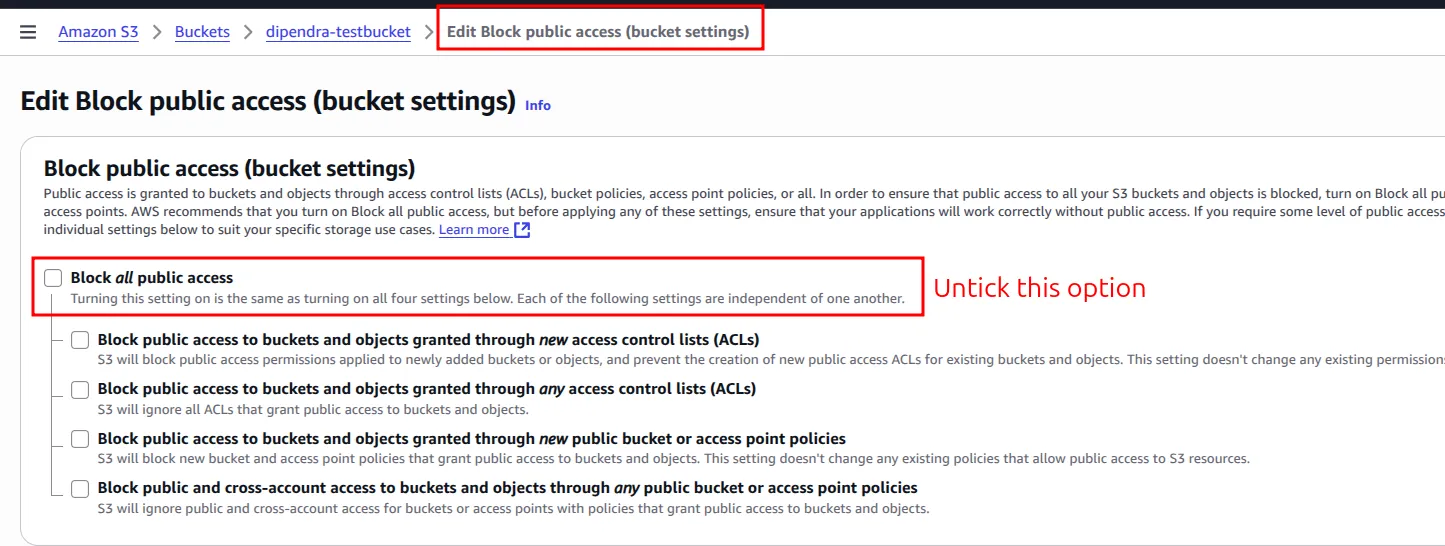
The site still returned 403. Turning off Block Public Access only allows public access; it does not grant it. You still need a policy that grants it.
4. Add a bucket policy
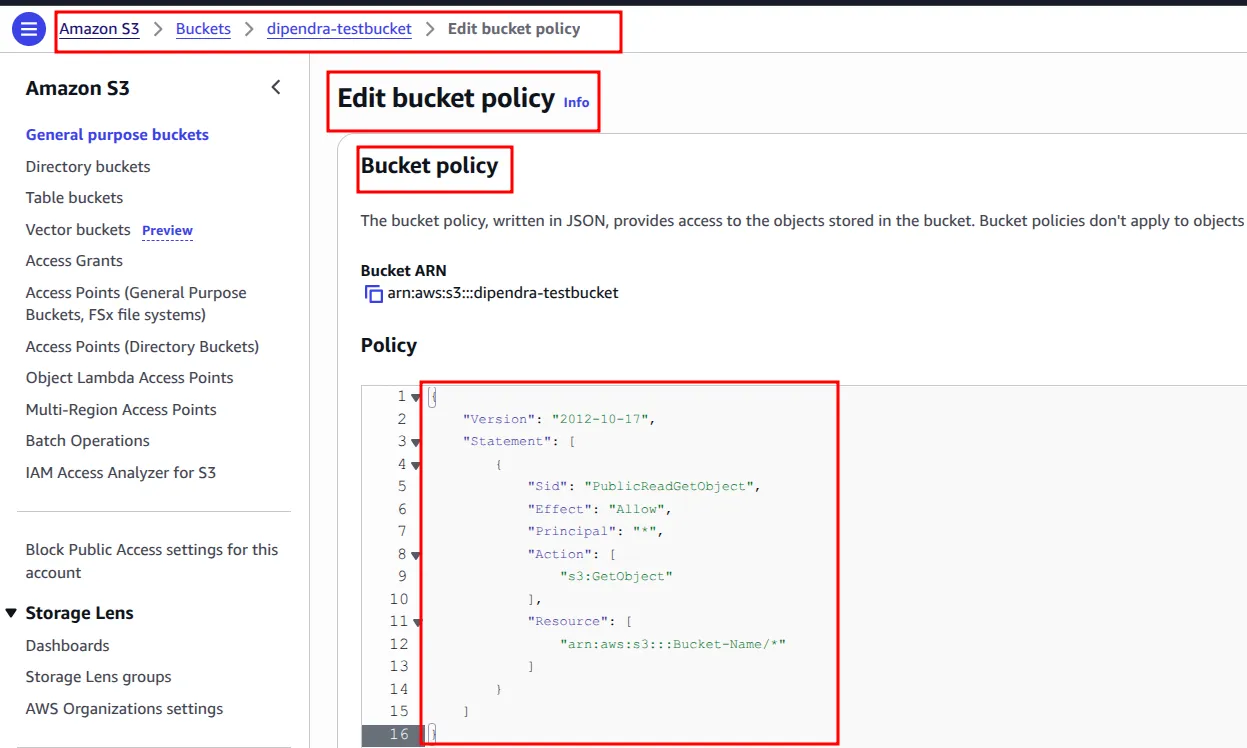
In Permissions > Bucket policy, click Edit and paste the bucket-policy.json shown earlier, with your own bucket name in the ARN.
After saving the policy, the site loaded at:
http://dipendra-testbucket.s3-website-us-east-1.amazonaws.com/devops-techaxis/index.html5. Add a custom error document
Back in the static website hosting settings, set the Error document to error.html and upload an error.html file to the root of the bucket.
A path that does not exist, such as /hello, now shows the custom page instead of the default S3 error:

Other bucket tabs worth knowing
| Tab | Feature | What it does |
|---|---|---|
| Permissions | Object Ownership | Turns ACLs on or off and decides who owns uploaded objects |
| Permissions | CORS | Cross-origin resource sharing: lets a web page on another domain make browser requests to this bucket |
| Metrics | Storage metrics | Shows bucket size and object count |
| Metrics | Storage Class Analysis | Watches access patterns to help you decide when to move data to a cheaper class |
| Metrics | Replication metrics | Shows the progress of replication to other buckets |
| Management | Lifecycle rules | Moves objects to another storage class, archives them, or deletes them after a set number of days |
| Management | Replication rules | Copies objects automatically to another bucket in the same Region or a different Region |
| Access Points | Access points | Creates named endpoints with their own policies for shared datasets |
Storage classes
You pick a storage class per object. The trade-off is storage price against access speed and retrieval cost. Storage classes are a common topic in AWS certification exams.
| Storage class | Use it for | Availability Zones | Retrieval |
|---|---|---|---|
| S3 Standard | Frequently accessed data; the default | 3 or more | Milliseconds |
| S3 Intelligent-Tiering | Unknown or changing access patterns; S3 moves objects between tiers for you | 3 or more | Milliseconds (optional archive tiers are slower) |
| S3 Express One Zone | Your most frequently accessed, latency-sensitive data (directory buckets) | 1 | Single-digit milliseconds |
| S3 Standard-IA | Infrequently accessed data that still needs fast access | 3 or more | Milliseconds, with a per-GB retrieval fee |
| S3 One Zone-IA | Infrequent, re-creatable data where losing one AZ is acceptable | 1 | Milliseconds, with a per-GB retrieval fee |
| S3 Glacier Instant Retrieval | Archive data read about once a quarter | 3 or more | Milliseconds |
| S3 Glacier Flexible Retrieval | Archive data that can wait (formerly S3 Glacier) | 3 or more | Minutes to hours |
| S3 Glacier Deep Archive | Long-term archive and compliance data; the cheapest class | 3 or more | Hours (up to 12 hours standard, up to 48 hours bulk) |
Points to remember:
- S3 is designed for 99.999999999% (11 nines) durability. S3 Standard is designed for 99.99% availability.
- The infrequent access and Glacier classes have a minimum storage charge: 30 days for Standard-IA and One Zone-IA, 90 days for Glacier Instant and Flexible Retrieval, 180 days for Deep Archive. Deleting an object early still costs the full minimum.
- Lifecycle rules are how you move data between classes automatically.
See the official S3 storage classes page for current details.
Why S3 cannot run an operating system
An operating system needs three capabilities that S3 does not provide:
- Compute. An OS needs a CPU and memory to run instructions. S3 only stores and returns data; it has no processors you can boot.
- Block storage. An OS reads and writes small parts of files all the time (blocks), and it needs a file system it can mount. S3 is object storage: you read or replace a whole object through an HTTP API. You cannot change a few bytes in the middle of a file the way a disk allows.
- Low-latency local access. Every S3 call is a network request, which is far too slow for an OS that does thousands of small disk operations per second.
In AWS, an OS runs on an EC2 instance (see Amazon EC2), and its root disk is an EBS volume (block storage) or a local instance store. S3 sits next to that for files, backups and artifacts.
Why S3 can host a static website
A static site is only files: HTML, CSS, JavaScript and images. Nothing has to run on the server. The browser asks for a file and the server returns it as it is. S3 can do exactly that:
- It stores files and returns them over HTTP, which is all a static site needs.
- The static website hosting feature adds an index document (
index.html) and an error document, so the bucket behaves like a basic web server. - A bucket policy can make the files publicly readable.
- AWS runs and scales the service, so there is no web server to patch, and traffic spikes are handled for you.
What S3 cannot host is a dynamic site that needs server-side code (PHP, Node.js, a database). For that you need compute, such as EC2, containers or Lambda.
Common mistakes
AccessDeniedon the object URL: objects are private by default. This is correct for most buckets.- Still 403 after turning off Block Public Access: you also need a bucket policy that allows
s3:GetObject. - Policy saved but access denied: check that the
ResourceARN uses your bucket name and ends with/*. - Looking for static website hosting under Permissions: it is under Properties.
- Uploading the
.gitfolder with the site: it makes repository data public. Upload only the built site files.
Key takeaways
- S3 stores objects in buckets; bucket + key (+ version ID) identifies each object, and folders are only key prefixes.
- Keep ACLs disabled (Bucket owner enforced) and control access with bucket and IAM policies.
- Public access needs two settings: Block Public Access turned off and a policy that grants read access.
- Choose storage classes by access pattern, and use lifecycle rules to move data to cheaper classes.
- S3 can serve static files but cannot run an OS or server-side code; that needs compute like EC2.
Next in this series: Amazon VPC.
Keep reading
- AWS Global Infrastructure and Core Services
How AWS Regions, Availability Zones and edge locations fit together, which services are global or regional, the main storage types, and the shared responsibility model.
- AWS Pricing, Billing and Cost Management
How AWS charges for compute, storage and data transfer, which pricing models save money, and how to estimate, track and limit costs with AWS billing tools.
- Cloud Computing Basics and Introduction to AWS
What cloud computing is, the IaaS, PaaS and SaaS service models, cloud, hybrid and on-premises deployment, the six advantages, and how AWS fits in.