AWS Pricing, Billing and Cost Management
How AWS charges for compute, storage and data transfer, which pricing models save money, and how to estimate, track and limit costs with AWS billing tools.

ON THIS PAGE
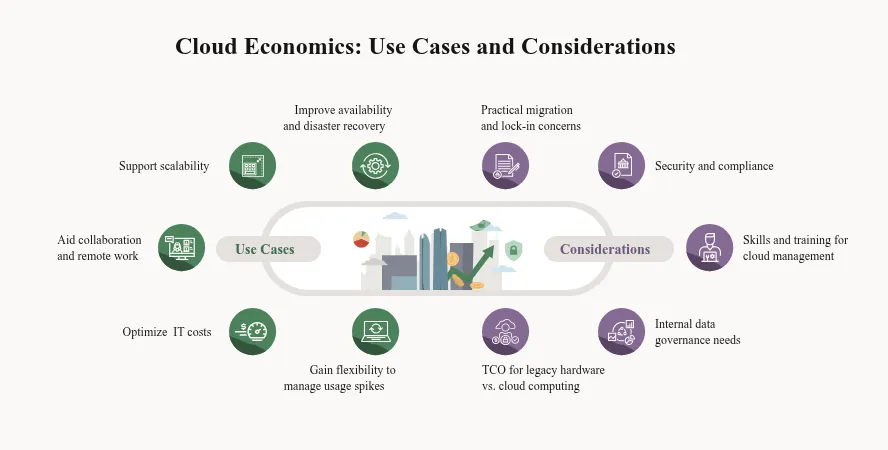
Unexpected AWS charges usually trace back to a few cost drivers that nobody was watching. This guide explains what drives an AWS bill, how the pricing models compare, how to estimate a design before you build it, and how to set alerts before spending gets out of hand. It draws on the cloud economics and billing module of the AWS Cloud Practitioner course, narrowed to the parts used in daily work.
How AWS charges you
Most AWS costs come from three drivers:
| Driver | How it is billed |
|---|---|
| Compute | By time the resource runs. EC2 bills per second (60-second minimum) for Amazon Linux, Windows, Red Hat Enterprise Linux and Ubuntu; some other operating systems bill per hour. The rate depends on the instance type. |
| Storage | Usually per GB per month, plus per-request charges on some services such as Amazon S3. |
| Data transfer | Inbound traffic from the internet is generally free. Outbound traffic to the internet is charged per GB. Traffic between Regions, and often between Availability Zones, is also charged. |
The default model is pay-as-you-go: you pay at the end of each month for what you used, you can stop any time, and there is no long-term contract unless you choose one for a discount.
Some services cost nothing by themselves, but the resources they create are billed:
- IAM and AWS Organizations (including consolidated billing).
- Amazon VPC. Some VPC features are charged, such as NAT gateways and public IPv4 addresses.
- AWS CloudFormation, AWS Elastic Beanstalk and EC2 Auto Scaling. The EC2 instances, load balancers and databases they launch are charged as usual.
Pricing models
| Model | How it works | Good for |
|---|---|---|
| On-Demand | Pay per second or hour, no commitment | Short, spiky or unknown workloads; testing |
| Savings Plans | Commit to a fixed spend per hour for 1 or 3 years, get a lower rate | Steady compute use that may change instance type or service |
| Reserved Instances | Commit to a specific instance configuration for 1 or 3 years (EC2, RDS and some other services). Payment options are All Upfront (largest discount), Partial Upfront, and No Upfront (smallest discount). | Steady, predictable workloads |
| Spot Instances | Use spare EC2 capacity at a large discount; AWS can take it back with a two-minute warning | Batch jobs, CI runners, anything that can be interrupted |
| Dedicated Hosts | A physical server only for you | Licensing or compliance needs |
| Volume (tiered) pricing | The price per unit drops as usage grows, for example S3 storage per GB | Large storage and data transfer users |
AWS also offers custom pricing for its largest customers, and it has cut prices many times as it has grown.
AWS Free Tier
The Free Tier changed in 2025. A new account now chooses between two plans:
- Free account plan: sign-up credits and no charges for up to six months, or until the credits run out. Some expensive services are not available on this plan.
- Paid account plan: the same credits, but once they are used you pay normal rates.
Free Tier offers come in two types:
- Always Free: a monthly allowance that never expires, for more than 30 services.
- Short-term trials: a free period for some services that starts when you activate the service.
Older accounts used the earlier "12 months free" model. Check the AWS Free Tier page for the current credit amounts and limits, and set a budget alert from day one (see AWS Budgets below).
Total cost of ownership (TCO)
TCO is an estimate of everything a system costs to own and run, not only the hardware price. On premises, that means servers, storage and network gear, software licenses, data center space, power and cooling, and the staff who operate it all. These are mostly upfront capital expenses, and you pay them whether the capacity is used or not.
In the cloud you pay operating expenses for what you use and can scale down when demand drops. A TCO comparison puts both side by side for the same workload, to build a business case for a migration. Beyond these direct "hard" savings, there are "soft" benefits that are harder to measure, such as faster delivery and developer productivity.
AWS Pricing Calculator
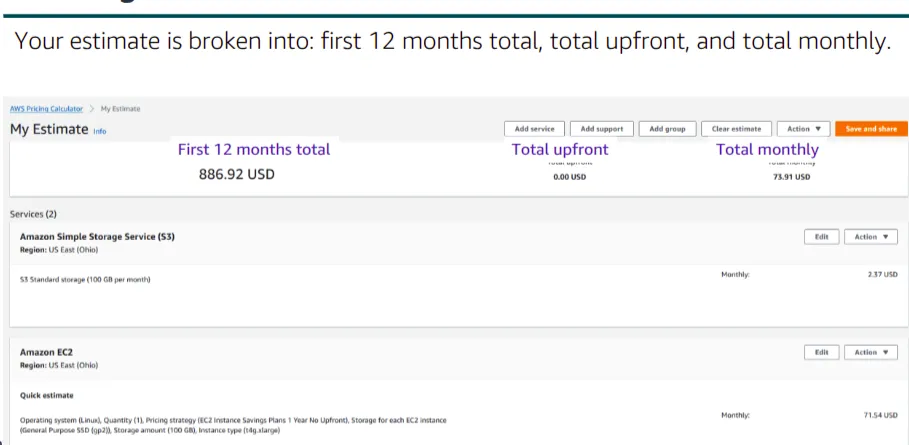
The AWS Pricing Calculator estimates the monthly cost of a design before you build it. It does not need an AWS account.
- Open the calculator and choose Create estimate.
- On the Add service page, search for a service, for example Amazon EC2, and choose Configure.
- Choose the Region and fill in the details: instance type, quantity, pricing model, storage and so on.
- Save the service to the estimate and repeat for other services.
- Use groups to organize services by project, team or environment. You can also build one group per design option and compare them.
- Read the summary on the My estimate page, which shows the upfront cost, the monthly cost and the 12-month total.
- Export the estimate to CSV or PDF, or save and share its link.
AWS Organizations
AWS Organizations lets you manage many AWS accounts from one place. It is free. Running separate accounts for dev, staging and production, or for each team, is common practice. Organizations keeps them under one structure and one bill.
Key terms:
- Management account: the account that creates the organization and pays the bill.
- Member account: any other account in the organization.
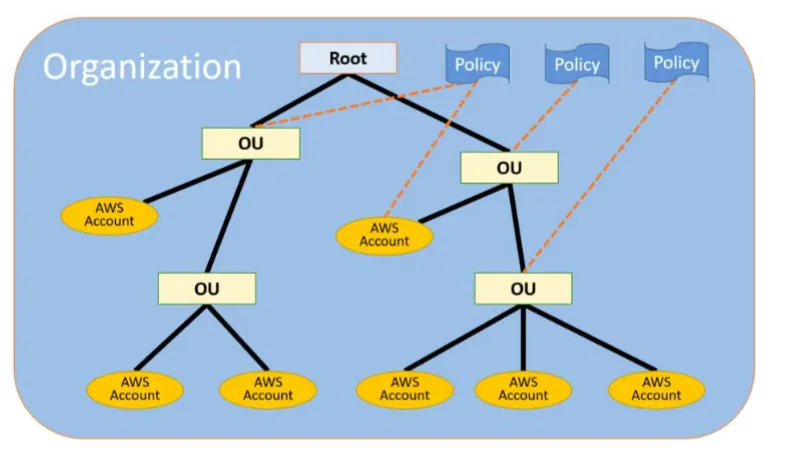
- Root: the top container of the organization.
- Organizational unit (OU): a folder for accounts. OUs can contain other OUs, so you get a tree. Each account belongs to exactly one parent.
- Policy: rules attached to the root, an OU or an account. A policy attached higher up applies to everything below it.
Service control policies (SCPs)
An SCP sets the maximum permissions for IAM users and roles in member accounts. Points to remember:
- SCPs never grant permissions. A user still needs an IAM policy that allows the action. The effective permission is what both the SCP and the IAM policy allow.
- SCPs apply to everyone in a member account, including that account's root user.
- SCPs do not affect the management account.
- SCPs need the organization to run with all features enabled. An organization with only consolidated billing cannot use them.
SCPs use the same JSON format as IAM policies (see AWS IAM). This common example stops member accounts from leaving the organization:
{
  "Version": "2012-10-17",
  "Statement": [
    {
      "Effect": "Deny",
      "Action": "organizations:LeaveOrganization",
      "Resource": "*"
    }
  ]
}Consolidated billing
With consolidated billing, the management account gets one bill for all member accounts:
- one payment method for every account;
- charges are still shown per account, so you can see who spent what;
- usage is combined across accounts for volume pricing tiers, and Reserved Instance and Savings Plans discounts can be shared between accounts.
Setting up an organization
- From the account that will be the management account, create the organization.
- Invite existing accounts or create new member accounts.
- Create OUs, for example
devandprod, and move the accounts into them. - Turn on the SCP policy type, then create and attach SCPs.
- Sign in to a member account and test that the SCPs block what they should.
You can manage Organizations from the console, the AWS CLI, the SDKs or the API.
Billing and cost management tools
All of these live in the Billing and Cost Management console:
| Tool | What it does |
|---|---|
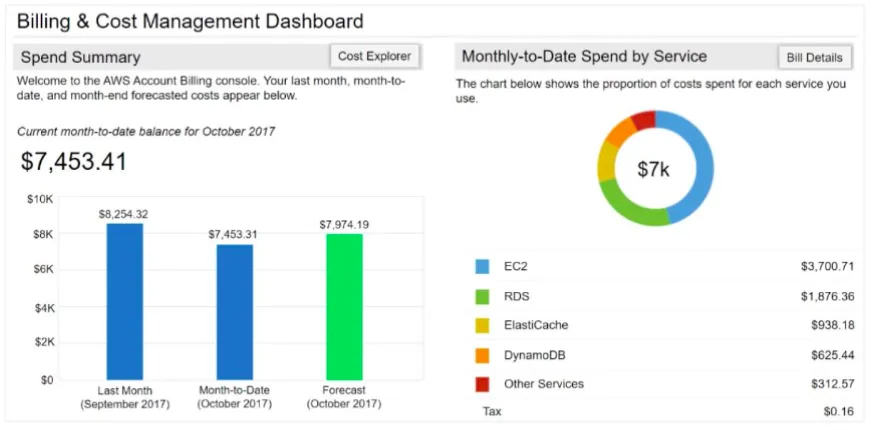
| Billing dashboard (Home) | Month-to-date spend, forecast for the month, and top services by cost |
| Bills | The monthly bill, broken down by service, Region and linked account |
| Cost Explorer | Charts of cost and usage over time, with filters, grouping and forecasts |
| Budgets | Alerts, and optional automatic actions, when cost or usage passes a threshold |
| Data Exports (Cost and Usage Report) | The most detailed line-item data, delivered on a schedule to an S3 bucket |
Billing dashboard
The dashboard is the first place to look. It shows last month's spend, the month-to-date cost, the month-end forecast, and how the cost splits between services.
Cost Explorer
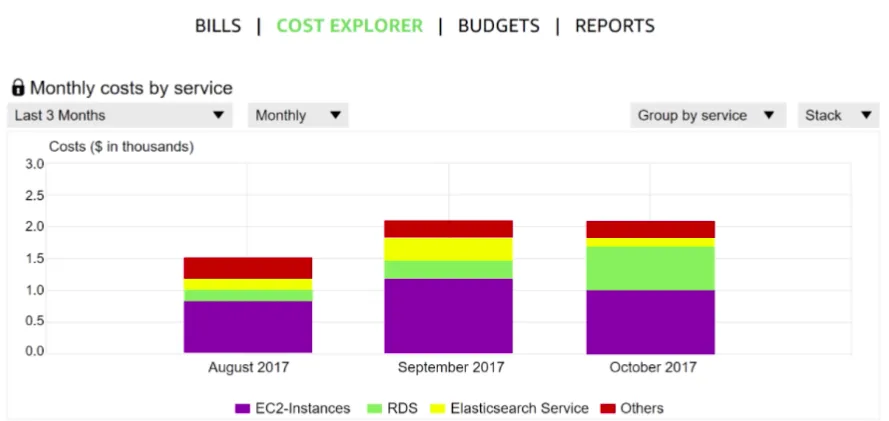
Cost Explorer turns billing data into charts. You can filter and group by service, account, Region, tag and more, at daily or monthly granularity. By default it shows up to the last 13 months and forecasts the next 18 months. The console is free to use; Cost Explorer API calls are charged per request.
AWS Budgets
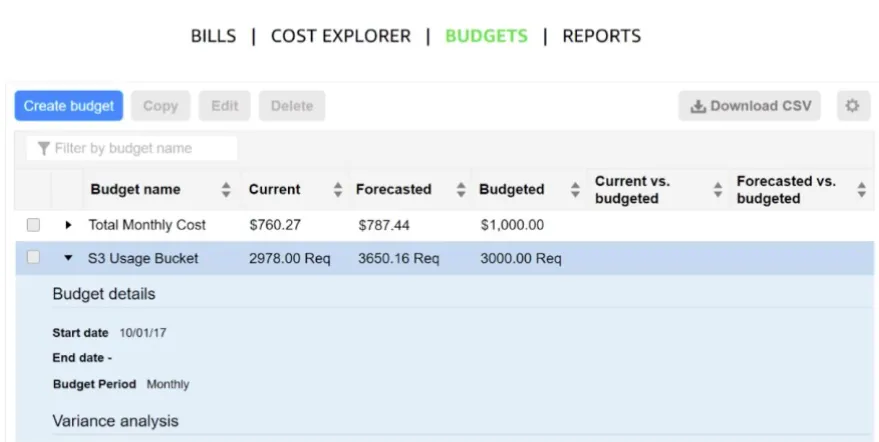
AWS Budgets tracks spending against a limit you set and alerts you before or after you cross it. Budget types include cost, usage, and Reserved Instance or Savings Plans utilization and coverage. Budgets can be monthly, quarterly, yearly or a custom period. Alerts can fire on actual or forecasted spend and go to email and/or an Amazon SNS topic. Budget actions can go further, for example by applying an IAM policy that blocks new resources.
Cost and Usage Report
For the most detail, create a Data Export with Cost and Usage Report 2.0 (the newer, recommended format). AWS writes line-item cost and usage data to an S3 bucket on a schedule, where you can query it with Athena or show it in QuickSight.
Key takeaways
- Compute time, storage and outbound data transfer drive most of an AWS bill; inbound data is generally free.
- On-Demand is for flexibility, Savings Plans and Reserved Instances are for steady workloads, and Spot is for work that can be interrupted.
- The Free Tier is now credit-based for new accounts, and the Pricing Calculator ignores it.
- AWS Organizations gives one bill for many accounts, and SCPs set permission guardrails that never grant access on their own.
- Turn on a budget with email alerts on day one, and use Cost Explorer to find what is driving the spend.
Next in this series: AWS IAM, the first part of the hands-on series.
Keep reading
- AWS Global Infrastructure and Core Services
How AWS Regions, Availability Zones and edge locations fit together, which services are global or regional, the main storage types, and the shared responsibility model.
- Cloud Computing Basics and Introduction to AWS
What cloud computing is, the IaaS, PaaS and SaaS service models, cloud, hybrid and on-premises deployment, the six advantages, and how AWS fits in.
- Amazon S3 Buckets, Bucket Policies and Static Website Hosting
Learn the core Amazon S3 ideas (buckets, keys, versioning, bucket policies, storage classes), then create a bucket and host a static website on it step by step.