AWS Global Infrastructure and Core Services
How AWS Regions, Availability Zones and edge locations fit together, which services are global or regional, the main storage types, and the shared responsibility model.

ON THIS PAGE
Every AWS resource runs in a specific place: you pick a Region, often an Availability Zone, and you take on a defined share of the security work. Wrong choices here lead to single points of failure, slow responses for distant users, or data stored in the wrong country. This guide explains Regions, Availability Zones and edge locations, global versus regional services, the main storage types, and the shared responsibility model.
A short history of AWS
AWS launched publicly in 2006 with Amazon S3 for storage, followed a few months later by Amazon EC2 for virtual servers. An early version of Amazon SQS (a message queue) had been announced in 2004. Today AWS offers more than 200 services. The official story is on the AWS origins page.
The building blocks
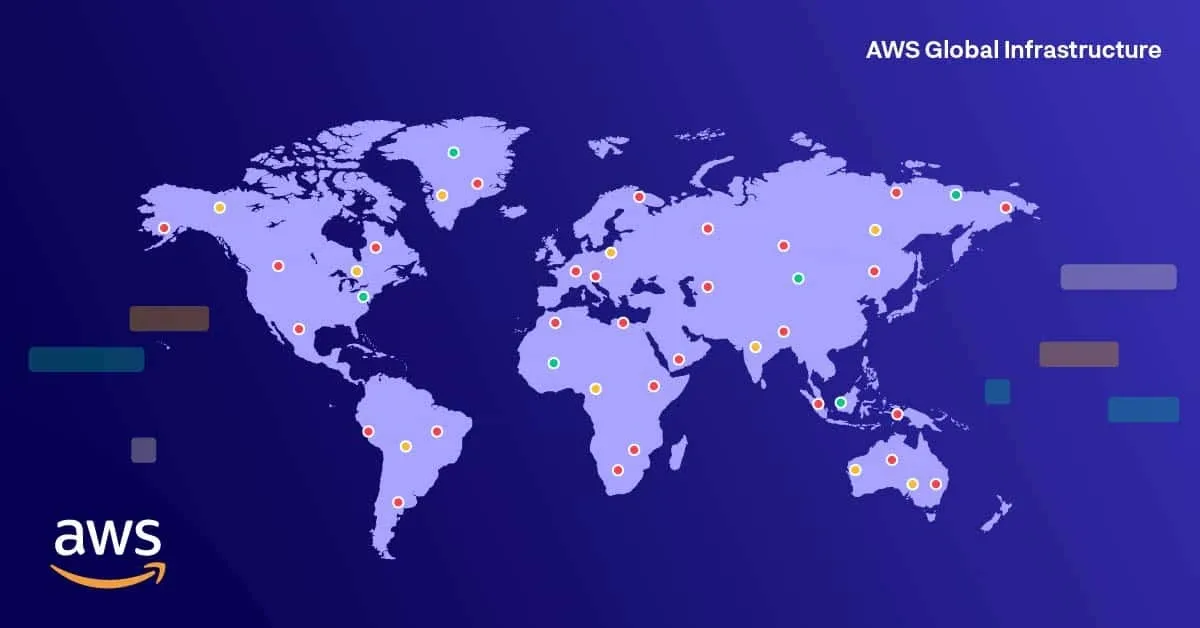
The AWS Global Infrastructure has three main layers:
| Component | What it is | You choose it? |
|---|---|---|
| Region | A separate geographic area, such as us-east-1 (N. Virginia), ap-south-1 (Mumbai) or eu-west-1 (Ireland). Each Region has multiple Availability Zones. | Yes, for almost every resource |
| Availability Zone (AZ) | One or more discrete data centers with their own power, networking and connectivity, inside a Region. Named like eu-west-1a. | Yes, for zonal resources such as EC2 instances and subnets |
| Point of Presence (PoP) | Edge locations and Regional edge caches in many cities, used to serve content and DNS close to users. | No, AWS routes users to the nearest one |
By count, edge locations outnumber Availability Zones, and Availability Zones outnumber Regions.
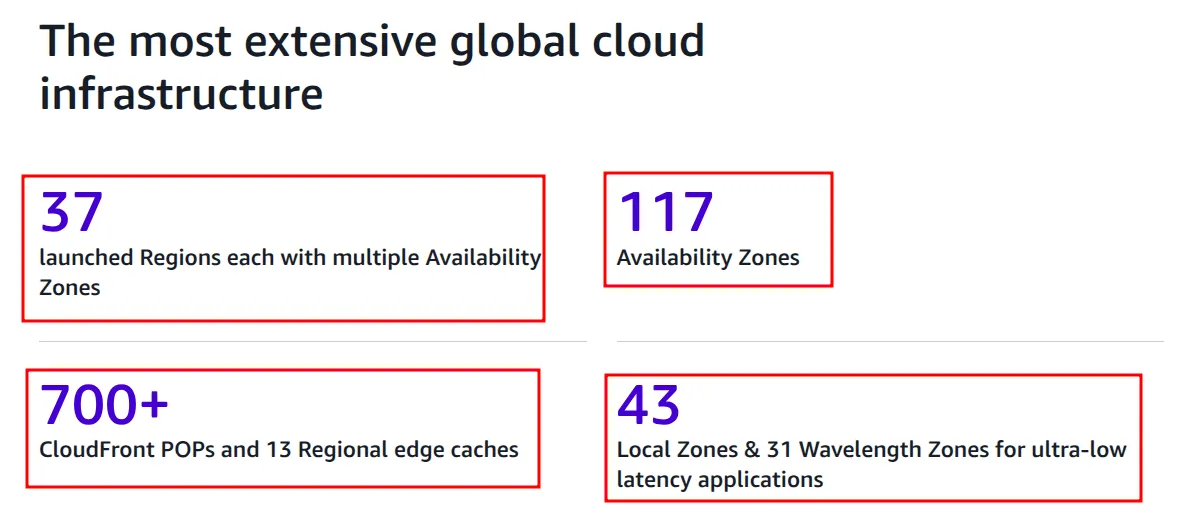
The screenshot below shows the AWS global infrastructure page when I captured it. It listed 37 Regions, 117 Availability Zones, more than 700 CloudFront PoPs with 13 Regional edge caches, 43 Local Zones and 31 Wavelength Zones. These numbers grow every year, so check the Regions and Availability Zones page for current counts.
Regions
A Region is a physical location with several Availability Zones. Regions are isolated from each other for fault tolerance. AWS does not copy your data to another Region on its own. If your business needs a copy in a second Region, you set up that replication yourself. Traffic between Regions travels over the AWS backbone network.
A few details that matter in practice:
- Opt-in Regions: Regions launched before March 20, 2019 are enabled by default. Newer ones, such as Asia Pacific (Hong Kong), Asia Pacific (Hyderabad) and Middle East (Bahrain), are disabled until you enable them on the account page. See Enable or disable AWS Regions.
- Separate partitions: the China Regions (Beijing and Ningxia) need a separate AWS China account. The AWS GovCloud (US) Regions are isolated Regions for US government agencies and customers with strict compliance needs.
- Example, London: the London Region (
eu-west-2) has three Availability Zones. If you spread your EC2 or RDS resources across all three and one AZ fails, the other two keep serving traffic.
Choosing a Region
| Factor | Why it matters |
|---|---|
| Data governance and law | Some laws require data to stay inside a country or region, for example the EU General Data Protection Regulation (GDPR). |
| Latency | Run close to your users and systems. Tools such as CloudPing measure latency from your location to each Region. |
| Service availability | Not every service exists in every Region. Check the AWS Regional Services List. |
| Cost | Prices differ by Region. The course example: an On-Demand t3.medium Linux instance cost $0.0416 per hour in US East (Ohio) and $0.0544 per hour in Asia Pacific (Tokyo). Prices change, so always check the pricing page. |
Availability Zones
Each Region has several AZs. An AZ is a fully isolated part of the AWS infrastructure: one or more data centers with redundant power, networking and cooling. AZs in a Region are many kilometers apart, so a fire, flood or power failure in one does not take down the others. All AZs in a Region are within 100 km (60 miles) of each other.
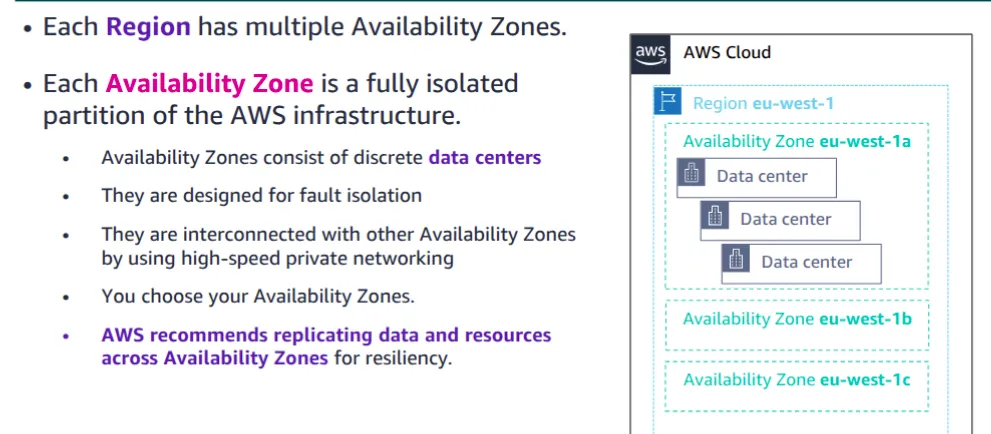
AZs are linked with high-bandwidth, low-latency private fiber. The network is fast enough for synchronous replication: a write is saved in two AZs before the application is told it succeeded. AWS does not apply it to every service automatically. Services such as Amazon RDS Multi-AZ use it, and for your own EC2 workloads you design it yourself.
You choose the AZs for your resources. AWS recommends running across at least two AZs so your system survives the loss of one.
Data centers
Data centers are where data is stored and processed. You cannot choose a data center; the AZ is the smallest location you can select. AWS keeps data center locations secret, limits physical access, builds in redundant power and networking, and moves traffic away from a failed area automatically.
Edge network: Points of Presence
Points of Presence bring some services closer to users than any Region can.
| Location type | Used for |
|---|---|
| Edge location | Caching content for Amazon CloudFront (the AWS content delivery network, or CDN), answering Amazon Route 53 DNS queries, and running AWS Shield and AWS WAF at the edge |
| Regional edge cache | A larger cache between edge locations and your origin. It keeps content that is not popular enough to stay at an edge location, so CloudFront does not have to fetch it from the origin again. Used by CloudFront by default. |
| Local Zone | An extension of a Region placed in a large city, for apps that need single-digit millisecond latency to users there |
| Wavelength Zone | AWS compute inside a telecom provider's 5G network, for mobile apps that need minimal latency, such as real-time gaming |
What the infrastructure gives you
- Elastic and scalable: capacity grows and shrinks with demand.
- Fault tolerant: built-in redundancy keeps workloads running when one component fails.
- Highly available: little downtime, with failover handled mostly without human action.
AWS service categories
On top of the infrastructure sit the services, in layers: foundation services (compute, networking, storage), then platform services (databases, analytics, application services, deployment and management), then end-user applications.
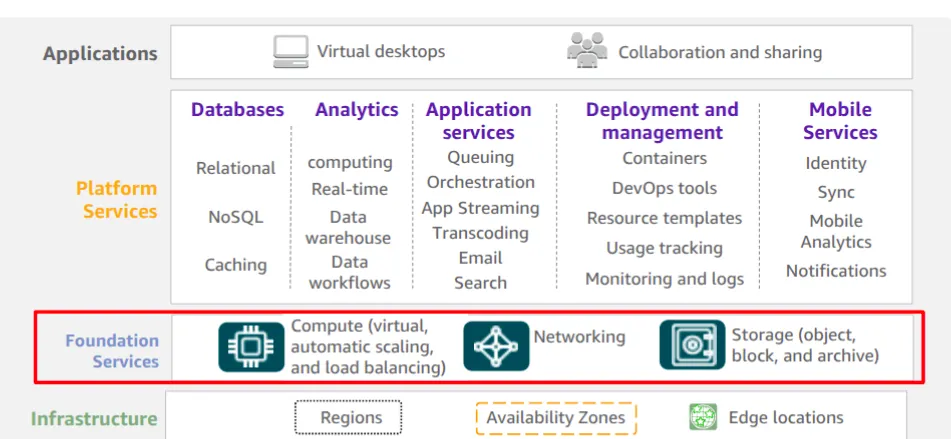
The full catalog is on the AWS products page. The Cloud Practitioner exam focuses on these categories:
| Category | Key services |
|---|---|
| Compute | Amazon EC2, EC2 Auto Scaling, AWS Lambda, AWS Elastic Beanstalk, Amazon ECS, Amazon EKS, Amazon ECR (container registry), AWS Fargate (serverless compute for ECS and EKS) |
| Storage | Amazon S3, S3 Glacier storage classes, Amazon EBS, Amazon EFS |
| Database | Amazon RDS, Amazon Aurora (MySQL and PostgreSQL compatible), Amazon DynamoDB (key-value and document), Amazon Redshift (data warehouse) |
| Networking and content delivery | Amazon VPC, Elastic Load Balancing, Amazon CloudFront, Amazon Route 53, AWS Transit Gateway, AWS Direct Connect, AWS VPN |
| Security, identity and compliance | AWS IAM, AWS Organizations (central management of many accounts), Amazon Cognito (sign-up and sign-in for apps), AWS Artifact (compliance reports), AWS KMS (encryption keys), AWS Shield (DDoS protection) |
| Cost management | AWS Cost and Usage Report, AWS Budgets, AWS Cost Explorer |
| Management and governance | AWS Management Console, AWS CLI, Amazon CloudWatch, AWS CloudTrail, AWS Config, AWS Trusted Advisor, AWS Well-Architected Tool, AWS Auto Scaling |
The core services each have a hands-on guide: IAM, EC2, S3 and VPC.
Global, regional and zonal services
The Region selector in the top-right of the console tells you how a service is scoped. For a global service it shows "Global". Service scope is a common exam question, and it also matters when you write Terraform or CLI commands, because a regional resource exists only in the Region you created it in.
| Scope | Examples | Notes |
|---|---|---|
| Global | AWS IAM, Amazon Route 53, Amazon CloudFront, AWS Organizations | Same users, roles and DNS zones in every Region |
| Global or regional | AWS WAF | Global when attached to CloudFront, regional when attached to a load balancer or API Gateway |
| Regional | Amazon VPC, AWS Lambda, Amazon S3 buckets, Amazon ECS, Amazon EKS, AWS Elastic Beanstalk | S3 bucket names are unique worldwide, but each bucket lives in one Region |
| Zonal (one AZ) | EC2 instances, EBS volumes, subnets | An EBS volume can attach only to an instance in the same AZ |
Storage types
| Type | Service | How it works | Use cases |
|---|---|---|---|
| Object | Amazon S3 | Files ("objects") stored in buckets and accessed over HTTPS. Highly durable and scales without limits you manage. | Backups, logs, media, static websites, data lakes |
| Block | Amazon EBS | A virtual hard disk attached to an EC2 instance in the same AZ. Volume types include gp3 and gp2 (general SSD), io2 and io1 (high-IOPS SSD), st1 and sc1 (HDD). | OS disks, databases |
| File | Amazon EFS | A managed NFS file system that many Linux instances can mount at once. Grows and shrinks automatically. | Shared content, home directories, containers |
| Managed file systems | Amazon FSx | Fully managed Windows File Server, Lustre, NetApp ONTAP or OpenZFS file systems | Windows file shares, high-performance computing |
| Temporary | EC2 instance store | Disks physically attached to the host. Fast, but the data is lost when the instance stops, hibernates or terminates. | Cache, scratch data, buffers |
S3 storage classes are covered in Amazon S3, and EBS volumes in Amazon EC2.
Accessing your AWS account
Root user and IAM users
When you sign up, AWS creates the root user, which signs in with the account email and has full access to everything. You need a payment card to sign up; AWS uses it to verify your identity.
Use the root user only for the few tasks that require it, such as changing account settings, closing the account or some billing tasks. Turn on MFA (multi-factor authentication) for it and never share its credentials. For daily work, use an IAM user or, preferably, AWS IAM Identity Center. In a company DevOps role you typically receive one of these, scoped to the permissions your job needs.
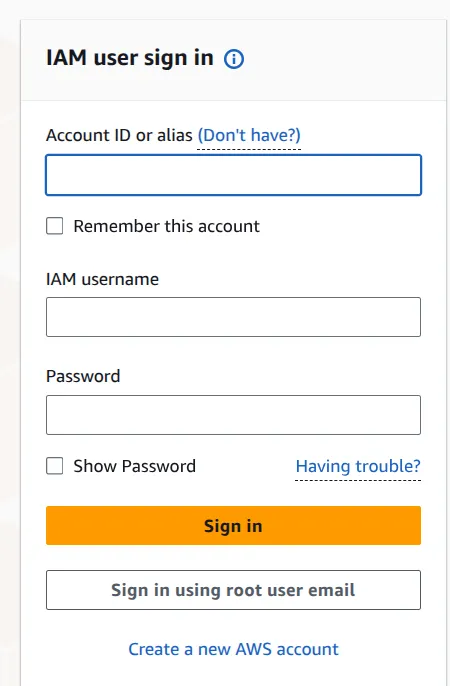
The sign-in page at https://console.aws.amazon.com/ asks IAM users for the account ID or alias, the IAM username and the password. The "Sign in using root user email" button is for the root user. After sign-in, the console home shows recently visited services, cost and usage, and security and health widgets. Setting up IAM users, groups and policies step by step is in AWS IAM.
CLI and SDK
The previous part lists the three ways to use AWS. The examples below show the CLI and SDK in practice. After you set up credentials with aws configure, this command lists your S3 buckets:
$ aws s3 lsThe same call from Python with the boto3 SDK:
import boto3

s3 = boto3.client("s3")
for bucket in s3.list_buckets()["Buckets"]:
print(bucket["Name"])The shared responsibility model
Security on AWS is split between AWS and you.
| Who | Responsible for | Example | Everyday analogy |
|---|---|---|---|
| AWS: security of the cloud | Physical data centers, hardware, the global network, the virtualization layer, and the software of managed services | Guards, fire suppression and power backup in the data center | The landlord maintains the building, locks, lifts and electricity |
| You: security in the cloud | Your data, IAM users and permissions, encryption, security groups, the guest OS and apps on EC2 | Patching your EC2 OS, closing open ports, encrypting sensitive data | The tenant locks the apartment door and keeps valuables safe |
The line moves with the service type. On EC2 (IaaS) you patch the operating system yourself. On Amazon RDS, AWS patches the database engine, but you still configure backups, network access and users. On S3 you mostly manage data, bucket policies and encryption settings. The official page is Shared Responsibility Model.
In the exam, expect a scenario that names the services in use and asks who is responsible for a given task.
Key takeaways
- A Region is a separate geographic area. It contains several Availability Zones, and each AZ is one or more data centers. Data does not leave a Region unless you copy it.
- Choose a Region by law and compliance first, then latency, service availability and cost. Spread workloads across at least two AZs.
- Edge locations and Regional edge caches serve CloudFront and Route 53 traffic close to users. Local Zones and Wavelength Zones bring compute closer for low latency.
- IAM, Route 53 and CloudFront are global. VPC, Lambda and S3 buckets are regional. EC2 instances, EBS volumes and subnets are zonal.
- Pick storage by access pattern: S3 for objects, EBS for one instance's disk, EFS or FSx for shared files, instance store only for temporary data.
- AWS secures the cloud itself, and you secure what you put in it. How much is yours depends on the service.
Next in this series: AWS Pricing and Billing.
Keep reading
- AWS Pricing, Billing and Cost Management
How AWS charges for compute, storage and data transfer, which pricing models save money, and how to estimate, track and limit costs with AWS billing tools.
- Cloud Computing Basics and Introduction to AWS
What cloud computing is, the IaaS, PaaS and SaaS service models, cloud, hybrid and on-premises deployment, the six advantages, and how AWS fits in.
- Amazon S3 Buckets, Bucket Policies and Static Website Hosting
Learn the core Amazon S3 ideas (buckets, keys, versioning, bucket policies, storage classes), then create a bucket and host a static website on it step by step.