Cloud Computing Basics and Introduction to AWS
What cloud computing is, the IaaS, PaaS and SaaS service models, cloud, hybrid and on-premises deployment, the six advantages, and how AWS fits in.

ON THIS PAGE
Nearly every DevOps task now touches a cloud provider, and that work depends on a precise shared vocabulary: what "the cloud" is, who manages each layer of the stack, and why organizations migrate to it. This guide covers the cloud service and deployment models, the six advantages of cloud computing, and the ways to work with AWS. It follows the first module of the AWS Cloud Practitioner course, combined with earlier work on cloud architecture.
What cloud computing is
Cloud computing is the on-demand delivery of IT resources (compute, storage, databases, networking, applications) over the internet, with pay-as-you-go pricing. The servers still exist. They sit in large data centers owned by a cloud provider such as AWS, Microsoft Azure or Google Cloud, and you rent what you need instead of buying it.
Infrastructure as hardware vs infrastructure as software
The central idea is a shift in how you think about infrastructure.
In the traditional model, infrastructure is hardware. You need space, power, staff, physical security and a large upfront payment. Buying servers takes weeks, so you plan capacity for a guessed peak. If you guess too high, you pay for idle machines. If you guess too low, your users get a slow or broken service. To host a new website you buy hardware, rack it, cable it and then maintain it.
In the cloud model, infrastructure behaves like software. You create resources in minutes, scale them up or down with demand, and delete them when you are done. You pay only for what you use, so servers become temporary and disposable. The provider takes over the "undifferentiated heavy lifting" (procurement, hardware maintenance, capacity planning), and your team can focus on the application.
Cloud architecture: front end and back end
A cloud service has two sides:
- Front end: what the user touches. This is the client side, such as a web browser, a mobile app or a command-line tool, plus the interface it talks to.
- Back end: everything the provider runs. Servers, storage systems, databases, networking, virtualization, security and the management software that keeps it all running. The back end is the larger part of the system, and the user never sees it.
The two sides talk over the internet, usually through APIs (application programming interfaces).
Cloud service models
The service model decides how much of the stack you manage and how much the provider manages.
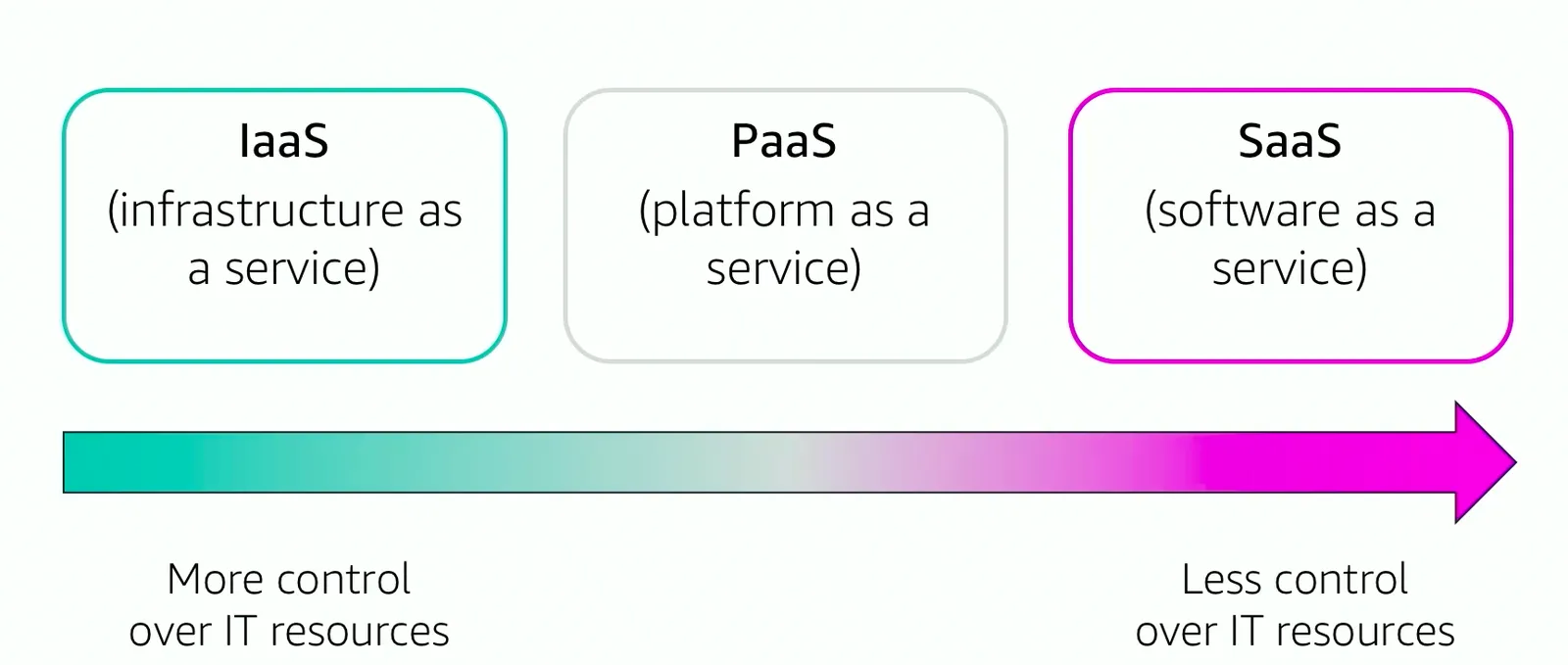
| Model | Provider manages | You manage | Example |
|---|---|---|---|
| IaaS (Infrastructure as a Service) | Data center, hardware, virtualization, network | Operating system, runtime, data, application | Amazon EC2 |
| PaaS (Platform as a Service) | Everything up to and including the OS and runtime | Your code and data | AWS Elastic Beanstalk |
| SaaS (Software as a Service) | The whole application | Only how you use it | Web-based email |
IaaS gives the most control and feels closest to running your own servers. SaaS gives the least control but needs no operations work from you.
Serverless
Serverless means you do not provision or manage any servers at all. You upload code or configure a service, and the provider runs it, scales it and bills you per request or per unit of work. Function as a Service (FaaS) is one form of serverless: you write small functions that run when an event happens, for example AWS Lambda running code when a file lands in an S3 bucket. Serverless is wider than FaaS, though. Amazon S3, Amazon DynamoDB and AWS Fargate are also serverless because you never see the machines behind them.
You will also see other "as a service" names, such as DBaaS (Database as a Service, for example Amazon RDS) and DaaS (Desktop as a Service, for example Amazon WorkSpaces). They are narrower applications of the same idea.
Cloud deployment models
The deployment model says where your application runs.
| Model | What it means | Typical use |
|---|---|---|
| Cloud (public cloud) | Every part of the application runs on a cloud provider's shared infrastructure. | New applications, or apps fully migrated to AWS |
| Hybrid | Cloud resources are connected to systems that stay outside the cloud, usually an on-premises data center. | Gradual migration, or data that must stay on site |
| On-premises (private cloud) | Resources run in your own data center, often with virtualization and management tools such as VMware or OpenStack. | Dedicated hardware or strict control needs |
A private cloud gives you dedicated resources, but most of the cloud benefits in the next section (no upfront cost, global reach, near-unlimited capacity) do not apply to it.
The six advantages of cloud computing
AWS defines six advantages of cloud computing:
| Advantage | What it means in practice |
|---|---|
| Trade fixed expense for variable expense | No large upfront spending on data centers. You pay for resources only while you use them. |
| Benefit from massive economies of scale | AWS buys hardware for a huge number of customers, so its pay-as-you-go prices are lower than what one company could get alone. |
| Stop guessing capacity | Scale up or down in minutes instead of buying for a guessed peak. |
| Increase speed and agility | New resources take minutes, not weeks, so trying an idea is cheap and fast. |
| Stop spending money running and maintaining data centers | No racking, stacking or powering servers. Spend that effort on your product. |
| Go global in minutes | Deploy to Regions around the world with a few clicks, closer to your users. |
The money side (pricing models, total cost of ownership and billing tools) is covered in AWS pricing and billing.
What AWS is
Amazon Web Services (AWS) is Amazon's cloud platform. It offers more than 200 services, grouped into categories such as Compute, Storage, Database, Networking and Content Delivery, Security, Identity and Compliance, and Management and Governance. Each service is a web service: a program you call over the network by sending a request (usually JSON over HTTPS) to an API and getting a response back. The caller does not need to know which language or hardware sits behind it.
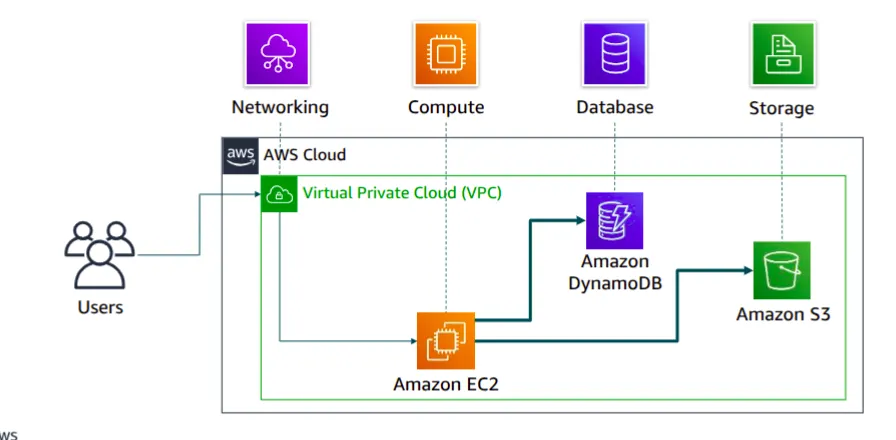
The services are designed to work together as building blocks. Consider this example from the course: users send data to Amazon EC2 instances running inside an Amazon VPC. The instances save the raw data as objects in Amazon S3 and keep an index in Amazon DynamoDB, so you can find all objects for one customer quickly. That one small solution uses four categories: networking, compute, database and storage.
Mapping traditional IT to AWS
Most components of an on-premises data center have an AWS equivalent:
| Area | Traditional IT | AWS |
|---|---|---|
| Security | Firewalls, ACLs, administrators | Security groups, network ACLs, AWS IAM |
| Networking | Routers, network pipeline, switches | Amazon VPC, Elastic Load Balancing |
| Compute | On-premises servers | Amazon EC2 instances launched from AMIs (Amazon Machine Images) |
| Storage | Disk attached to one server (DAS) | Amazon EBS |
| Storage | Shared network file system used by many servers | Amazon EFS |
| Storage | Network storage for files, backups and media | Amazon S3 (object storage over the internet) |
| Database | Relational database server | Amazon RDS |
Choosing a compute service
One category can hold many services, and the right one depends on how much you want to manage. For compute alone:
| Service | Choose it when you want to |
|---|---|
| Amazon EC2 | Have full control over virtual machines |
| AWS Lambda | Run code without managing servers |
| AWS Elastic Beanstalk | Have AWS deploy, scale and manage a web application for you |
| Amazon Lightsail | Run a simple web app on a lightweight, fixed-price platform |
| AWS Batch | Run large numbers of batch jobs |
| Amazon ECS, Amazon EKS, AWS Fargate | Run containers (ECS and EKS orchestrate them, Fargate removes the servers) |
| AWS Outposts | Run AWS infrastructure inside your own data center |
Ways to interact with AWS
| Tool | What it is | Good for |
|---|---|---|
| AWS Management Console | Web-based graphical interface | Learning, exploring, one-off tasks |
| AWS CLI (Command Line Interface) | The aws command on Linux, macOS or Windows | Scripts and repeatable tasks |
| AWS SDKs (Software Development Kits) | Libraries for Python (boto3), Java, JavaScript, Go, .NET and more | Calling AWS from your own application code |
All three send requests to the same AWS APIs, so anything you can do in the console you can also script. In DevOps work you also manage AWS through infrastructure as code tools such as AWS CloudFormation or Terraform, which call the same APIs. The next part shows the console sign-in and CLI examples.
Moving to the cloud: the AWS Cloud Adoption Framework
Cloud migration is not only a technical project. People and processes must change too, and that change takes time. The AWS Cloud Adoption Framework (AWS CAF) is AWS guidance that helps an organization find gaps in skills and processes and plan the move. It groups the guidance into six perspectives. Each perspective is a set of capabilities owned by a group of stakeholders.
| Perspective | Focus | Typical stakeholders |
|---|---|---|
| Business | Cloud investments support business goals and outcomes | Business managers, finance managers, budget owners, strategy owners |
| People | Culture, structure, skills and training | HR, staffing and people managers |
| Governance | Manage cloud initiatives to get the most value with the least risk | CIO, program managers, enterprise architects, portfolio managers |
| Platform | Build and run the target cloud architecture | CTO, IT managers, solutions architects |
| Security | Confidentiality, integrity and availability of data and workloads | CISO, IT security managers and analysts |
| Operations | Run cloud services at the level the business needs | IT operations and IT support managers |
The first three focus on business capabilities. Platform, Security and Operations focus on technical capabilities. More detail is on the official AWS CAF page.
Key takeaways
- Cloud computing is on-demand IT resources over the internet with pay-as-you-go pricing. You treat infrastructure like software, not hardware.
- IaaS, PaaS and SaaS differ in how much of the stack you manage. Serverless removes server management completely, and FaaS is one type of it.
- The deployment models are cloud, hybrid and on-premises (private cloud).
- The six advantages reduce to lower and variable cost, no capacity guessing, faster delivery, and global reach.
- You can use AWS through the console, the CLI or an SDK, and all of them call the same APIs.
- The AWS CAF splits cloud adoption into six perspectives: Business, People, Governance, Platform, Security and Operations.
Next in this series: AWS Global Infrastructure.
Keep reading
- AWS Global Infrastructure and Core Services
How AWS Regions, Availability Zones and edge locations fit together, which services are global or regional, the main storage types, and the shared responsibility model.
- AWS Pricing, Billing and Cost Management
How AWS charges for compute, storage and data transfer, which pricing models save money, and how to estimate, track and limit costs with AWS billing tools.
- Amazon S3 Buckets, Bucket Policies and Static Website Hosting
Learn the core Amazon S3 ideas (buckets, keys, versioning, bucket policies, storage classes), then create a bucket and host a static website on it step by step.