Docker Introduction: Containers, Architecture and Objects
How a container differs from a VM, how the Docker client, daemon and registry fit together, and what images, volumes, bind mounts and networks do.

ON THIS PAGE
A container starts in seconds while a virtual machine takes minutes, and that gap shapes how modern services are built, shipped and scaled. This guide explains what a container is at the kernel level, how it compares with a VM, and which Docker components do the work behind each command.
By the end, you can explain containers versus VMs, name each part of the Docker architecture, and choose between a volume, a bind mount and a custom network.
What a container is
A container is a running process (or group of processes) that is packaged with everything it needs: application code, runtime, system libraries and settings. The package is called an image. When you run an image, you get a container. Because the image carries its own dependencies, the same container behaves the same on a laptop, a test server and production.
A container is not a small VM. It is a normal Linux process that the kernel isolates using two features:
- Namespaces give the process its own view of the system: its own process IDs, network interfaces, mount points and hostname. Inside the container, the application sees only its own resources.
- Control groups (cgroups) limit and measure how much CPU, memory and disk I/O a group of processes can use.
Docker did not invent these features. It made them practical to use, and it added a standard image format and a registry model for sharing images.
Containers vs virtual machines
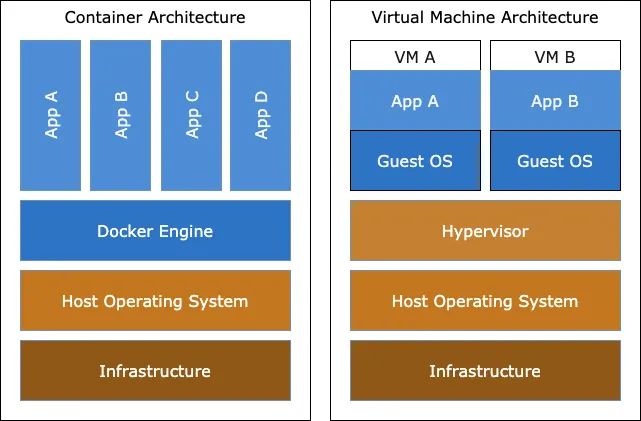
| Containers | Virtual machines | |
|---|---|---|
| What is abstracted | The application layer: code plus its dependencies | The hardware: one physical server becomes many |
| Kernel | All containers share the host's kernel | Each VM runs its own full guest OS and kernel |
| Managed by | A container engine such as Docker Engine | A hypervisor such as VirtualBox, KVM or Hyper-V |
| Size | Usually megabytes | Usually gigabytes |
| Start time | Seconds or less | Usually minutes, because a whole OS boots |
| Isolation | Process-level, weaker than a VM | Strong, hardware-level |
The two are often used together. In cloud setups, containers usually run inside VMs: the VM gives strong isolation between tenants, and the containers give fast, dense packing of apps on each VM.
How Docker became a standard
- Docker was released as open source in 2013.
- In 2015 Docker gave its image format and its low-level runtime, runc, to the Open Container Initiative (OCI). The OCI specs are why an image built with Docker also runs on Podman, containerd or Kubernetes.
- containerd is the runtime that Docker Engine uses under the hood. It pulls images, manages container lifecycles and calls runc to start each container. Docker donated containerd to the Cloud Native Computing Foundation (CNCF), and Kubernetes can use it directly.
When you run docker run, the request passes through this chain: Docker CLI → Docker daemon (dockerd) → containerd → runc → a Linux process with namespaces and cgroups.
Why containers fit microservices
Containers rose alongside microservices, and the two complement each other.
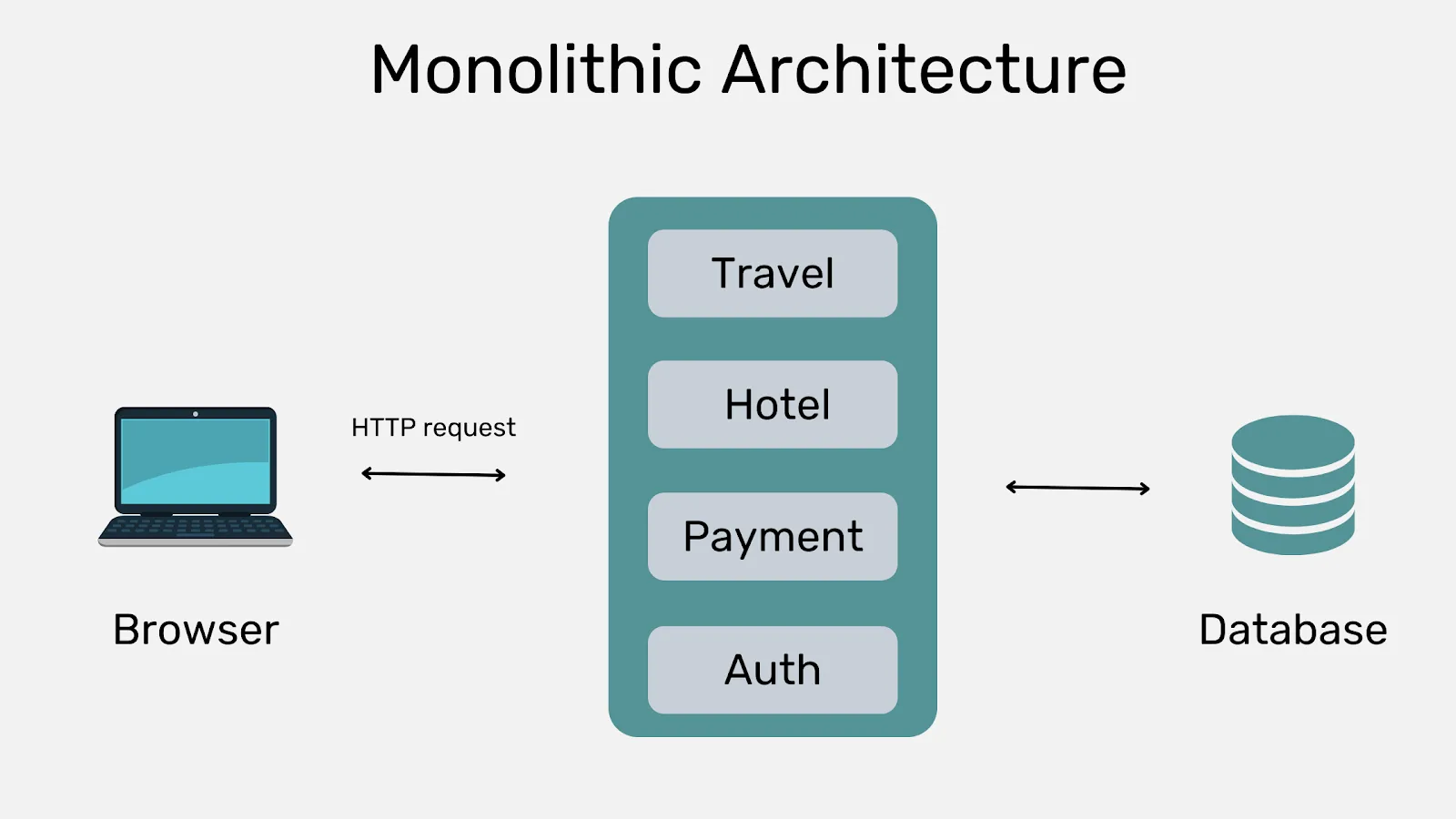
A monolith is one application where all modules are built, deployed and scaled as a single unit. Its problems show up as it grows:
- A small change means rebuilding and redeploying the whole app.
- You cannot scale one busy module on its own; you scale everything.
- Modules are tightly coupled, so one bug can take down the whole app.
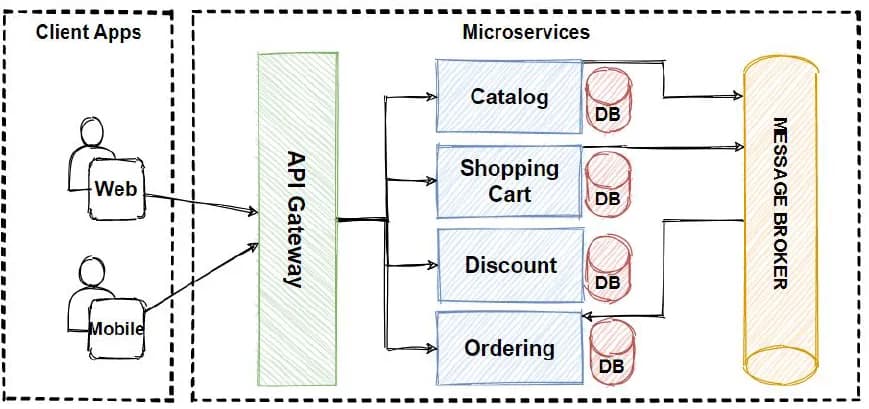
Microservices split the app into small services that talk to each other through APIs. Each service has its own codebase, can be deployed on its own and can be scaled on its own. Netflix is a well-known early adopter: it started moving away from its monolith around 2009.
Microservices carry a cost. They add complexity: more pipelines, more network calls, more components to monitor, and higher infrastructure cost. Containers help because each service ships as its own image with its own dependencies.
Linux containers on Windows and macOS
A container uses the host's kernel. So a Linux container needs a Linux kernel, and a Windows container needs a Windows kernel. That constraint determines every case below.
| Question | Answer |
|---|---|
| Linux containers on Windows | Yes. Docker Desktop runs them inside a lightweight Linux VM, using the WSL 2 backend (or Hyper-V). |
| Windows containers on Windows | Yes. Docker Desktop can switch to "Windows containers" mode. One daemon runs either Linux or Windows containers at a time, not both. |
| Linux containers on macOS | Yes. Docker Desktop for Mac runs a small Linux VM and the containers run inside it. |
| Windows containers on Linux | No. There is no Windows kernel to share. You would need a full Windows VM. |
| "macOS containers" on Linux | No. Docker has no macOS container images. Running macOS on non-Apple hardware also breaks Apple's licence terms. |
On Windows, the usual setup is WSL 2 (Windows Subsystem for Linux) plus Docker Desktop. To install WSL, open PowerShell as Administrator:
$ wsl --install
$ wsl --list --online
$ wsl --install -d UbuntuThe first command installs WSL with the default distribution (Ubuntu). The second lists other distributions, and the third installs a specific one. Restart Windows when asked, create your Linux user, then run sudo apt update && sudo apt upgrade -y inside the distribution. After that, install Docker Desktop for Windows and enable the WSL 2 based engine.
Docker architecture
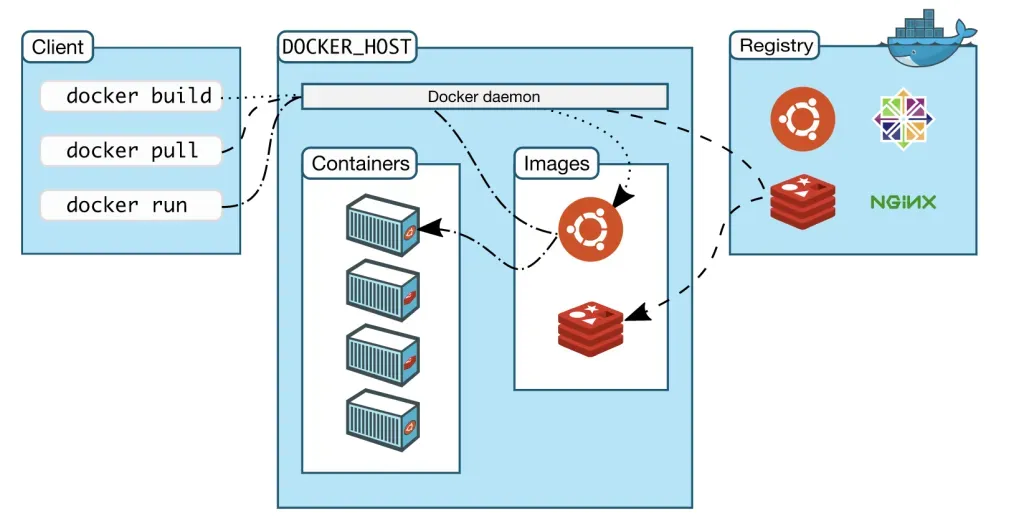
Docker uses a client-server design:
| Part | What it does |
|---|---|
Docker client (docker) | The CLI you type into. It turns commands like docker run into calls to the Docker API. One client can talk to several daemons, local or remote. |
Docker daemon (dockerd) | The server. It listens for API requests and manages images, containers, networks and volumes. Daemons can also talk to each other, for example in Swarm mode. |
| Docker host | The physical or virtual machine where the daemon runs. |
| Registry | Stores images. Docker Hub is the default public registry, so docker pull nginx looks there unless you name another registry. |
| Docker Desktop | An app for Windows, macOS and Linux that bundles Docker Engine, the CLI, Docker Compose, an optional Kubernetes cluster and a GUI. |
Docker objects
Images
An image is a read-only template for creating containers. You can pull one from a registry or build your own from a Dockerfile, a text file with build steps.
Each instruction in a Dockerfile creates a layer. When you rebuild, Docker reuses unchanged layers from its build cache and only rebuilds from the first changed step onwards. Layer caching keeps builds fast and makes the order of steps in a Dockerfile important. Part 3 covers this in detail.
Containers
A container is a running (or stopped) instance of an image. You can create, start, stop, move and delete it with the CLI or the API, connect it to networks and attach storage. By default it is isolated from other containers and from the host. A container is defined by its image plus the options you give it at docker run time.
Anything a container writes to its own filesystem is lost when the container is removed. To keep data, use a volume or a bind mount.
Volumes and bind mounts
A volume is storage that Docker creates and manages, under /var/lib/docker/volumes/ on Linux. A bind mount maps any file or folder on the host into the container by its full path.
| Volume | Bind mount | |
|---|---|---|
| Where data lives | In a Docker-managed area of the host | Anywhere on the host |
| Managed with | docker volume commands | Normal host tools |
| Who should change it | Only Docker and containers | Host processes and containers can both change it |
| Survives container removal | Yes | Yes (it is a host folder) |
| Good for | Databases and any data that must persist | Sharing source code or build output between host and container during development |
| Extras | Straightforward to back up and migrate, works on Linux and Windows containers, can be shared by several containers, supports volume drivers for remote or cloud storage | Depends on the host's folder layout |
Rule of thumb: use a volume for data the app owns, and a bind mount when you need to see or edit the files from the host.
Networks
Docker networking lets containers talk to each other, to the host and to the outside world. Internally Docker follows a design called the Container Network Model (CNM), implemented by a library called libnetwork, which uses pluggable drivers:
| Driver | What it does |
|---|---|
bridge | The default. Containers get a private IP on a virtual bridge on the host and reach the outside through NAT. User-defined bridge networks also give containers DNS by name. |
host | Removes network isolation. The container uses the host's network stack directly, so no port mapping is needed. |
overlay | Connects containers on different Docker hosts. Used by Docker Swarm. |
macvlan | Gives the container its own MAC address so it looks like a physical device on your LAN. Useful for apps that expect to sit directly on the network, such as traffic monitors. |
none | No networking except the loopback interface. |
| Plugins | Third-party drivers for other network setups. |
Key takeaways
- A container is an isolated Linux process. Namespaces give it its own view of the system, and cgroups limit its resources.
- Containers share the host kernel, so they are small and fast, but they isolate less strongly than VMs.
- Linux containers on Windows or Mac run inside a Linux VM that Docker Desktop manages.
docker(client) talks todockerd(daemon), which uses containerd and runc to run containers and pulls images from a registry.- Use volumes for persistent app data, bind mounts for host files you edit, and user-defined networks so containers can find each other by name.
Next in this series: Install Docker on Ubuntu and Essential Docker Commands.
Keep reading
- Install Docker on Ubuntu and Essential Docker Commands
Install Docker Engine on Ubuntu from Docker's official apt repository, then manage containers, images, networks and volumes with the essential CLI commands.
- Docker Swarm: Building a Cluster with Vagrant
Build a Docker Swarm cluster on Vagrant VMs, then initialise it, join nodes, run and scale services, and use overlay networks and volumes in swarm mode.
- Docker Compose: Multi-Container Apps with compose.yaml
Define a whole multi-container stack in one compose.yaml with Docker Compose v2: services, ports, named volumes, .env variables and a MySQL-backed example.