Docker Compose
Docker Compose Tool for defining and running multi container applications. Simplifies the control of your entire application stack, making it easy yo manage servicess, networks and volumes in a…

ON THIS PAGE
Docker Compose
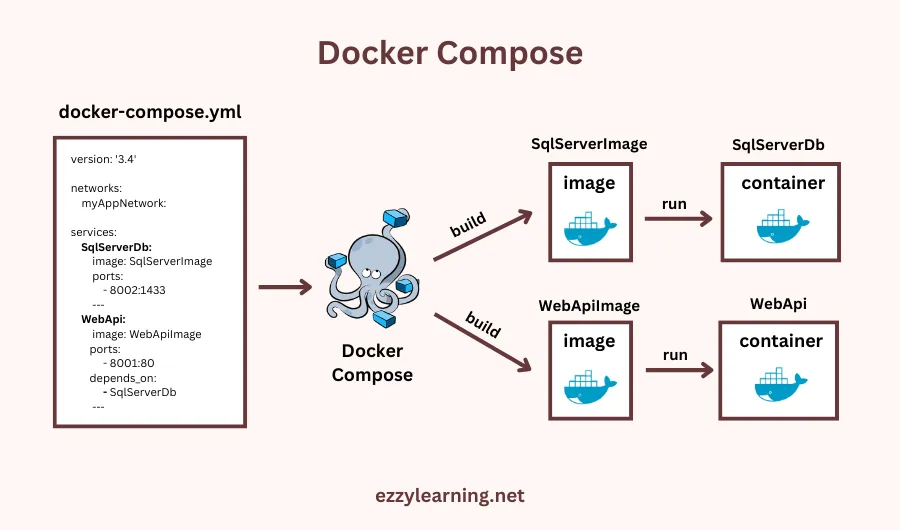
Tool for defining and running multi container applications. Simplifies the control of your entire application stack, making it easy yo manage servicess, networks and volumes in a single YAML configuration file
File name: compose.yaml
Commands
- docker compose up: To start all the services
- docker compose down: To stop and remove all the running containers
- docker container logs: To monitor the output of the running container
- docker compose ps: List all the services along with the status
- docker compose stop: To stop all the running services
- docker compose start: To start all the running services
- docker compose down –volumes: To delete volumes also
compose.yaml file
The docker compose file is written in YAML[YAML Ain’t Markup Language] format.
ervices:
  web:
    build: .
    ports:
      - "8000:5000"
  redis:
image: "redis:alpine"- Services: Used to specify all of the containers the application need to run
- we can use any name for the service but it is better to use name based on the service it is providing example: frontend, backend, database, etc.
Variables
.env file
An .env file in Docker Compose is a text file used to define variables that should be made available for interpolation when running docker compose up. This file typically contains key-value pairs of variables, and it lets you centralize and manage configuration in one place. The .env file is useful if you have multiple variables you need to store.
The .env file is the default method for setting variables. The .env file should be placed at the root of the project directory next to your compose.yaml file.
Need to mention  file like this in compose.yaml file if .env file in different path

env_file:
- ./BackEnd/config.env- The following syntax rules apply to environment files:
- Lines beginning with
#are processed as comments and ignored. - Blank lines are ignored.
- Unquoted and double-quoted (
") values have interpolation applied. - Each line represents a key-value pair. Values can optionally be quoted.
VAR=VAL->VALVAR="VAL"->VALVAR='VAL'->VAL
- Inline comments for unquoted values must be preceded with a space.
VAR=VAL # comment->VALVAR=VAL# not a comment->VAL# not a comment
- Inline comments for quoted values must follow the closing quote.
VAR="VAL # not a comment"->VAL # not a commentVAR="VAL" # comment->VAL
- Single-quoted (
') values are used literally.VAR='$OTHER'->$OTHERVAR='${OTHER}'->${OTHER}
- Quotes can be escaped with
\.VAR='Let\'s go!'->Let's go!VAR="{\"hello\": \"json\"}"->{"hello": "json"}
- Common shell escape sequences including
\n,\r,\t, and\\are supported in double-quoted values.
If you create a file with another name like compose.env in current directory but want to use in runtime you can pass the file while running command
docker compose --env-file compose.env down || true
docker compose --env-file compose.env pull
docker compose --env-file compose.env up -dWe can also define variables directly in compose.yaml file
services:
    webapp:
      image: my-webapp-image
      environment:
- DEBUG=${COMPOSE_DEBUG}Declare volumes
services:
  mongodb:
    image: mongo:4.4
    command: [--bind_ip_all]
    volumes:
      - mongo-data:/data/db
volumes:
mongo-data:- Here mongo-data is the named volume that we have created.
- mongo-data is in host and /data/db is container path.
Exposing ports
services:
  frontend:
    image: "${FRONTEND_IMAGE}"
    ports:
      - "3000:80"
    networks:
- mynetwork- Here we use ports: to assign port
- 3000 is host port and 80 is container port
Examples:
To deploy a word press site
.env file
MYSQL_ROOT_PASSWORD=root@123
MYSQL_DATABASE=mydb
MYSQL_USER=dipen
MYSQL_PASSWORD=password


TAG=8.0.42-oraclelinux9compose.yaml file
services:
  scheduler:
    build: scheduler/.
    ports:
      - "8000:80"
    depends_on:
      - database
  storefront:
    build: storefront/.
    ports:
      - "8001:80"
    depends_on:
      - database
  database:
    image: "mysql:${TAG}"
    environment:
      MYSQL_ROOT_PASSWORD: ${MYSQL_ROOT_PASSWORD}
      MYSQL_DATABASE: ${MYSQL_DATABASE}
      MYSQL_USER: ${MYSQL_USER}
      MYSQL_PASSWORD: ${MYSQL_PASSWORD}
    volumes:
      - ./mysql:/docker-entrypoint-initdb.d:ro
      - kineteco:/var/lib/mysql
volumes:
kineteco:- This is the format to create a compose.yaml file and .env file.
Keep reading
- Docker Orchestration
Container Orchestration Container orchestration automates the deployment, management, scaling, and networking of containers. It is a solution that consists of a set of tools and scripts that can help…
- Docker file, Best practices and Registry
Dockerfile Docker can build images automatically by reading the instructions from a Dockerfile. A Dockerfile is a text document that contains all the commands a user could call on the command line to…
- Docker Installation and commands
Docker Installation Installation Uninstall old versions Install using the apt repository Another method for installing docker is to run the official script from https://get.docker.com Post…