DOCKER Introduction
Docker container Container standard and industry leadership Micro kernel Monolithic Kernel Can we run Linux container on windows and vice versa? Can we run linux container on mac and vice versa?…

ON THIS PAGE
Container
- Standard unit of software that packages up code and all of its dependencies so the application runs quickly and reliably from one computing environment to another.
- Docker container image is a lightweight, standalone, executable package of softwate that includes everything need to run an application ie; code, runtime, system tools, system libraries and seetings.
- Container image become containers at runtime and in case of docker container-images becomes container when they run on the Docker engine.
- Available for both windows and linux.
- containerized software run the same regardless of the infrastructure.
- Run same in development phase, testing phase and customer environment.
Docker container that run in Docker engine
- standard: Created the industry standard for containers.
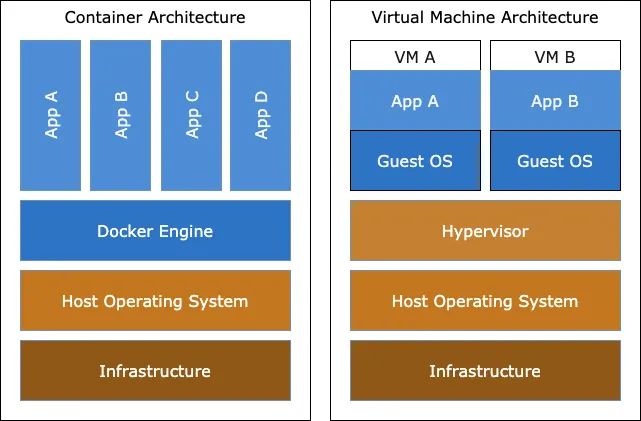
- Lightweight: Containers share the machine OS kernel so it doesn’t need an OS per application.
- Reduce licensing cost.
- Reduce and the boot time and they are quite fast.
- Secure: Applications are safer in container and docker provides the strongest default isolation capabilities in the industry.
- Serverless: A cloud computing execution models where developers build and run application without managing server. The cloud provider handles server management, configuration, scaling and billing.
Docker container
- Open source and launched in 2013.
- It used existing computing concepts especially existing tools in Linux [cgroup and namespaces] to create container and make them work efficent and in isolated way.
- cgroup: Known as control group. This allows you to limit and control resources like CPU, memory, I/O that a group of processes like container can use.
- Namespaces: Linux feature that provide isolation.
- It helps developers and system admins by isolating application needs [like specific software version] from underlying computer system [The server or cloud infrastructure].
- Docker is widely used in linux, windows, data center and cloud.
Difference between containers and VMs.
| Containers | Virtual Machines |
|---|---|
| They are the abstraction at app layer that packages code and dependencies together. | They are the abstraction of physical hardware turning one server into many servers. |
| Multiple containers can run on same OS, sharing same kernel and running isolated in user space. | Hypervisor allows multiple VMs to run on a single machine. |
| Share OS kernel and doesn’t include full copy of an OS and boot time is much faster. | VM includes a full copy of an OS, taking up tens of GBS making them slow to boot. |
| Takes less space typically in MBs. | Takes more space typically in GBs. |
| Abstraction: Hiding complex details and presenting simpler one |
Note: Containers and VMs when used together provides great deal of flexibity in deploying and managing app.
Container standard and industry leadership
- Docker created a way to package and run application call linxu container technologies; portable, flexible and easy to deploy.
- In June 2015, Docker contributed its core technology [container image specs and runtime code later know as [runc ] to the open container initiative [OCI] to help establish standardization as the ecosystem of container grows.
- Containerd:
- Container runtime, fundamental piece of software needed to actually run containers.
- Why containerd ?
- Becomes industry standard [ Many different system and tools used ]
- Built with simplicity, robustness [reliability and portability]
- Powered by runc.
- Relationship to docker :
- Containerd is the core of the Docker Engine. When we use docker to run a container it’s actually Containerd doing heavy task behind the scenes.
- Docker donate to CNFC [Cloud native computing foundation]
Docker
- Open platform for developing, shipping and running application.
- Helps to separate your application from infrastructure so you can deliver software quickly.
- Using docker methodologies for shipping, testing and deploying code you can significantly reduce the delay time between writing and running it in the production.
Docker platform
- Docker provide the ability to package and run application in a loosely isolated environment called a container.
- Container are lightweight and contain everything that is needed to run an application.
What can we do with Docker?
- Write the code locally and share them using docker container.
- Push application into test environment and run automated and manual tests.
- Fix the bug in the development environment and re-deploy them in the test environment.
- When all of the bugs are fixed then psh the image to the production environment.
Underlying Technology?
- Runnable instance of an image
- Uses namespaces [feature of the linux kernel] to provide the isolated workspace for container.
- Each aspect of the container runs in a seperate namespace and its access is limited to that namespace.
Kernel system
- core part of the os that manages system resources
- Also acts as a bridge between the application and hardware of the computer.
- First program loaded on startup [After the bootloader]
- Types of kernel
- Micro kernel
- Monolithic kernel
- Hybrid kernel
- Exo kernel
- Nanokernel
Micro kernel
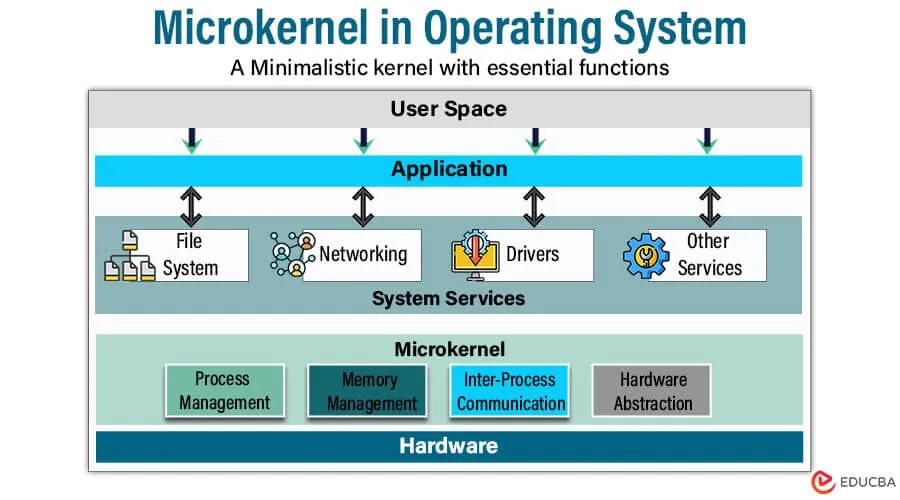
- The user services and kernel services are implemented in different address spaces. i.e.; User address space and kernel address space thus reducing the size of kernel and OS.
- In this architecture only important services are inside the kernel and the rest of the OS services are presented inside the system application program.
- Example: macos, windows 10 11,L4 linux
Monolithic Kernel
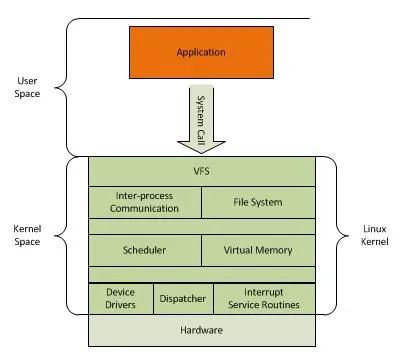
- User and kernel services are implemented under the same address space.
- increase size of the kernel, thus increasing the size of OS.
- Execution is faster becuase both the services are in the same space.
- All the OS services run in kernel space, meaning they all share the same memory space. [Tight integration of the system services and its high performance]
- Example: Linux
This is in the case of OS architecture but in case of how application is build we have monolithic architecture and micro services.
Monolithic Architecture: An application where all components are tightly coupled and run as a single, indivisible unit
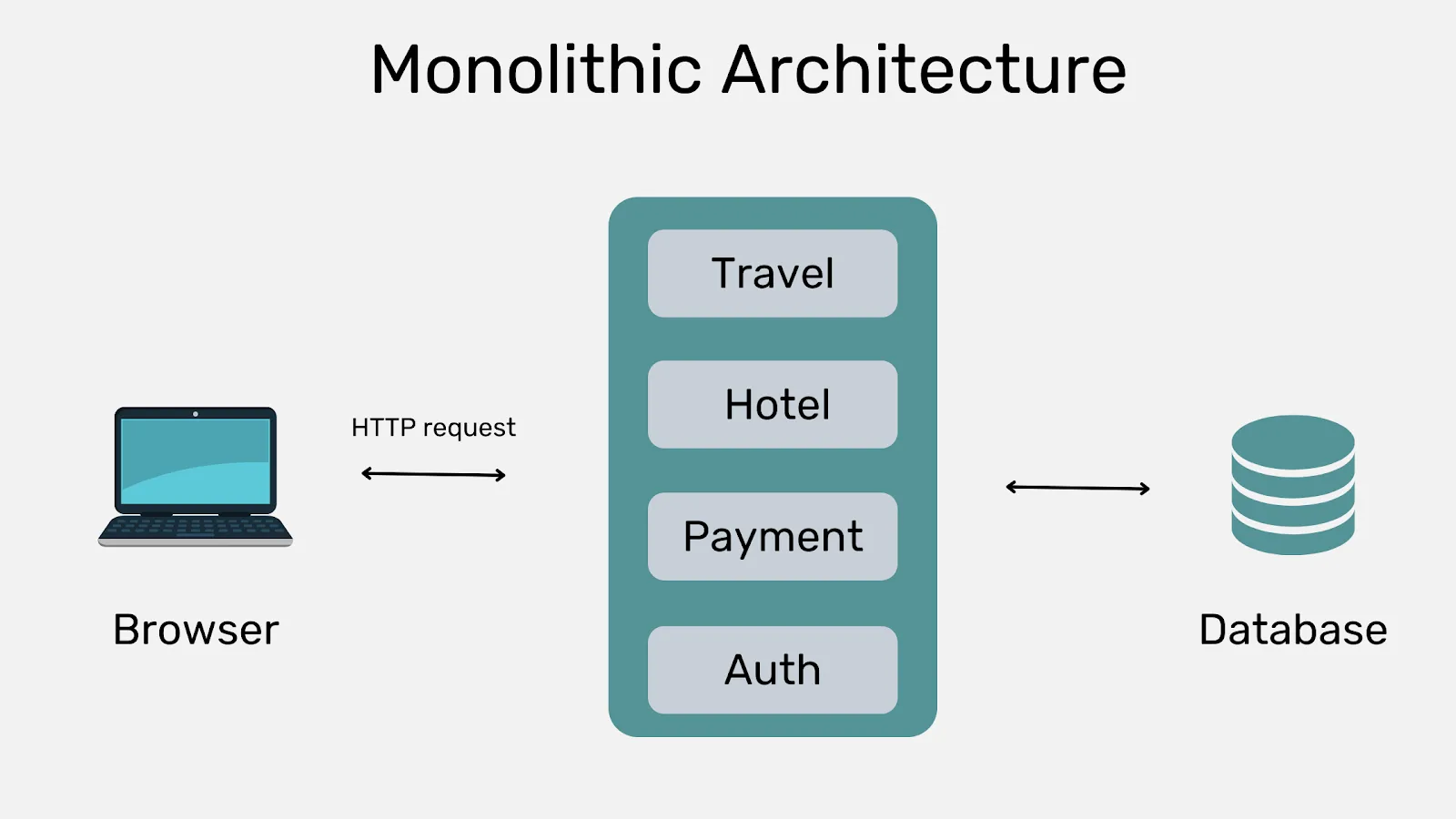
This is in the case of OS architecture but in case of how application is build we have monolithic architecture and micro services.
Monolithic Architecture: An application where all components are tightly coupled and run as a single, indivisible unit
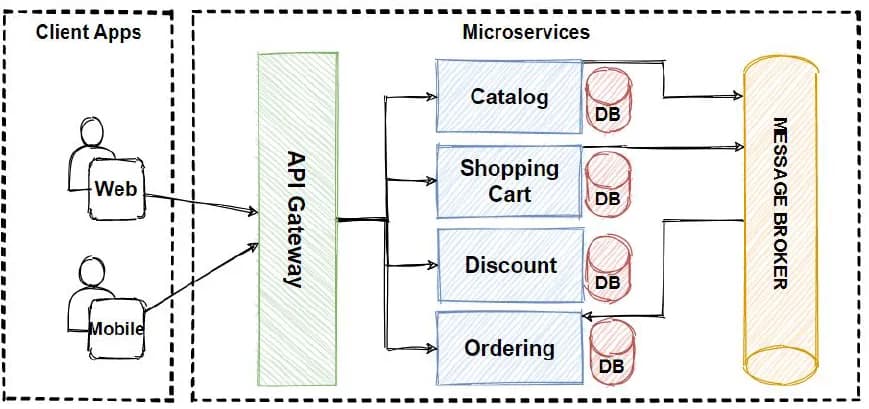
Micro services: Asoftware development approach where an application is structured as a collection of small, independent, and loosely coupled services
Issue in monolithic:
- If we make any changes in the code then whole code need to be redeployed.
- It has scaling limitation. Like we cannot create different version of services.
- As code is tightly coupled it has lots of dependencies. That means if we have bug in a code then whole application will be affected.
To overcome these issue of monolithic kernel we got microservices architecture. Netflix faced the same problem in 2009 as it uses monolithic architecture. It become first pioneer to adapt this service.
Benefits of micro services are
- Independent development and deployment
- Separate codebase
- microservices architecture splits an application into a series of independently deployable services that can communicate through APIs.
- This allows each individual services to be deployed and scaled independently.
- Easier to maintain individual components rather than whole code.
Disadvantages of micro service architecture
- Complex
- management overhead
- High infrastructure cost as we need to maintain individual CI/CD
Questions
Can we run Linux container on windows and vice versa?
Running Linux container on windows.
- They are widely used and fully supported through WSL2 and Docker desktop.
- Docker desktop leverages WSL2 to provide a native linux kernel interface on windows 10/11. This integration allows you to run linux container seamlessly on a windows host.
Install WSL in windows
Step 1: Enable WSL on Windows
1. Open PowerShell as Administrator:
– To start, right-click on the Start button on your desktop.
– From the context menu that appears, choose ‘Windows PowerShell (Admin)’ or ‘Command Prompt (Admin)’.
– This will open a PowerShell window with administrative privileges.
2. Enable WSL:
– In the PowerShell window, type the following command to enable the Windows Subsystem for Linux (WSL) feature:
“`bash
wsl –install
OR
wsl –install -d kali
OR
wsl –install -d ubuntu
OR
wsl –install -d Debian
“`
– This command installs WSL and sets up the default Linux distribution on your machine.
– WSL allows you to run Linux distributions natively on your Windows machine without needing a virtual machine.
3. Restart Your Computer:
– After the WSL installation completes, you’ll be prompted to restart your computer.
– Save any open work and click on ‘Restart Now’. This ensures that the WSL installation is fully integrated into your system.
Step 2: Install a Linux Distribution
1. Choose a Linux Distribution:
– After your computer restarts, WSL will automatically install a default Linux distribution, usually Ubuntu.
– If you prefer a different distribution, you can choose one from the Microsoft Store. Popular alternatives include Debian, Kali Linux, and Fedora.
2. Download a Linux Distribution:
– Open the Microsoft Store from the Start menu.
– In the search bar, type ‘Linux’ and press Enter.
– A list of available Linux distributions will appear. Select the one you want to install and click ‘Install’.
– Wait for the installation to complete. This may take a few minutes depending on your internet speed.
3. Launch the Linux Distribution:
– Once the installation is complete, launch the Linux distribution from the Start menu.
– On first launch, you will be prompted to set up a new user account and password for your Linux environment.
– Follow the on-screen instructions to complete the setup.
Step 3: Update the Linux Distribution
1. Update Package Lists:
– Keeping your system updated is crucial for stability and security. Start by updating the package lists on your Linux system.
– Open your Linux terminal and type the following command:
“`bash
sudo apt update
“`
– This command fetches the latest package lists from the repositories, ensuring you have the latest information on available packages.
2. Upgrade Installed Packages:
– Next, upgrade the installed packages to their latest versions by running the following command:
“`bash
sudo apt upgrade -y
“`
– This command updates all the installed packages to their newest versions. The `-y` flag automatically confirms the upgrade, so you don’t have to manually approve each update.
Note: If we enable wsl2 based engine in docker desktop then we can run Linux container but not windows containers.
Running Windows container on Linux
- It is not tnatively supported due to kernel differences.
- Can be possible through virtualization but introduce
- Complexity
- Additional overherad making it less pratical
- Challanges
- Cannot run windows and Linux container simultaneously on the same platform i.e.; same docker daemon
- Docker is OS-level virtualization; meaning its main function is to contain and isolate applications as they run on an OS.
- Container running Linux services : Need to run on Linux platform
- Containers running windows services: Need to run on windows platform
Can we run linux container on mac and vice versa?
Running linux container on mac is not natively supported but can be done with the help of Desktop environment.
Download and setup using DOCKER DESKTOP.
Running mac container on linux is not done in real world due to
- Legal and licensing constraints
- performance overhead
- stability issue
- Complex configuration
Docker Architecture
Docker client [Docker]
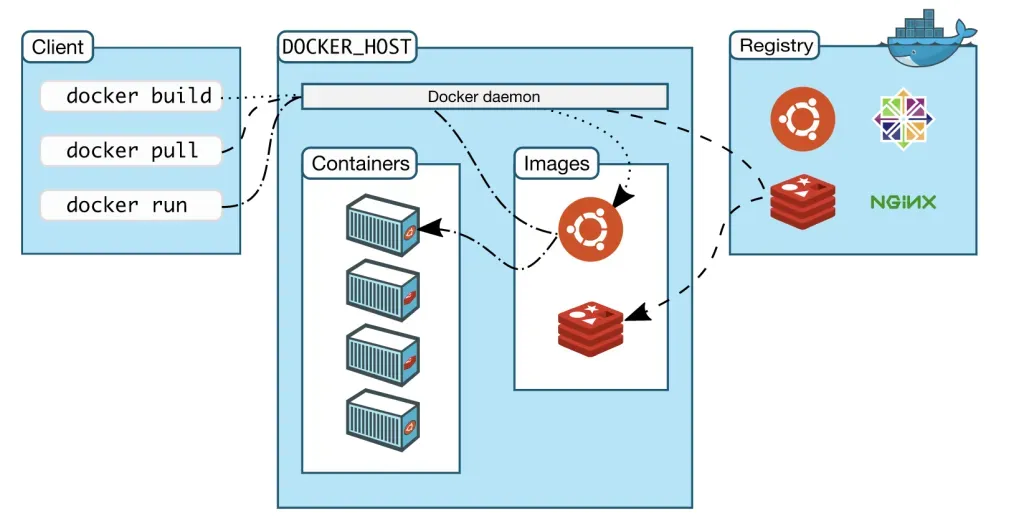
- The Docker Client is a Command Line Interface (CLI) tool used to interact with Docker (e.g.,
docker run,docker build).- It allows users to issue commands to Docker.
- When you run a command like
docker run, the client communicates with the Docker Daemon (dockerd) using the Docker API. - The Docker Client can communicate with multiple Docker Daemons.
Docker Daemon [docked]
- The Docker Daemon (commonly called
dockerd) is the core component of Docker. It:- Listens for Docker API requests.
- Manages Docker objects such as images, containers, networks, and volumes.
- Performs tasks requested by the Docker Client.
- Can also communicate with other Docker daemons to coordinate distributed containerized services.
Docker Host
- The Docker Host is the physical or virtual machine on which the Docker Engine (i.e., Docker Daemon) is installed and running.
- It provides the environment to build, run, and manage Docker containers.
Docker Registry
- Stores Docker images
- Dockerhub is public registry that anyone can use. Docker looks for the imae in docker hub when we request to pull image.
Docker desktop
- Docker Desktop is a user-friendly application for Windows and macOS that enables you to:
- Build, run, and share containerized applications and microservices.
- It includes Docker Engine, Docker CLI, Docker Compose, Kubernetes, and a GUI dashboard.
Docker Objects
Using docker we will create images, container, networks, volumes, plugins and other many more.
Images
- Read only template for creating a docker container.
- Can create own image or use the images
- STEPS To create an IMAGE:
- Write a Dockerfile for defining the steps to create the image and run it.
- Each instruction in Dockerfile creates a a layer in the image.
- When we change and rebuild the image only those layers which have been changed are rebuilt this makes docker lightweight, small and faster. This process is know as docker using cache. To make sure docker is using cache during build we need to follow best practices to write docker file.
Containers
- Runnable instance of an image.
- Can start, stop, move, create or delete it using Docker API or CLI.
- Can connect it to one or more networks, attach storage to it.
- By default it is isolated from the other containers and its host machine.
- A container is defined byits image as well as any configuration options you provide to it.
Volumes
- Persistent data storage for containers created and managed by docker.
- Why we need to use volumes rather than bind mounts?
- Easier to backup or migrate than bind mounts
- manages volumes using docker cli
- Work on both Linux/ windows containers.
- When not to use?
- Volumes are not good choice if we need to access data from hosts as it is completely managed by docker.
- Volume doesn’t increase the size of the container
- If the container is removed then volume data is still remained intact and can be copied in another container.
Bind Mounts
- A file or directory pf the host machine is mounted from the host into a container.
- When we use volume, a new directory is created within Docker’s storage directory on the host machine and docker manages that directory contents.
- When to use?
- Sharing source or build artifacts between a development environment on the docker host and the container.
- When we create or generate file in a container and want that files onto the host’s file system.
Major differences between them are:
| Volumes | Bind Mount |
|---|---|
| Stored in the part of the host filesystem which is managed by docker. | Can be stored anywhere on the host system . |
| Non docker process should not modify this part of the system. | Non docker process on the docker host or a Docker container can modify them at any time. |
| They are the best way to persist data. | File or directory is referenced by its full path on the host machine. |
| They are isolated form the core functionality of the host machine. | |
| Can be mounted into multiple container simultaneously. | |
| Also supports the use of volume drivers, which allows you to store your data on remote hosts or cloud providers among other possibilities. |
Docker Networking
Refers to ability for containers to connect and communicate with each other or to no- Docker workloads. The major components of docker networking are.
- Container network model(CNM)
The first one is the container network model, it is the design specification and it outlines the
fundamental building blocks of Docker network. - The libnetwork implements CNM
The second component is the libnetwork, it is the real-world implementation of the CNM and docker uses it for connecting containers. Libnetwork is also responsible for service discovery, ingress-based container load balancing, and the network and management control plane functionality. Libnetwork uses a system of drivers. - **Driver extends the model by network topologies
**Driver extends the model by implementing specific network topologies
Network drivers
- bridge: It is a default network. It is a link layer device, which forwards traffic between network segments. It uses a software bridge. It only works on Linux.
- host: Remove network isolation between the container and the Docker host, and use the host’s
networking directly. - overlay: Used on connecting containers in multiple hosts
- macvlan: Allows you to assign a MAC address to a container and this gives it the
appearance of being a physical device on your network. E.g an application that monitors
networking traffic, and those applications are expected to be physically connected to a network. - none: To disable the network. Used in conjunction with a custom network driver. Cannot be
used in swarm service. - Network plugin:
Keep reading
- Docker Installation and commands
Docker Installation Installation Uninstall old versions Install using the apt repository Another method for installing docker is to run the official script from https://get.docker.com Post…
- Docker Orchestration
Container Orchestration Container orchestration automates the deployment, management, scaling, and networking of containers. It is a solution that consists of a set of tools and scripts that can help…
- Docker file, Best practices and Registry
Dockerfile Docker can build images automatically by reading the instructions from a Dockerfile. A Dockerfile is a text document that contains all the commands a user could call on the command line to…