Ansible Templates, Handlers, Roles and Vault
Push chrony NTP config with templates, edit sshd_config with lineinfile, restart services only on change with handlers, then organize it all into a role and encrypt secrets with Vault.

ON THIS PAGE
A single playbook is enough for a lab, but automation shared across a team needs a reusable structure, controlled service restarts and protected secrets. Continuing from Ansible Playbooks, this guide edits configuration files on Ubuntu and CentOS VMs with the template and lineinfile modules, restarts services only when their config changes, moves the work into a role, and encrypts sensitive files with Ansible Vault.
The file module
ansible.builtin.file manages files and directories themselves, not their content: it creates files, directories and symbolic links, deletes them, and sets owner, group and permissions.
- name: Change file ownership, group and permissions
  ansible.builtin.file:
    path: /etc/foo.conf
    owner: foo
    group: foo
mode: "0644"Quote mode. Without quotes, YAML reads 0644 as a number, which can give the wrong permissions.
Lab setup: shared folder and VS Code
Editing YAML in vim inside the VM is slow, so this lab shares a folder between the laptop and the Ansible control VM and edits files in VS Code. Add the synced folder to the Vagrantfile (see the Vagrant guide):
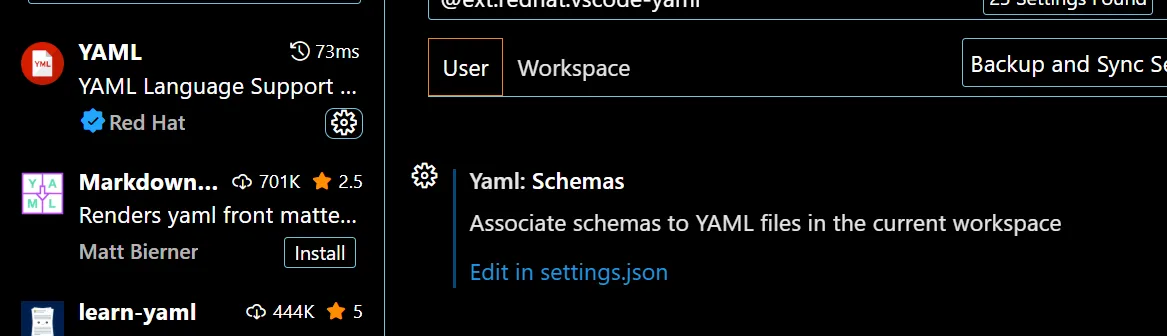
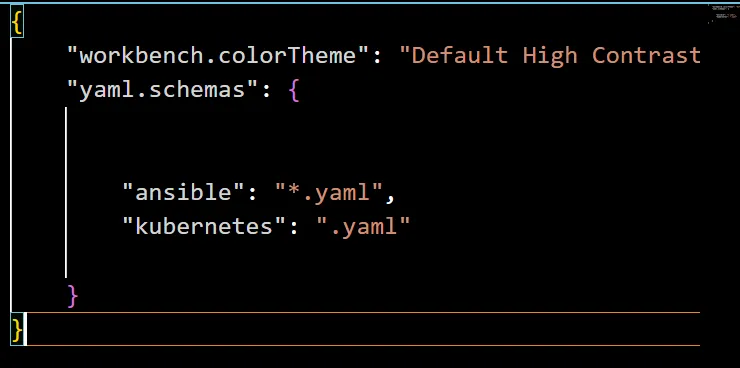
config.vm.synced_folder "./shared_folder", "/home/vagrant/shared_folder"In VS Code, install the Red Hat YAML extension and open its "Yaml: Schemas" setting with "Edit in settings.json":
The shared folder introduces two problems:
ansible.cfgwas ignored. The VirtualBox shared folder is mounted world-writable (anyone can write to it). Ansible refuses to loadansible.cfgfrom a world-writable current directory, because another user could plant a malicious config there. Inside the shared folder, pass the inventory on every run:ansible-playbook -i inventory playbook.yaml. SettingANSIBLE_CONFIGto the file's path also works.- SSH keys failed with "bad permissions".
chmod 600has no effect on files in the shared folder, so SSH rejects a private key stored there. Keep the key in a regular directory on the VM instead.
Templates: push the same NTP config to every server
NTP (Network Time Protocol) keeps computer clocks in sync with time servers. Ubuntu and CentOS both use chrony as the NTP client. Its config is at /etc/chrony/chrony.conf on Ubuntu and /etc/chrony.conf on CentOS. The default Ubuntu config uses Ubuntu's pool servers:

This lab targets time servers close to Nepal. The NTP Pool page for Nepal (np.pool.ntp.org) says the zone has too few servers and recommends the Asia zone, asia.pool.ntp.org, instead.
Changing a few lines on one machine is manageable. Repeating that change on many machines, each with a slightly different file, leads to drift and mistakes. Instead, edit the file once on the control node and let Ansible push it. The template module copies a file to the hosts and first renders it with Jinja2, the templating engine Ansible uses for {{ variables }}, conditions and loops inside files.
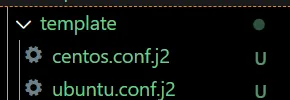
Create one template per distribution, because their default files differ:
-pool ntp.ubuntu.com        iburst maxsources 4
-pool 0.ubuntu.pool.ntp.org iburst maxsources 1
-pool 1.ubuntu.pool.ntp.org iburst maxsources 1
-pool 2.ubuntu.pool.ntp.org iburst maxsources 2
+pool 0.asia.pool.ntp.org iburst maxsources 4
+pool 1.asia.pool.ntp.org iburst maxsources 1
+pool 2.asia.pool.ntp.org iburst maxsources 1
+pool 3.asia.pool.ntp.org iburst maxsources 2pool 0.asia.pool.ntp.org iburst
pool 1.asia.pool.ntp.org iburst
pool 2.asia.pool.ntp.org iburst
pool 3.asia.pool.ntp.org iburstThe .j2 extension is a convention that tells people (and editors) the file is a Jinja2 template. Ansible does not require it. These templates have no variables yet, so they behave like copy. Templates become valuable when you replace a value with a variable, for example pool {{ ntp_pool }} iburst, and set ntp_pool per group.
The template tasks pick the right source and destination for each distribution:
    - name: Update chrony config on Ubuntu
      ansible.builtin.template:
        src: ./template/ubuntu.conf.j2
        dest: /etc/chrony/chrony.conf
      when: ansible_distribution == "Ubuntu"

    - name: Update chrony config on CentOS
      ansible.builtin.template:
        src: ./template/centos.conf.j2
        dest: /etc/chrony.conf
when: ansible_distribution == "CentOS"My first version ended with a task that restarted chronyd on every run, even when nothing had changed. The handlers section below fixes that.
Edit one line with lineinfile: an SSH login banner
The ansible.builtin.lineinfile module makes sure one line in a file is present (or absent). With regexp it finds an existing line and replaces it. The example below uses it to display a warning banner before SSH login. By default sshd_config has the banner commented out:

The playbook writes the banner text, points sshd_config at it, and restarts SSH. The service is called ssh on Ubuntu and sshd on CentOS, so there are two restart tasks.
---
- name: Add an SSH login banner
  hosts: all
  become: true
  tasks:
    - name: Write the banner text
      ansible.builtin.copy:
        dest: /etc/banner.txt
        content: |
          ***************************************
          Welcome to Ansible-Managed Server!
          If you are not an authorized user,
          please logout immediately.
          ***************************************

    - name: Point sshd_config at the banner
      ansible.builtin.lineinfile:
        path: /etc/ssh/sshd_config
        regexp: "^#Banner none"
        line: "Banner /etc/banner.txt"
        state: present

    - name: Restart ssh on Ubuntu
      ansible.builtin.service:
        name: ssh
        state: restarted
      when: ansible_distribution == "Ubuntu"

    - name: Restart sshd on CentOS
      ansible.builtin.service:
        name: sshd
        state: restarted
when: ansible_distribution == "CentOS"After the run, the line is replaced on both distributions:

And a new SSH login shows the banner before the password prompt:

Handlers: restart only when something changed
A handler is a task that runs only when another task notifies it, and only if that task reported changed. This is the usual way to restart a service after its config file changes. Handlers run once at the end of the play, even if several tasks notify them.
---
- name: Provision servers
  hosts: all
  become: true
  tasks:
    - name: Install packages on Ubuntu
      ansible.builtin.apt:
        name: "{{ item }}"
        state: present
        update_cache: true
      when: ansible_distribution == "Ubuntu"
      loop:
        - chrony
        - wget
        - git
        - zip
        - unzip

    - name: Install packages on CentOS
      ansible.builtin.dnf:
        name: "{{ item }}"
        state: present
      when: ansible_distribution == "CentOS"
      loop:
        - chrony
        - wget
        - git
        - zip
        - unzip

    - name: Start and enable chronyd
      ansible.builtin.service:
        name: chronyd
        state: started
        enabled: true

    - name: Update chrony config on Ubuntu
      ansible.builtin.template:
        src: ./template/ubuntu.conf.j2
        dest: /etc/chrony/chrony.conf
      notify: Restart chronyd
      when: ansible_distribution == "Ubuntu"

    - name: Update chrony config on CentOS
      ansible.builtin.template:
        src: ./template/centos.conf.j2
        dest: /etc/chrony.conf
      notify: Restart chronyd
      when: ansible_distribution == "CentOS"

  handlers:
    - name: Restart chronyd
      ansible.builtin.service:
        name: chronyd
state: restartedOn Ubuntu the unit is chrony.service, but it also answers to the name chronyd, so one handler covers both distributions.
After a small edit to a template, the handler runs:
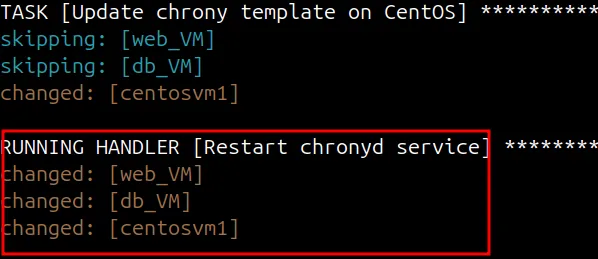
On a second run with no changes, the template tasks report ok and the handler does not run:

Roles: organize and reuse
As playbooks grow, one file becomes hard to read. A role is a standard folder layout that Ansible understands. It loads tasks, handlers, templates, files and variables from fixed places, so a role can be reused in many playbooks and shared with others.
roles/
  common/            # one role
    tasks/main.yml     # tasks; can import smaller task files
    handlers/main.yml  # handlers
    templates/         # files for the template module
    files/             # files for the copy and script modules
    vars/main.yml      # role variables (high priority)
    defaults/main.yml  # default variables (lowest priority, easy to override)
meta/main.yml # role metadata and dependenciesInside a role, modules find their files automatically: template: src=ubuntu.conf.j2 looks in the role's templates/ folder, and copy: src=index.html looks in files/.
Ansible Galaxy
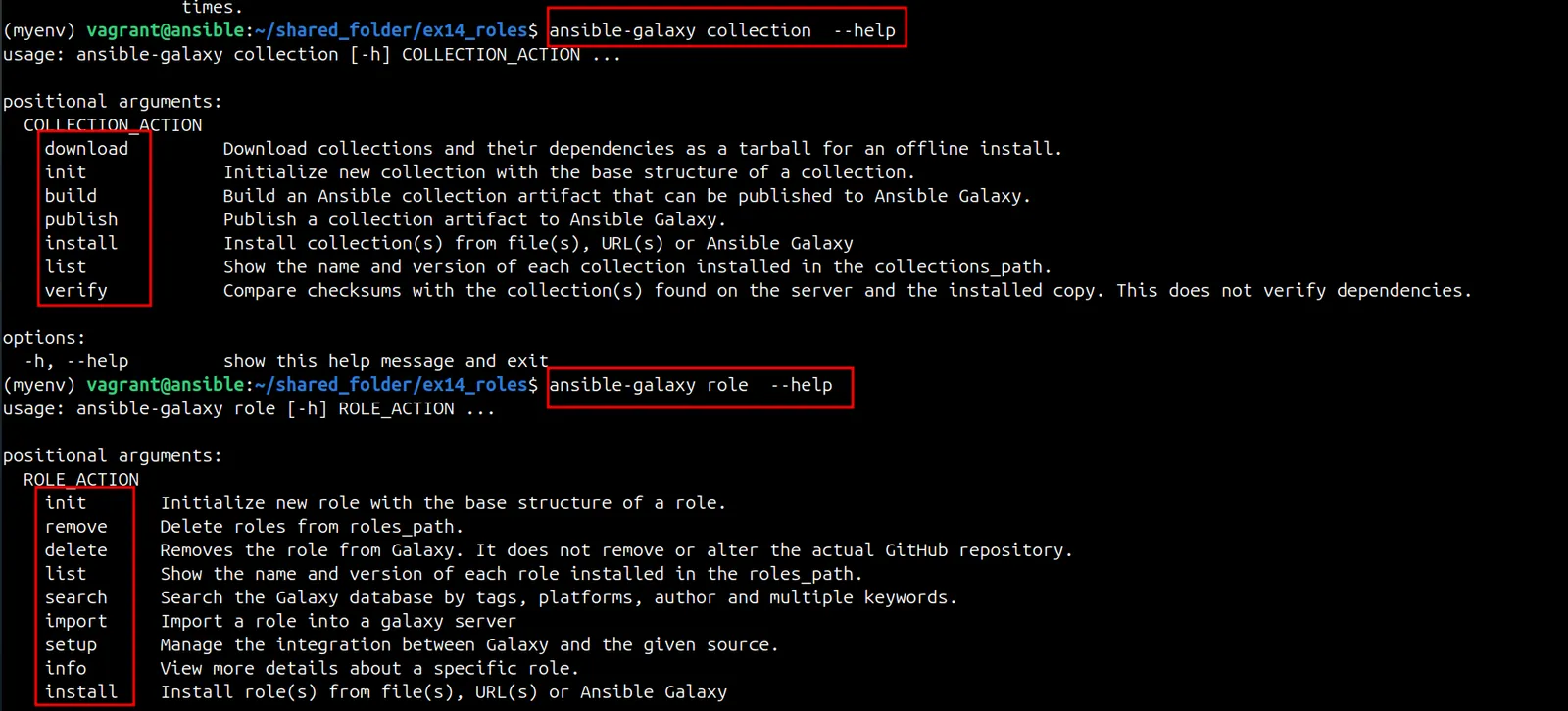
Ansible Galaxy is the public hub for roles and collections written by the community. You can download one instead of writing your own. The ansible-galaxy command manages both:
Create a custom role
$ ansible-galaxy role init demo_role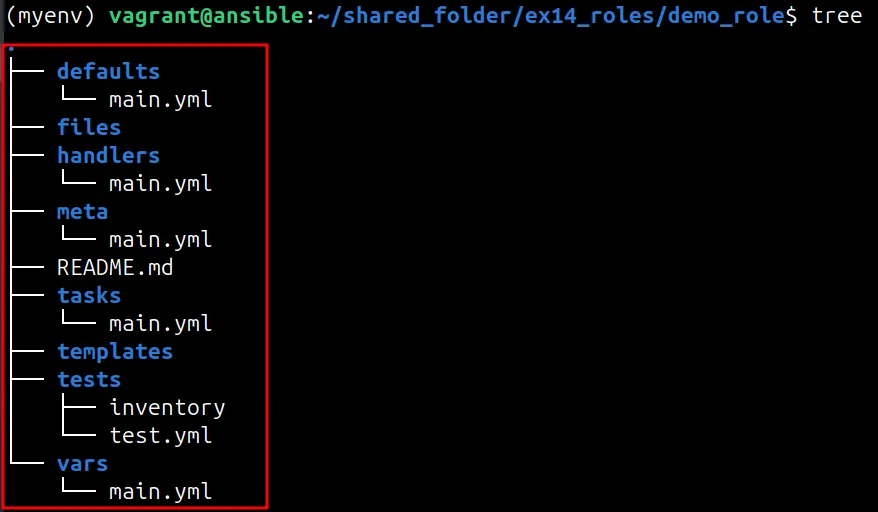
init creates only the skeleton. Move the work from the earlier playbooks into it:
- Split the tasks into separate files (
banner.yaml,chrony.yaml,setupdb.yaml,useradd.yaml) intasks/. - Make
tasks/main.ymlcall those files. - Move the chrony templates to
templates/,index.htmltofiles/, variables tovars/main.yml(ordefaults/main.yml), and the restart handler tohandlers/main.yml.
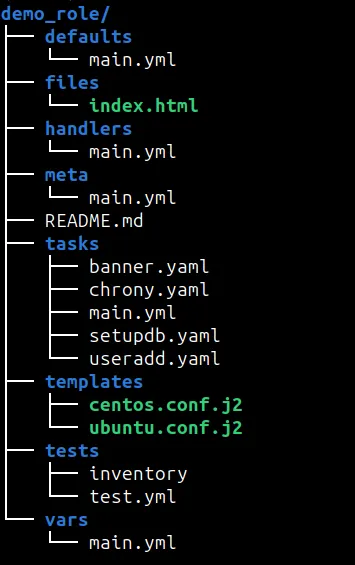
tasks/main.yml only pulls in the other task files, for example:
---
- name: Configure chrony
  ansible.builtin.import_tasks: chrony.yaml

- name: Add SSH banner
  ansible.builtin.import_tasks: banner.yaml

- name: Set up the database
  ansible.builtin.import_tasks: setupdb.yaml

- name: Add users
ansible.builtin.import_tasks: useradd.yamlThe playbook itself shrinks to the hosts and the role name:
---
- name: Provision servers with demo_role
  hosts: all
  become: true
  roles:
- demo_roleThe practice files for this series are in the Ansible_Practices repository.
ansible-galaxy role commands
| Command | What it does |
|---|---|
ansible-galaxy role init <name> | creates a new role skeleton |
ansible-galaxy role install <name> | downloads a role from Galaxy |
ansible-galaxy role list | lists installed roles |
ansible-galaxy role info <name> | shows details about a role |
ansible-galaxy role remove <name> | deletes an installed role from your machine |
ansible-galaxy role delete <name> | removes a role you published from the Galaxy server (not from your machine) |
Ansible Vault: encrypt secrets
Passwords, keys and tokens should not sit in plain text in a Git repository. Ansible Vault encrypts whole files (or single strings) with a password, using AES-256. Ansible decrypts them in memory at run time when you give it the vault password. You can encrypt inventories, group_vars and host_vars files, role variables, and even task files.
In this lab, the inventory holds the VM passwords, so encrypt it:
$ ansible-vault encrypt inventory
New Vault password:
Confirm New Vault password:
Encryption successful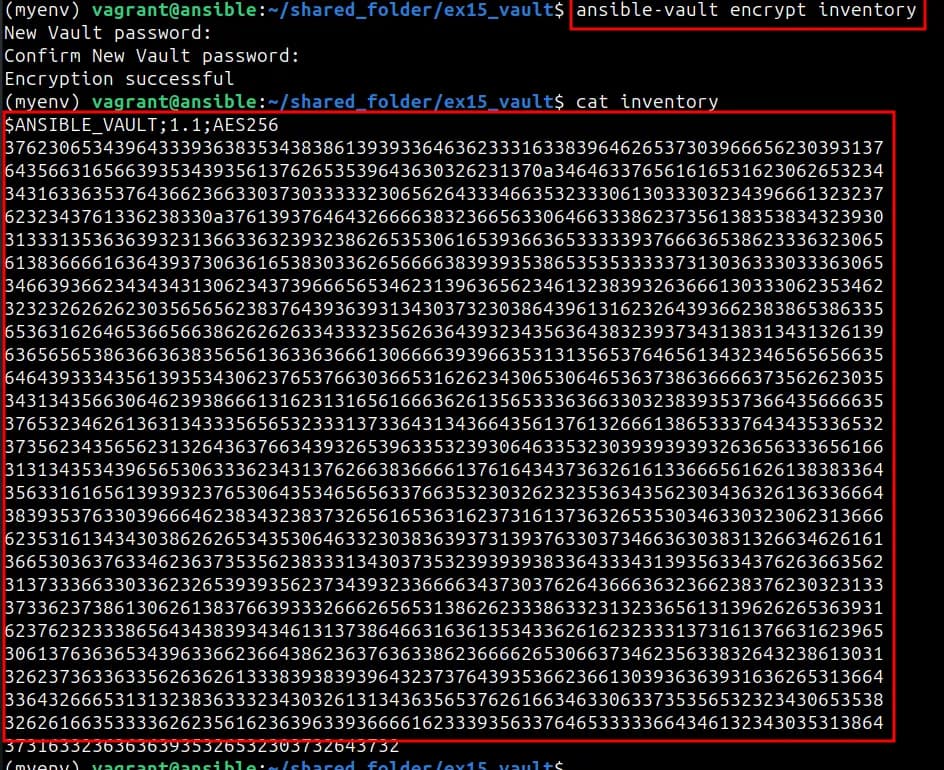
To run a playbook that uses encrypted files, either type the password when asked or read it from a file:
$ ansible-playbook playbook.yaml --ask-vault-pass
$ ansible-playbook --vault-password-file=/home/vagrant/mypass playbook.yaml
| Command | What it does |
|---|---|
ansible-vault create <file> | creates a new encrypted file and opens it in an editor |
ansible-vault encrypt <file> | encrypts an existing file |
ansible-vault decrypt <file> | decrypts a file back to plain text |
ansible-vault view <file> | shows the content without decrypting the file on disk |
ansible-vault edit <file> | opens the encrypted file in an editor |
ansible-vault rekey <file> | changes the vault password |
ansible-vault encrypt_string | encrypts one value to paste into a YAML file |
The official Ansible Vault guide covers multiple vault IDs and other options.
Beyond the command line: AWX and Automation Platform
Ansible Tower was Red Hat's web UI and API for running Ansible with access control, scheduling and logs. It is now part of the paid Red Hat Ansible Automation Platform. Its free, open-source upstream project is AWX. AWX releases are currently paused while the project is being refactored.
Common mistakes
ansible.cfgignored in a Vagrant shared folder: the folder is world-writable. Pass-i inventoryor setANSIBLE_CONFIG.- SSH key "bad permissions" in a shared folder: move the key to a normal directory and
chmod 600it. - Service restarted on every run: use
notifywith a handler instead of a plain restart task. ansible-galaxy role deletedid not remove the local role:deleteacts on the Galaxy server; useremovefor local roles.- Unquoted file
mode: writemode: "0644", notmode: 0644.
Key takeaways
templaterenders a Jinja2 file and copies it;lineinfilechanges a single line;filemanages permissions, ownership and links.- Handlers run only when a notifying task reports
changed, and only once at the end of the play. - Roles give tasks, handlers, templates, files and variables a fixed place, so playbooks stay short and reusable.
- Ansible Vault encrypts secrets with AES-256; keep the vault password file out of Git.
- Tower is now part of Red Hat Ansible Automation Platform; AWX is its open-source upstream.
This is the last part of the Ansible series. Start from the beginning with Getting Started with Ansible.
Keep reading
- Getting Started with Ansible: Install, Inventory and Ad-hoc Commands
Install Ansible in a Python virtual environment, connect Vagrant VMs with passwords and SSH keys, write a first inventory and manage packages with ad-hoc commands.
- Ansible Playbooks: Apache, MariaDB, Variables, Conditionals and Loops
Write Ansible playbooks that install Apache and MariaDB, create a database and user, and use variables, facts, when conditions and loops across Ubuntu and CentOS VMs.
- Terraform on AWS: EC2, State, Backends, Workspaces and Modules
A hands-on Terraform walkthrough on AWS: launch EC2, read the state file, handle drift, use map variables, provisioners, outputs, an S3 backend, workspaces and modules.