Kubernetes Architecture: Control Plane, Nodes and Add-ons
How a Kubernetes cluster is built: what the control plane and node components do, which add-ons matter, and when to use kubectl, kind, minikube or kubeadm.

ON THIS PAGE
Most Kubernetes errors, such as a pod stuck in Pending, a node in NotReady or a Service with no endpoints, trace back to one specific cluster component. This guide maps the control plane, the node components and the add-ons, explains where each one runs, and compares the tools used to start a cluster.
What Kubernetes is
Kubernetes (often written K8s) is an open source container orchestration platform. It does the same job as Docker Swarm, but at a much larger scale: it decides where containers run, keeps them running, and connects them to each other. Google open-sourced it in 2014, and the Cloud Native Computing Foundation (CNCF) now hosts it. The name is Greek for helmsman or pilot.
Kubernetes is declarative. You write down the state you want (for example "three copies of this nginx container") and Kubernetes keeps working until the real state matches it. This is the same idea as an Ansible playbook: you describe the result, not the steps.
The features that matter most to an operator:
- Self-healing: failed containers are restarted or replaced, and unhealthy ones stop getting traffic.
- Scaling: change the number of copies with one command, or let an autoscaler do it based on CPU.
- Rollouts and rollbacks: update an image gradually and undo it if the new version is broken.
- Service discovery and load balancing: a stable DNS name and IP in front of a changing set of containers.
- Bin packing: you declare how much CPU and memory a container needs, and the scheduler fits it onto a node.
- Config and secrets: keep configuration and passwords outside the container image.
Kubernetes is not a full Platform as a Service. Logging, monitoring and CI/CD are not built in. You plug in the tools you want.
Cluster architecture
A cluster has two kinds of machines:
- The control plane makes decisions for the whole cluster. It stores the desired state and works to reach it.
- Worker nodes run your application containers, grouped into pods (a pod is the smallest unit Kubernetes runs, usually one container).
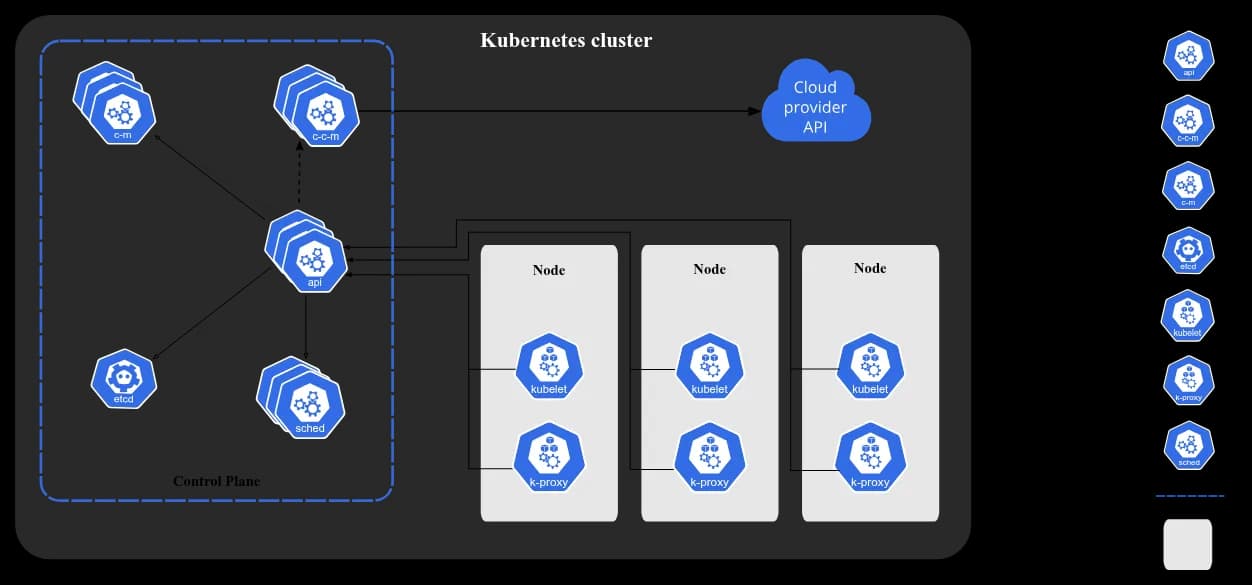
Every component talks to the API server. Nothing else talks to etcd directly, and nodes never talk to each other's kubelet. This matters during debugging: if the API server is down, nothing in the cluster can change.
Control plane components
| Component | What it does | What breaks without it |
|---|---|---|
kube-apiserver | The front door of the cluster. kubectl, the kubelets and the controllers all read and write state through it. It scales horizontally: you can run several copies behind a load balancer. | Nothing can be created, changed or read. |
etcd | A consistent, highly available key-value store. It holds all cluster data. | The cluster loses its memory. Back it up. |
kube-scheduler | Watches for new pods with no node assigned and picks a node for each one, based on resources, affinity rules and taints. | New pods stay in Pending. |
kube-controller-manager | Runs the control loops that move the real state toward the desired state. | Dead pods are not replaced and Deployments stop rolling out. |
cloud-controller-manager | Optional. Links the cluster to a cloud provider's API. | No cloud load balancers, routes or node cleanup on AWS, Azure or GCP. |
The controller manager is one binary, but it contains many controllers. A few examples:
- Node controller: notices when a node stops responding.
- Job controller: creates pods for one-off Job objects and runs them to completion.
- EndpointSlice controller: links Services to the pods behind them.
- ServiceAccount controller: creates a default ServiceAccount in every new namespace.
The cloud controller manager has its own cloud-aware versions: a node controller that checks whether a stopped node was deleted in the cloud, a route controller, and a service controller that creates cloud load balancers for LoadBalancer Services.
Node components
These run on every node, including control plane nodes in small clusters.
| Component | What it does |
|---|---|
kubelet | The agent on each node. It receives pod specs from the API server and makes sure those containers are running and healthy. It ignores containers that Kubernetes did not create. |
kube-proxy | Maintains network rules (iptables or IPVS) so traffic sent to a Service reaches the right pods. It is optional: some network plugins, such as Cilium, replace it. |
| Container runtime | Pulls images and starts and stops containers. Kubernetes talks to it through the Container Runtime Interface (CRI). Common runtimes are containerd and CRI-O. |
Add-ons
Add-ons are normal Kubernetes workloads (Deployments, DaemonSets) that add cluster features. They live in the kube-system namespace.
| Add-on | Why you want it |
|---|---|
| Cluster DNS (CoreDNS) | Gives every Service a DNS name. Not strictly required, but nearly every production setup depends on it. |
| Network plugin (CNI) | Implements the Container Network Interface. It gives each pod an IP address and lets pods talk across nodes. Examples: Flannel, Calico, Amazon VPC CNI. Nodes stay NotReady until one is installed. |
| Web UI (Dashboard) | A browser UI for the cluster. |
| Resource monitoring | Collects CPU and memory metrics. metrics-server powers kubectl top and the Horizontal Pod Autoscaler. |
| Cluster-level logging | Ships container logs to a central store you can search. |
Cluster tools
| Tool | What it is | Typical use |
|---|---|---|
| kubectl | The command-line client. It sends requests to the API server. It does not create clusters. | Every day, on every cluster. See the kubectl cheat sheet. |
| kind | Runs a cluster inside Docker or Podman containers. | Fast throwaway clusters and CI tests. |
| minikube | Runs a local single-node or multi-node cluster on a laptop, using a VM or container driver. | Learning. Used in the next part. |
| kubeadm | Bootstraps a real cluster on machines you own: VMs, bare metal or EC2. | Learning how a cluster is put together. See kubeadm and EKS. |
Common manifest files
Kubernetes objects are usually written as YAML files. The most common ones are:
| File (by convention) | Object | Purpose |
|---|---|---|
pod.yaml | Pod | One or more containers that share network and storage. |
deployment.yaml | Deployment | Runs a set of identical pods and handles scaling and rolling updates. |
service.yaml | Service | A stable name and IP in front of a group of pods. |
configmap.yaml | ConfigMap | Non-secret configuration kept outside the image. |
secret.yaml | Secret | Passwords, tokens and keys. Base64-encoded, not encrypted by default. |
ingress.yaml | Ingress | HTTP and HTTPS routing from outside the cluster to Services. |
pvc.yaml | PersistentVolumeClaim | A request for storage that survives pod restarts. |
hpa.yaml | HorizontalPodAutoscaler | Scales the number of pods up or down from metrics. |
role.yaml | Role | Permissions for actions inside one namespace. |
rolebinding.yaml | RoleBinding | Gives a Role to a user or ServiceAccount. |
Key takeaways
- The control plane decides and the worker nodes run. Everything goes through the API server, and etcd stores the state.
- The scheduler only picks a node. The kubelet on that node starts the containers.
- A cluster is not usable until a CNI network plugin is installed. CoreDNS is effectively required as well.
- Use containerd or CRI-O as the runtime. Docker Engine needs
cri-dockerdsince Kubernetes 1.24. - Use minikube or kind to learn, kubeadm to understand a real cluster, and a managed service such as Amazon EKS for production.
Next in this series: Kubernetes with minikube.
Keep reading
- Kubernetes with minikube: Pods, Deployments and Services
Set up a local Kubernetes cluster with minikube, then create pods, ReplicaSets and Deployments from YAML, roll updates forward and back, and expose nginx with Services.
- kubectl Cheat Sheet by Category
The most-used kubectl commands, grouped by task: cluster info, namespaces, pods, Deployments, Services, ConfigMaps, Secrets, storage, contexts and debugging.
- Kubernetes Cluster Setup with kubeadm and Amazon EKS
Build a three-node Kubernetes cluster with kubeadm on EC2 or VirtualBox, resolve common CNI and certificate errors, then create an Amazon EKS cluster and deploy a multi-tier app.