Amazon S3
Amazon Simple Storage Service (Amazon S3) is an object storage service that offers industry-leading scalability, data availability, security, and performance. Customers of all sizes and industries…

ON THIS PAGE
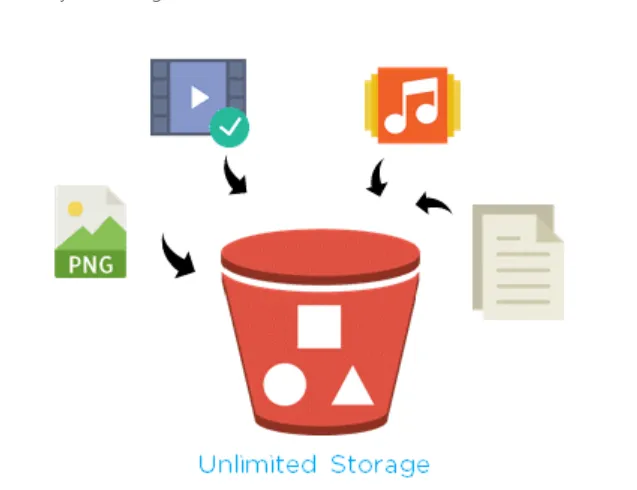
Amazon Simple Storage Service (Amazon S3) is an object storage service that offers industry-leading scalability, data availability, security, and performance. Customers of all sizes and industries can use Amazon S3 to store and protect any amount of data for a range of use cases, such as data lakes, websites, mobile applications, backup and restore, archive, enterprise applications, IoT devices, and big data analytics.Amazon S3 provides management features so that you can optimize, organize, and configure access to your data to meet your specific business, organizational, and compliance requirements.
- Kunai pani size ko data store garna sakinxa
- Infinite size of data can be
- Building block of AWS
- Important service of AWS
- If we want to store the data of EC2 also then we can also use the S3 service.
The data stored in bucket we can access the data store in the bucket from other services. For this we need to define roles. ie; We need to classify permission.
Purposes
- Application hosting
- Big data analytics purpose
- Cheaper that EC2
- Disaster recovery
- Software delivery; Can store the files in s3 bucket and the customers can download from there
Terminologies
Bucket
You can compare this with normal house hold bucket.
Amazon S3 supports four types of buckets—general purpose buckets, directory buckets, table buckets, and vector buckets. Each type of bucket provides a unique set of features for different use cases.
- General purpose buckets
- For general purpose. Used for all kinds of purposes.
- Directory buckets
- Recommended for low-latency use cases and data-residency use cases. By default, you can create up to 100 directory buckets in your AWS account, with no limit on the number of objects that you can store in a directory bucket.
- If we need fast transimmsions then we use this
- Latency
- The delay between a user action and the corresponding response from a system or network
- Table buckets – Recommended for storing tabular data, such as daily purchase transactions, streaming sensor data, or ad impressions. Tabular data represents data in columns and rows, like in a database table. Table buckets provide S3 storage that’s optimized for analytics and machine learning workloads, with features designed to continuously improve query performance and reduce storage costs for tables.
- Used for sensitive data
- Vector buckets – S3 vector buckets are a type of Amazon S3 bucket that are purpose-built to store and query vectors. Vector buckets use dedicated API operations to write and query vector data efficiently.
Objects
Objects are the fundamental entities stored in Amazon S3. Objects consist of object data and metadata. The metadata is a set of name-value pairs that describe the object. files, document, videos photos, etc.
Every object is contained in a bucket. For example, if the object named photos/puppy.jpg is stored in the amzn-s3-demo-bucket general purpose bucket in the US West (Oregon) Region, then it is addressable by using the URL https://amzn-s3-demo-bucket.s3.us-west-2.amazonaws.com/photos/puppy.jpg. For more information, see Accessing a Bucket.
Keys
An object key (or key name) is the unique identifier for an object within a bucket. Every object in a bucket has exactly one key. The combination of a bucket, object key, and optionally, version ID (if S3 Versioning is enabled for the bucket) uniquely identify each object. So you can think of Amazon S3 as a basic data map between “bucket + key + version” and the object itself.
For example, in the URL https://`amzn-s3-demo-bucket`.s3.us-west-2.amazonaws.com/photos/puppy.jpg, `amzn-s3-demo-bucket` is the name of the bucket and photos/puppy.jpg is the key.
S3 versioning
You can use S3 Versioning to keep multiple variants of an object in the same bucket. With S3 Versioning, you can preserve, retrieve, and restore every version of every object stored in your buckets. You can easily recover from both unintended user actions and application failures.
version Id
When you enable S3 Versioning in a bucket, Amazon S3 generates a unique version ID for each object added to the bucket. Objects that already existed in the bucket at the time that you enable versioning have a version ID of null. If you modify these (or any other) objects with other operations, such as CopyObject and PutObject, the new objects get a unique version ID.
Bucket policy
A bucket policy is a resource-based AWS Identity and Access Management (IAM) policy that you can use to grant access permissions to your bucket and the objects in it. Only the bucket owner can associate a policy with a bucket. The permissions attached to the bucket apply to all of the objects in the bucket that are owned by the bucket owner. Bucket policies are limited to 20 KB in size.
S3 access points
Amazon S3 access points are named network endpoints with dedicated access policies that describe how data can be accessed using that endpoint. Access points are attached to an underlying data source, such as a general purpose bucket, directory bucket, or a FSx for OpenZFS volume, that you can use to perform S3 object operations, such as GetObject and PutObject. Access points simplify managing data access at scale for shared datasets in Amazon S3.
Access control lists (ACLs)
You can use ACLs to grant read and write permissions to authorized users for individual general purpose buckets and objects. Each general purpose bucket and object has an ACL attached to it as a subresource. The ACL defines which AWS accounts or groups are granted access and the type of access. ACLs are an access control mechanism that predates IAM. For more information about ACLs, see Access control list (ACL) overview.
To create bucket in aws
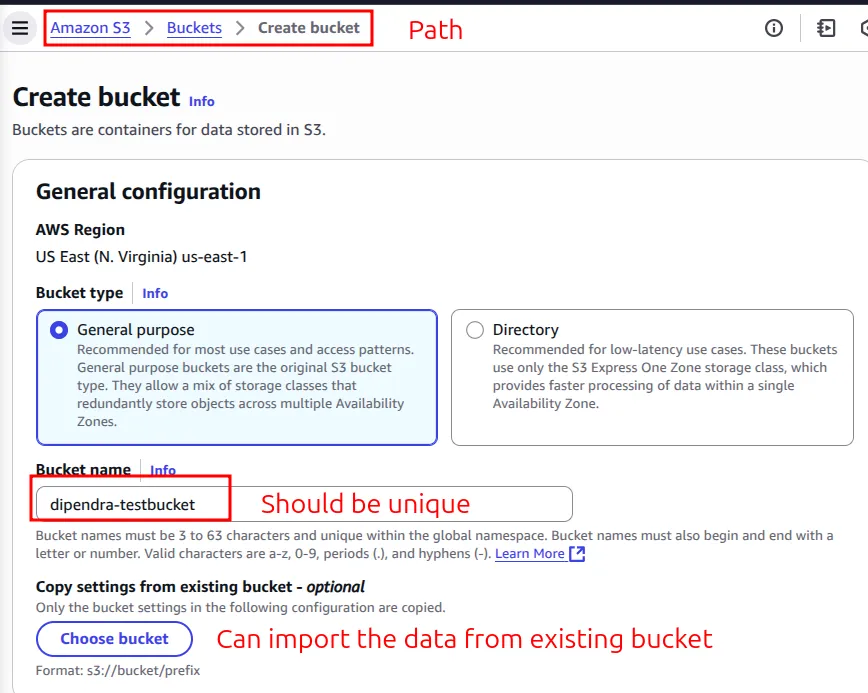
- Bucket name should be unique while creating the bucket name.
- dipendra-testbucket
- Copy settings from existing bucket – optional
- Can Copy settings from existing bucket – optional
- Object Ownership
- Permission related to the objects in S3.
- ACLs allows us to configure permission in granular level.
- ACLs disabled (recommended) //Using this
- Block Public Access settings for this bucket
- By default it will block public access
- We need to add services based on our preferences.
- By default all outgoing traffic is blocked.
- Bucket Versioning
- Versioning is a means of keeping multiple variants of an object in the same bucket.
- By default it is also disabled
- Keeping the different version of the same object
- For example: we have place a pdf and we make changes to the pdf
- then
- Default encryption
- Server-side encryption is automatically applied to new objects stored in this bucket.
- Server-side encryption with Amazon S3 managed keys (SSE-S3) //By default this is used
- Server-side encryption with AWS Key Management Service keys (SSE-KMS)
- Dual-layer server-side encryption with AWS Key Management Service keys (DSSE-KMS)
- BUCKET KEYS
- We can configure keys for bucket
- Server-side encryption is automatically applied to new objects stored in this bucket.
- Advanced settings
- Object Lock
- Store objects using a write-once-read-many (WORM) model to help you prevent objects from being deleted or overwritten for a fixed amount of time or indefinitely. Object Lock works only in versioned buckets.
- Write only one time and access multiple times.
- Kasai le modify na garos vanne kura ko lagi this will be enabled.
- Object Lock works only in versioned buckets. Enabling Object Lock automatically enables Versioning.
- Object Lock
- Now click on create bucket.
- Now let’s upload some files.
- To upload files/folder click on upload and select whay you want to upload.
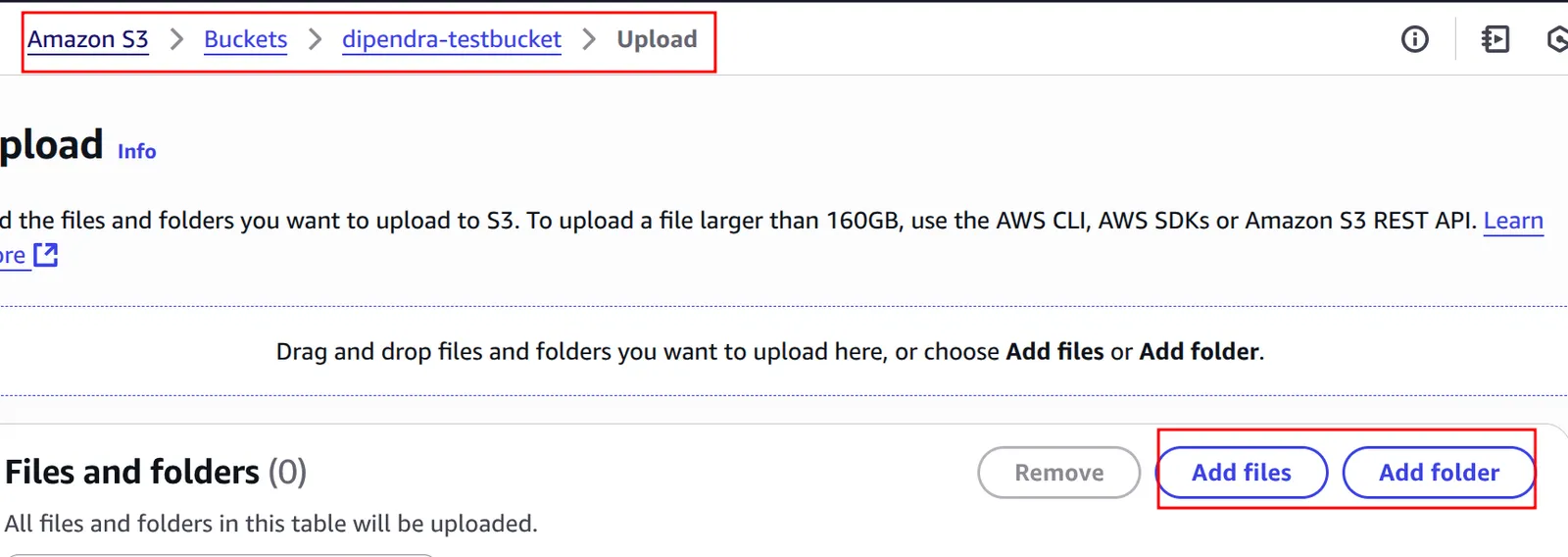
- For now i am uploading folder.
- After files and folders are uploaded the return code is 200. //very important
- If we are uploading large files then we can use S3 accelerator. In the case of the amazon of s3 if we upload large size files then what will be the cost.
- For example: There is no cost while uploading any size of the files but when you access those data from outside then it will cost money.
- Here are the files of in the bucket.
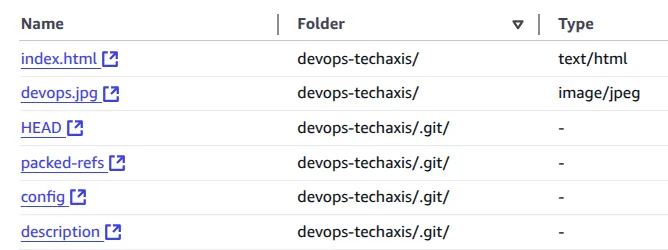
- We can perform all these actions with the objects the bucket
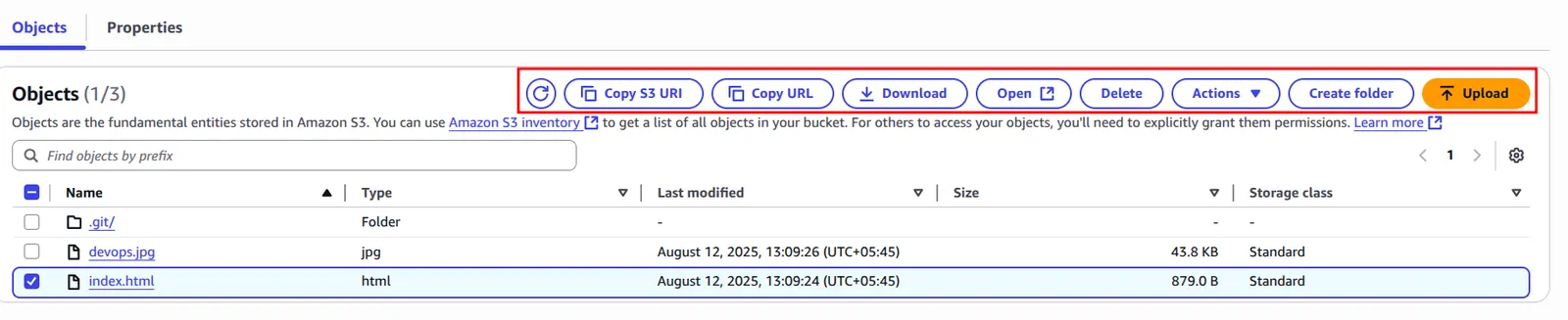
- Now if we click on any object we will see the url of the object
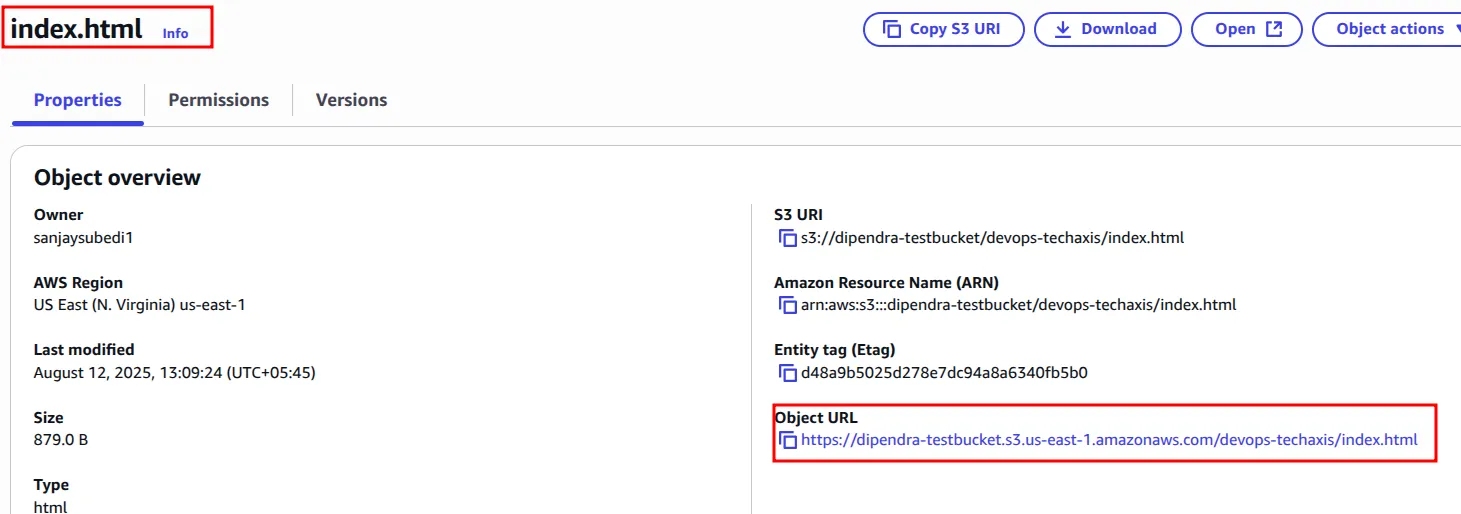
- But if we click on this URL we will see a message like this.
<Error>
<Code>AccessDenied</Code>
<Message>Access Denied</Message>
<RequestId>RGJNJJMFSEA2PRY5</RequestId>
<HostId>nkK5Fq27Ko8JUP71n2d1ebsE/gQhE25DNl4gyzCMxQciIIboUBB4+jWhqxGjUprg4+f94Bkc0J0zEbKSvXMxV/MGTmMBReuP</HostId>
</Error>- Because by default public access of the bucket is blocked.
Hosting an static website
- For this you need to go to your bbucket and then permission. Here at the end you will see the option of static website hosting.
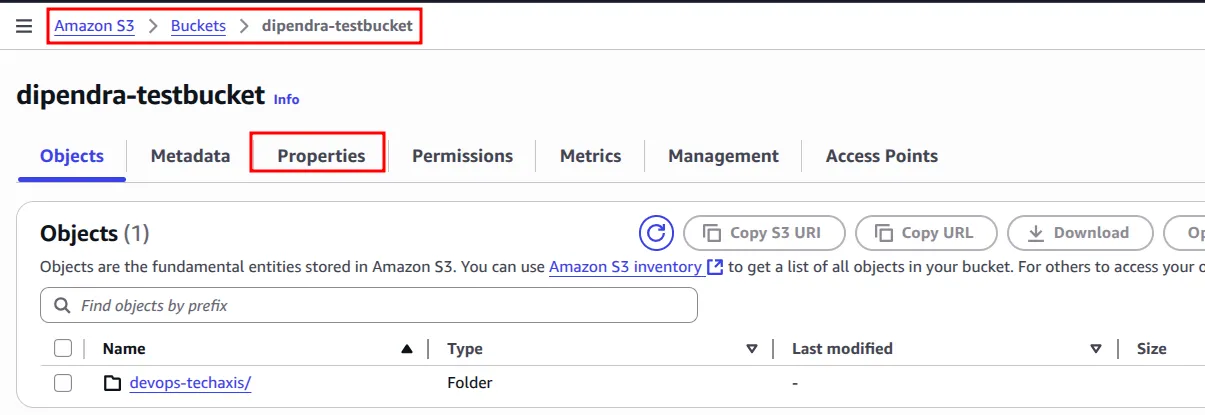

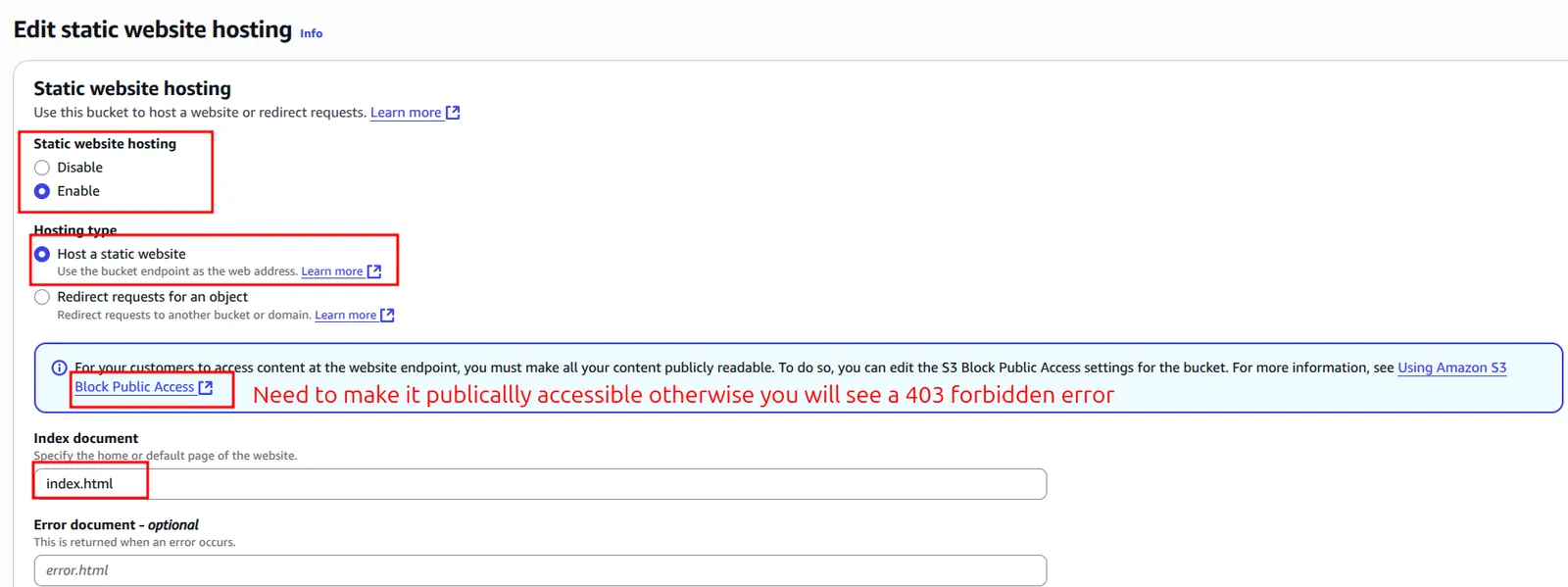
- After doing this configuration save these settings now you will see the url for the static website.
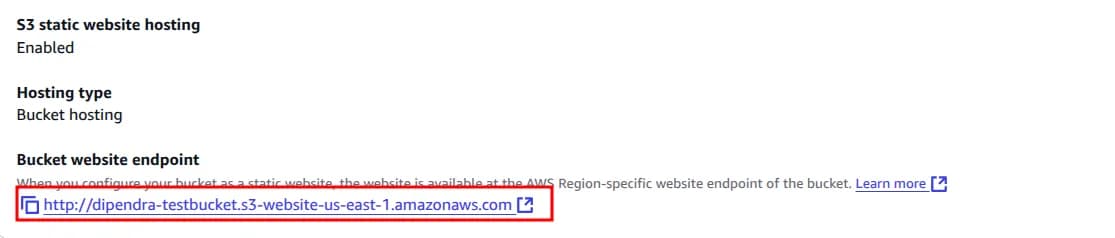
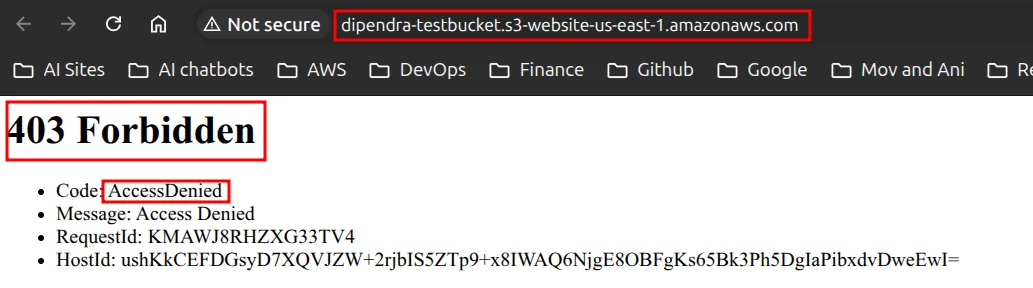
- Now we need to make it publically accessible otherwise when we try to browse the link we will see the error.
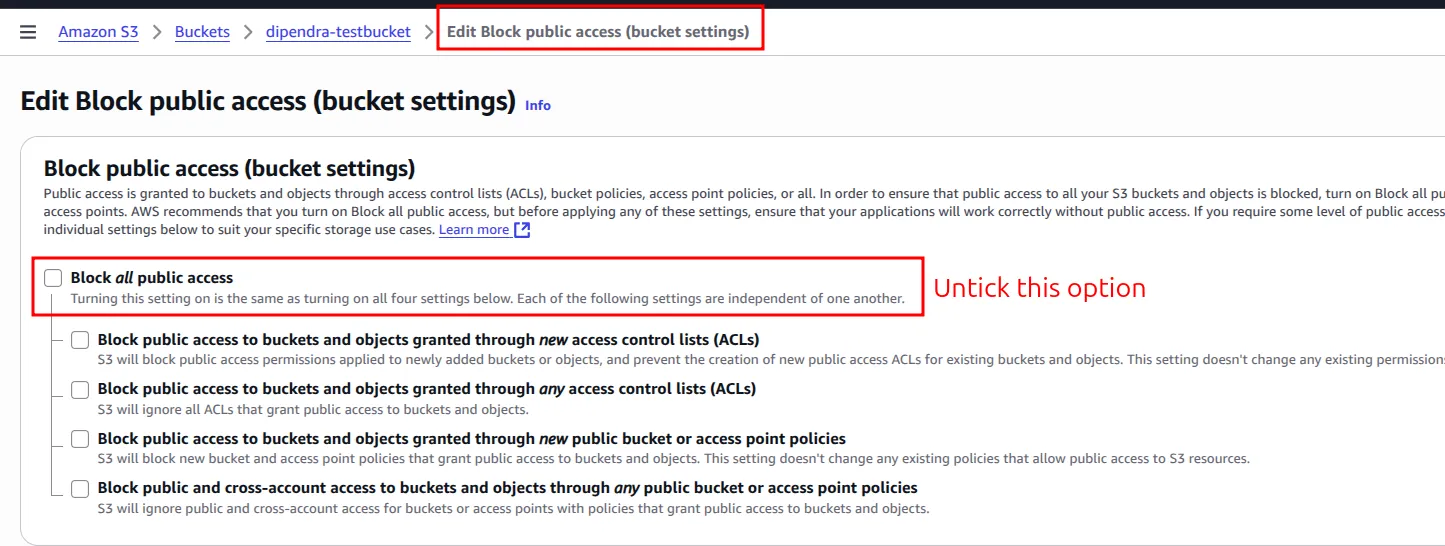
- Now to resolve this we need to remove block public access from the permission
- After that still we can’t access the website. So now we need to configure bucket policy.
To read about this in detail click this link
- We can configure this in permission section of the bucket.
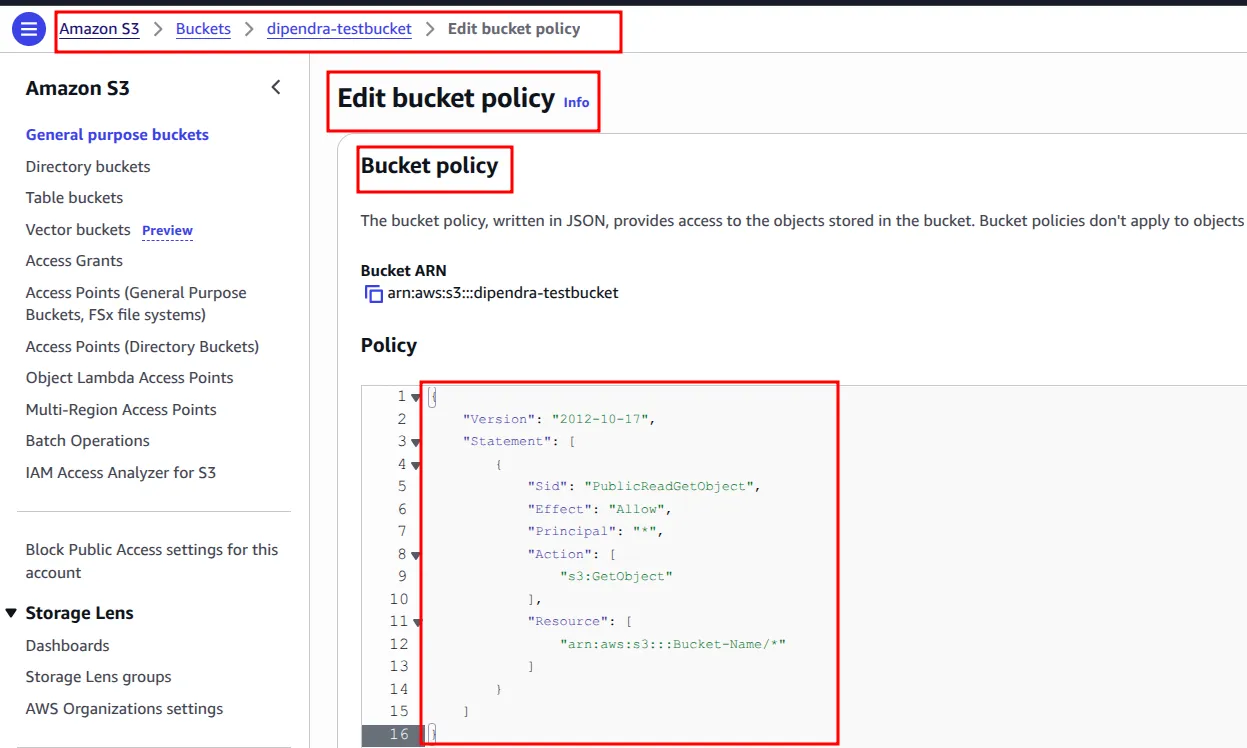
{
    "Version": "2012-10-17",
    "Statement": [
        {
            "Sid": "PublicReadGetObject",
            "Effect": "Allow",
            "Principal": "*",
            "Action": [
                "s3:GetObject"
            ],
            "Resource": [
                "arn:aws:s3:::dipendra-testbucket/*"
            ]
        }
    ]
}- Now save this policy.
http://dipendra-testbucket.s3-website-us-east-1.amazonaws.com/devops-techaxis/index.html
- Now if you browse this file you can see the website is live.
Other options in permission section
- Object Ownership
- Can transfer object ownership
- Access control list (ACL)
- Allows us to configure permissions in granular level ie; read/write permissions.
- Cross-origin resource sharing (CORS)
- Multiple regions ma resource share garna sakinxa
Metrics
- Can see the size of the objects form here
- Storage Class Analysis
- d
- Replication metrics
- We can create replicas of the bucket in different regions or in same regions
Management
- Lifecycler rule
- Kun bela ma euta storage class bata arko ma lagne
- Kun bela archieve garne
- kun bela ma data delete garne
- We can configure this from here
- replication rule
- Arko region ma storage class configure gardai xam vanesi kun bela ma garne kun bela ma na garne
Access points
- Access points are named network endpoints that are attached to buckets which simplify managing data access at scale in S3. To see if any of the access points attached to this bucket grant public or cross-account access, go to IAM Access Analyzer for S3.
- If we want to scale the data in large volume then we can manage from here.
Now how to configure/write error document
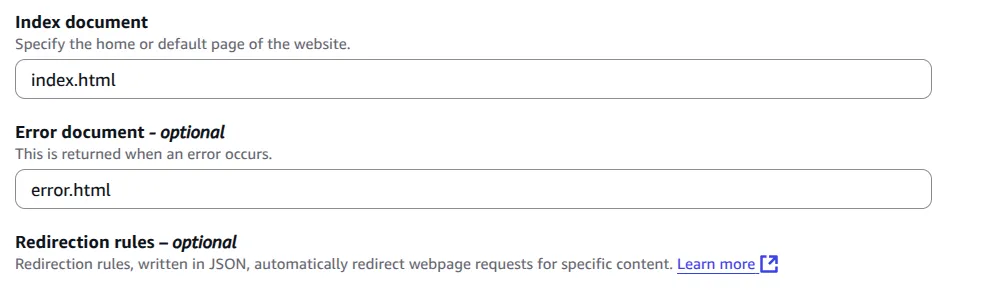
- simply write the error.html file name here.

- Now you can see the error message here that you have configured.
Storage classes in S3
S3 Standard offers high durability, availability, and performance object storage for frequently accessed data. Because it delivers low latency and high throughput, S3 Standard is appropriate for a wide variety of use cases, including cloud applications, dynamic websites, content distribution, mobile and gaming applications, and big data analytics.
Key features:
- General purpose storage for frequently accessed data
- Low latency and high throughput performance
- Designed to deliver 99.99% availability with an availability SLA of 99.9%
The S3 storage classes include S3 Intelligent-Tiering for automatic cost savings for data with unknown or changing access patterns, S3 Standard for frequently accessed data, S3 Express One Zone for your most frequently accessed data, S3 Standard-Infrequent Access (S3 Standard-IA) and S3 One Zone-Infrequent Access (S3 One Zone-IA) for less frequently accessed data, S3 Glacier Instant Retrieval for archive data that needs immediate access, S3 Glacier Flexible Retrieval (formerly S3 Glacier) for rarely accessed long-term data that does not require immediate access, and Amazon S3 Glacier Deep Archive (S3 Glacier Deep Archive) for long-term archive and digital preservation with retrieval in hours at the lowest cost storage in the cloud.
Amazon S3 provides the most durable storage in the cloud. Based on its unique architecture, S3 is designed to exceed 99.999999999% (11 nines) data durability. Additionally, S3 stores data redundantly across a minimum of 3 Availability Zones by default, providing built-in resilience against widespread disaster. Customers can store data in a single AZ to minimize storage cost or latency, in multiple AZs for resilience against the permanent loss of an entire data center, or in multiple AWS Regions to meet geographic resilience requirements. If you have data residency requirements that can’t be met by an existing AWS Region, you can use S3 storage classes for AWS Dedicated Local Zones or S3 on Outposts racks to store your data in a specific data perimeter.
NOTE: Very very important for certification exams.
Questions
- Very important for certification and daily life work
Why we cannot run OS in S3? //very important
We cannot run an operating system (OS) directly in Amazon S3 because S3 is an object storage service, not a compute or execution environment. S3 is designed for storing and retrieving data as objects, not for running code or system processes that an OS requires. Unlike an OS, which needs direct access to hardware resources like CPU, memory, and persistent block storage (for system files and execution), S3 only provides scalable cloud storage accessible over the network.
Reasons:
- Nature of S3: It acts as a scalable, distributed storage service optimized to store objects (files, images, videos, backups) with high durability and availability but without the capability to execute programs or manage hardware resources.
- No compute environment: Running an OS requires a processor and memory to execute instructions. S3 provides no compute resources or the ability to boot or run software.
- No block-level storage: Operating systems require block storage to read/write system files and perform input/output operations. S3 is object storage, which uses a different data model and access method that is not suitable for OS-level operations or file system mounts.
- Usage model: OSes run on physical or virtual machines (such as EC2 in AWS) that attach to block storage (EBS) or local disks. S3 is typically used for storing static data, backups, and media, not for system boot or execution.
In short, S3 is designed for storage and data access, not for running or booting an OS, which requires a computing environment and block-level storage support.
We can run static sites in S3 or not. If yes why?
Amazon S3 can host static sites because:
- Static File Storage: S3 is built to store and serve static files like HTML, CSS, JavaScript, and images, which are the core components of a static site. No server-side processing is needed, so S3’s object storage works perfectly.
- Built-in Web Hosting Feature: S3 has a specific “Static Website Hosting” option that lets you designate an index file (e.g., index.html) and an error file, enabling it to serve web pages directly over HTTP.
- Public Access Capability: S3 allows you to set bucket policies to make files publicly accessible, which is necessary for a website to be viewable by users.
- Scalable and Reliable: S3 handles traffic spikes automatically and provides 99.99% availability and 99.999999999% durability, ensuring your site stays online and accessible.
- No Server Management: As a managed service, S3 eliminates the need to run or maintain web servers, making it simple to host static content.
Keep reading
- AWS Global Infrastructure cert
AWS Global Infrastructure Overview The AWS Global Infrastructure is designed and built to deliver a flexible, reliable, scalable, and secure cloud computing environment with high-quality global…
- Cloud Computing Economics
Fundamentals of pricing AWS Pricing Model Three fundamental drivers of cost with AWS There are three fundamental drivers of cost with AWS: compute, storage, and outbound data transfer. These…
- VPC
VPC We can isolate resources from other resources and also isolate it from other resources.Amazon Virtual Private Cloud (VPC) is an Amazon Web Services (AWS) service that allows you to launch AWS…