KUbernetes
Introduction kubernetes is similar to docker swarm. Kubernetes is also a container orchestration tool. We can run kubernetes in every environment example laptop, dev, production, cloud. So if there…

ON THIS PAGE
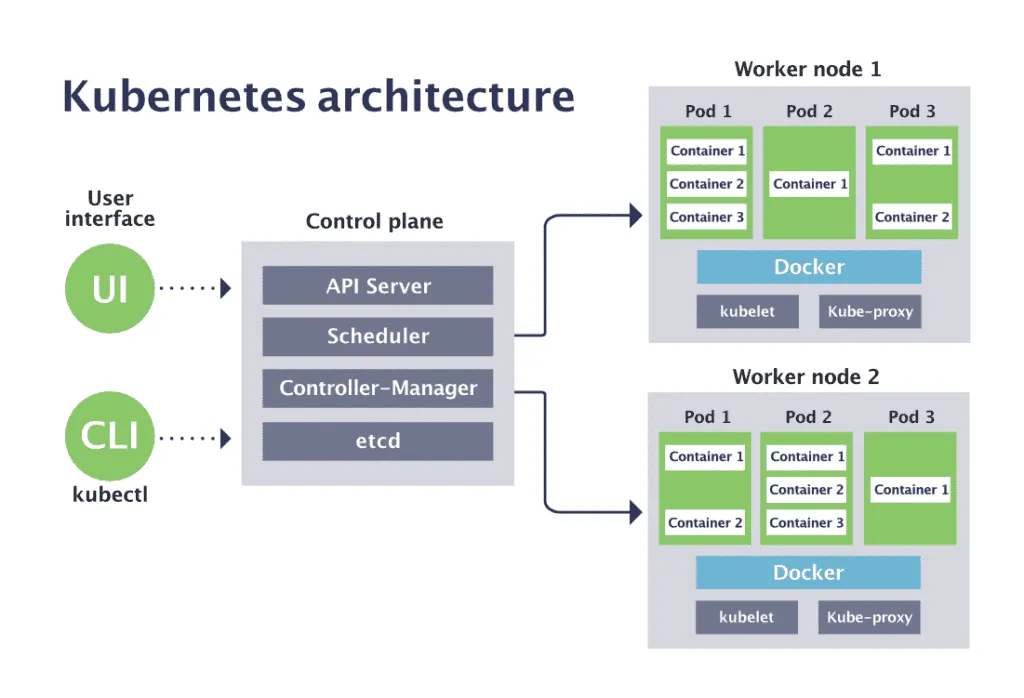
Introduction
kubernetes is similar to docker swarm. Kubernetes is also a container orchestration tool. We can run kubernetes in every environment example laptop, dev, production, cloud. So if there is very complex architecture. If we have to manage millions of container running in millions of the host then we use kubernetes. Kubernetes is one of top rank project.
Kubernetes is an open source container orchestration engine for automating deployment, scaling, and management of containerized applications. The open source project is hosted by the Cloud Native Computing Foundation (CNCF).
Kubernetes is a portable, extensible, open source platform for managing containerized workloads and services, that facilitates both declarative configuration and automation. We also wrote the declarative configuration in ansible. ie;
The name kubernetes originates from Greek, meaning helmsman or pilot. Can also called as k8. Google open-sourced the kubernetes in 2014. Today we can see giant applications are running with the help of Kubernetes.
Why Kubernetes
We need to ensure that there is no downtime in production environment. For example: If a container goes down then the another container needs to start. Wouldn’t it be easier if this behavior was handled by a system ?
Kubernetes provides a framework to run distributed system resiliently. It takes care of scaling and fall over for your application, provides deployment patterns and more. Some of the other benefits of Kubernetes are:
- Service discovery and load balancing: It can expose a container using the DNS name or using their own IP address that will help us to identify a container and if the traffic is very high it will distribute the traffic among containers.
- Storage orchestration: Allows to automatically mount a storage system of your choice, such as local storages, public cloud providers, and more.
- Automated rollouts and rollbacks: You can automate Kubernetes to create new containers for your deployment, remove existing containers and adopt all their resources to the new container. If the new container have any bugs, errors or any other problem you can roll back to the previous stage also.
- Automatic bin packing: You tell Kubernetes how much CPU and memory (RAM) each container needs. Kubernetes can fit containers onto your nodes to make the best use of your resources.
- Self-healing Kubernetes restarts containers that fail, replaces containers, kills containers that don’t respond to your user-defined health check.
- Secret and configuration management Kubernetes lets you store and manage sensitive information, such as passwords, OAuth tokens, and SSH keys.
- Batch execution: Kubernetes can manage your batch and CI workloads, replacing containers that fail.
- Horizontal scaling Scale your application up and down with a simple command, with a UI, or automatically based on CPU usage.
- IPv4/IPv6 dual-stack Allocation of IPv4 and IPv6 addresses to Pods and Services
- Designed for extensibility Add features to your Kubernetes cluster without changing upstream source code.
What Kubernetes is not
Kubernetes is not a traditional, all-inclusive PaaS (Platform as a Service) system. Since Kubernetes operates at the container level rather than at the hardware level, it provides some generally applicable features common to PaaS offerings, such as deployment, scaling, load balancing, and lets users integrate their logging, monitoring, and alerting solutions. However, Kubernetes is not monolithic, and these default solutions are optional and pluggable.
Control plane components
Kubernetes Components
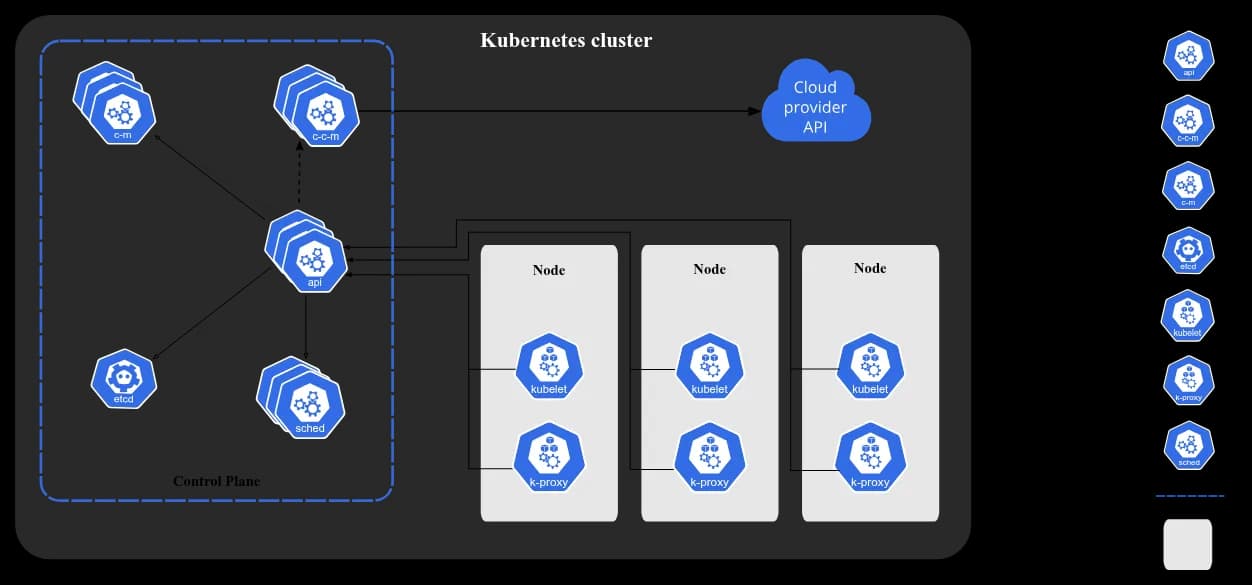
kube-apiserver
Main components of kubernetes. It interacts with all other services. The API server is the front end for the Kubernetes control plane.You can run several instances of kube-apiserver and balance traffic between those instances. That means it does horizontal scaling.
etcd
Consistent and highly-available key value store for all API server data.
kube-scheduler
Control plane component that watches for newly created Pods with no assigned node, and selects a node for them to run on.
kube-controller-manager
Control plane component that runs controller processes. Logically, each controller is a separate process, but to reduce complexity, they are all compiled into a single binary and run in a single process.
- Node controller: Responsible for noticing and responding when nodes go down.
- Job controller: Watches for Job objects that represent one-off tasks, then creates Pods to run those tasks to completion.
- EndpointSlice controller: Populates EndpointSlice objects (to provide a link between Services and Pods).
- ServiceAccount controller: Create default ServiceAccounts for new namespaces.
cloud-controller-manager
A Kubernetes control plane component that embeds cloud-specific control logic. The cloud controller manager lets you link your cluster into your cloud provider’s API, and separates out the components that interact with that cloud platform from components that only interact with your cluster.
The following controllers can have cloud provider dependencies:
- Node controller: For checking the cloud provider to determine if a node has been deleted in the cloud after it stops responding
- Route controller: For setting up routes in the underlying cloud infrastructure
- Service controller: For creating, updating and deleting cloud provider load balancers
Node components
Node components run on every node, maintaining running pods and providing the Kubernetes runtime environment.
kubelet
An agent that runs on each node in the cluster. It makes sure that containers are running in a Pod.The kubelet doesn’t manage containers which were not created by Kubernetes.
kube-proxy (optional)
kube-proxy is a network proxy that runs on each node in your cluster, implementing part of the Kubernetes Service concept.
kube-proxy maintains network rules on nodes. These network rules allow network communication to your Pods from network sessions inside or outside of your cluster.
Container runtime
A fundamental component that empowers Kubernetes to run containers effectively. It is responsible for managing the execution and lifecycle of containers within the Kubernetes environment.
Kubernetes supports container runtimes such as containerd, CRI-O, and any other implementation of the Kubernetes CRI (Container Runtime Interface).
Addons
Addons use Kubernetes resources (DaemonSet, Deployment, etc) to implement cluster features. Because these are providing cluster-level features, namespaced resources for addons belong within the kube-system namespace. Addons.
DNS
While the other addons are not strictly required, all Kubernetes clusters should have cluster DNS, as many examples rely on it. Cluster DNS is a DNS server, in addition to the other DNS server(s) in your environment, which serves DNS records for Kubernetes services.
Web UI (Dashboard)
Dashboard is a general purpose, web-based UI for Kubernetes clusters.
Container resource monitoring
Container Resource Monitoring records generic time-series metrics about containers in a central database, and provides a UI for browsing that data.
Cluster-level Logging
A cluster-level logging mechanism is responsible for saving container logs to a central log store with a search/browsing interface.
Network plugins
Network plugins are software components that implement the container network interface (CNI) specification. They are responsible for allocating IP addresses to pods and enabling them to communicate with each other within the cluster.
Tools
kubectl
The Kubernetes command-line tool, kubectl, allows you to run commands against Kubernetes clusters. You can use kubectl to deploy applications, inspect and manage cluster resources, and view logs
kind
kind lets you run Kubernetes on your local computer. This tool requires that you have either Docker or Podman installed.
minikube
Like kind, minikube is a tool that lets you run Kubernetes locally. minikube runs an all-in-one or a multi-node local Kubernetes cluster on your personal computer (including Windows, macOS and Linux PCs) so that you can try out Kubernetes, or for daily development work.[Beginners friendly and most of the Beginners uses this]
kubeadm
You can use the kubeadm tool to create and manage Kubernetes clusters. It performs the actions necessary to get a minimum viable, secure cluster up and running in a user friendly way.
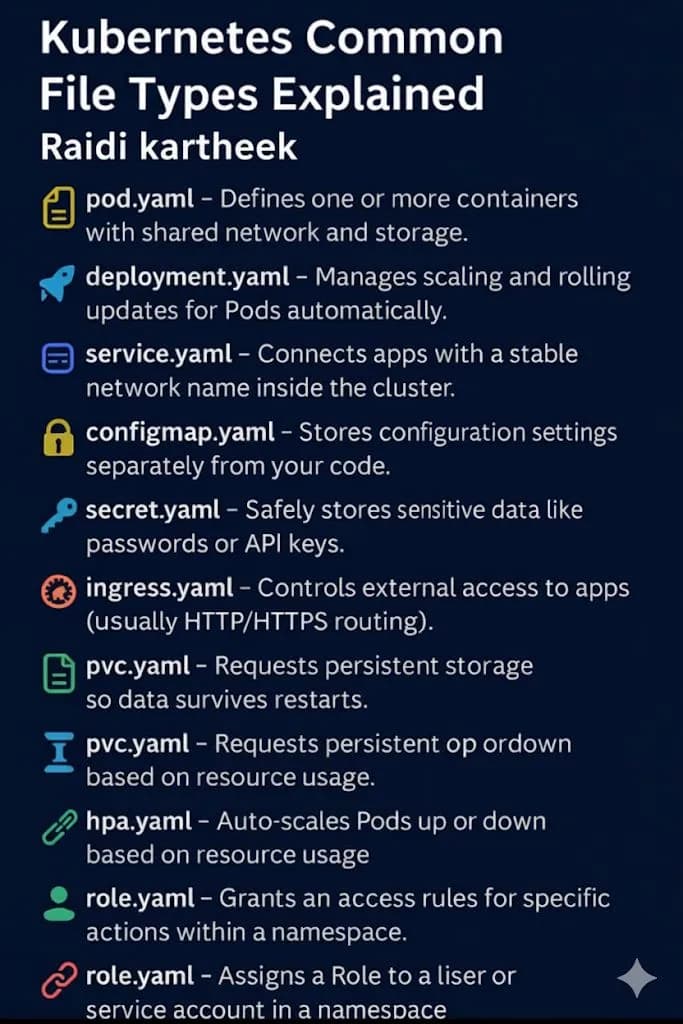
Common files in Kubernetes
Keep reading
- Kubernetes in AWS
In this topic we will learn how kubeadm is used to used to setup cluster. ECS is not recommended while setting up cluster. We are doing example of EKS in this blog. In complex scenarios, highly…
- kubectl Cheat Sheet (With Clear Categories & Uses)
📌 1. Basic Cluster & Node Info Command Use kubectl version –short Check client & server versions kubectl cluster-info Display cluster master & services kubectl get nodes List nodes kubectl describe…
- minikube
How to install minikube in linux You can download the minikube from the above link for different OS. For now i will explain steps to setup in linux environment. Run this in your terminal and it will…